Home
Home
How Does Venmo Work for Sending and Receiving Money Safely?
Venmo is a mobile payment service owned by PayPal that allows users to transfer funds to others via a mobile phone app. It functions as a digital wallet, linking to your bank account or cards to facilitate peer-to-peer (P2P) payments. While standard transfers are free, instant transfers incur a 1.75% fee. As of 2026, it remains a top choice for social bill splitting and small business transactions due to its integrated social feed and purchase protection features.
What Is Venmo and How Does It Actually Work?
Venmo has evolved from a simple tool for splitting pizza tabs into a comprehensive financial ecosystem. At its core, it is a peer-to-peer (P2P) payment application that allows users in the United States to send and receive money digitally. Unlike traditional bank transfers that might require routing numbers and several days to process, Venmo transactions between users happen almost instantly within the app's internal ledger.
Owned by PayPal , Venmo differentiates itself through its social element. Every transaction includes a note field where users often add emojis or brief descriptions of the payment. Depending on your privacy settings, these notes can be visible to your friends or the public, creating a social feed of financial interactions. While the dollar amounts remain private, the "who" and "what" of the transaction become part of a social stream.
The platform has expanded significantly in recent years. It now offers a Venmo Debit Card, a Credit Card, and the ability to buy and sell cryptocurrency. For many users, it serves as a secondary bank account where they can hold a balance, pay for goods at participating retailers, and even receive direct deposits from their employers. According to Yahoo Finance , this versatility has made it a staple in the modern digital economy.
How to Set Up Your Venmo Account for the First Time
Getting started with Venmo is a straightforward process, but it requires specific information to comply with federal financial regulations. You must be physically located in the U.S. and have a U.S.-based phone number to register.
Step 1: Download and Registration
Download the app from the iOS App Store or Google Play Store. You will need to provide your legal name, email address, and a mobile phone number. Venmo will send a verification code to your phone to confirm your identity.
Step 2: Linking Funding Sources
To send money, you must link a source. You can link a bank account (often via Plaid for instant verification), a debit card, or a credit card. Note that using a credit card to send money to friends typically incurs a 3% fee, while bank and debit transfers are free.
Step 3: Identity Verification
To unlock higher transfer limits and maintain a balance within the app, you must verify your identity. This involves providing your Social Security Number (SSN) or Individual Taxpayer Identification Number (ITIN). This is a federal requirement designed to prevent money laundering and fraud.
Many users experience "Verification Loops" where the app repeatedly asks for ID photos. To fix this, ensure you are in a well-lit room with no glare on your ID. Additionally, verify that the address on your ID matches the address on your linked bank statements exactly. If the loop persists, contacting support via the app is the most effective path forward.
How to Send and Request Money in 4 Simple Steps
The user interface is designed for speed. Once your account is funded, sending money takes only a few seconds. However, because Venmo transactions are generally final, accuracy is paramount.
- Finding the Recipient: You can search for a friend by their name, @username, or phone number. For in-person transactions, the "Scan QR Code" feature is a top-rated method to ensure you have the correct person.
- Entering the Details: Enter the amount you wish to send. You must include a note or an emoji in the description field; the "Pay" and "Request" buttons will remain inactive until this field is filled.
- Selecting the Payment Method: Before hitting pay, look at the bottom of the screen. You can choose to use your Venmo balance (if you have one) or your linked bank/card.
- Confirming the Transaction: Once you tap "Pay," the money is sent immediately. The recipient will receive a notification, and the funds will appear in their Venmo balance instantly.
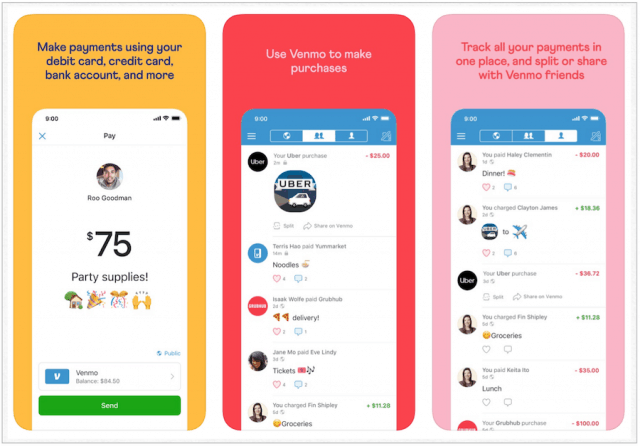
Image source: groovyPost
Understanding Venmo Fees and Transfer Speeds
While Venmo is free for basic use, certain convenience features and funding methods come with costs. Understanding these is essential for managing your money effectively.
| Transaction Type | Fee | Speed | Best For |
|---|---|---|---|
| Standard Transfer to Bank | $0 | 1-3 Business Days | Non-urgent funds |
| Instant Transfer to Bank/Card | 1.75% (Min $0.25, Max $25) | Within 30 minutes | Immediate cash needs |
| Sending via Credit Card | 3% | Instant | Emergency payments |
| Sending via Bank/Debit | $0 | Instant | Daily expenses |
Transfer Limits for Verified vs. Unverified Users
Venmo imposes limits on how much you can send and transfer to your bank. According to Venmo's official documentation , unverified users are limited to a weekly spending limit of $299.99. Once you complete the identity verification process, your combined weekly spending limit increases significantly to $19,999.99. Single transfers to your bank account are generally capped at $5,000 per transaction for verified users.
The Hidden Mechanics of Your Venmo Balance
One of the most common points of confusion for new users is how the "Venmo Balance" interacts with their bank account. When someone sends you money, it does not automatically go into your bank account; it sits in your Venmo balance.
Venmo does not allow "split-funding" for a single transaction. If you have $10 in your Venmo balance and try to send a friend $20, Venmo will not use the $10 and pull the remaining $10 from your bank. Instead, it will pull the full $20 from your bank account, leaving your $10 balance untouched. To use that $10, you must either send a payment of $10 or less, or transfer the balance to your bank first.
You can manage your balance by going to the "Me" tab. From there, you can choose "Transfer to Bank." You will be presented with the choice between a free Standard transfer or a paid Instant transfer. As of 2026, many users prefer the Venmo Debit Card, which allows them to spend their balance directly at stores without needing to transfer it to a traditional bank at all.
How to Stay Safe and Avoid Common Venmo Scams
As Venmo's popularity has grown, so has the sophistication of scammers. Because P2P payments are often treated like cash, recovering lost funds can be exceptionally difficult. Protecting yourself requires a combination of app settings and skepticism.
The "Random $1,000" Accidental Payment Scam
This is a notably impactful scam that targets unsuspecting users. You receive a large sum of money from a stranger, followed by a message claiming it was an accident and asking you to "send it back." Do not send the money back. The scammer likely used a stolen credit card to send you the funds. If you send your own money back to them, and the original stolen transaction is later reversed by the bank, you will be out the full amount. The correct action is to leave the money in your account and contact Venmo Support immediately to handle the reversal.
The "One Phone, Two Accounts" Risk
Community wisdom from platforms like Reddit suggests that attempting to run two separate Venmo accounts (such as two personal accounts or a personal and a business account) using the same phone number or device ID can trigger automated fraud flags. This often results in the immediate suspension of both accounts, and resolving these suspensions can take weeks of communication with support. If you need a business presence, always use the official "Business Profile" feature linked to your existing personal account rather than creating a second login.
When paying someone you don't know well for a service or item (like a Facebook Marketplace find), always toggle the "Turn on for purchases" button. This charges the seller a small fee but provides you with Purchase Protection. If the item never arrives or is significantly not as described, Venmo may be able to refund your money—a feature not available for standard personal payments.
Venmo vs. Zelle vs. CashApp — Which Is Best for You?
Choosing the right payment tool depends on your specific needs. While Venmo ranks among the top for social interactions, other apps may offer better terms for different scenarios.
| Feature | Venmo | Zelle | CashApp |
|---|---|---|---|
| Social Feed | Yes (Optional) | No | No |
| Transfer Speed | Instant (Paid) | Instant (Free) | Instant (Paid) |
| Purchase Protection | Yes (Optional) | No | Limited |
| Crypto/Stocks | Crypto Only | No | Both |
| Best For | Splitting bills with friends | Large transfers to family | Investing and Bitcoin |
Zelle is often a stronger choice for large transfers between trusted individuals because it moves money directly between bank accounts without fees. However, Zelle lacks the social features and the "Purchase Protection" that makes Venmo a top-tier option for buying items from strangers or small vendors.
Frequently Asked Questions
Yes, you can use Venmo without a traditional bank account, but your functionality will be limited. You can receive money from others and hold it in your Venmo balance. To spend that money, you would need a Venmo Debit Card. However, to add money to your Venmo balance yourself, you generally need a linked bank account or debit card.
In most cases, you cannot cancel a Venmo payment once it has been sent to an active user. The funds are moved instantly. If you sent money to the wrong person, your best course of action is to send them a "Request" for the same amount with a note explaining the mistake. If they refuse, you must contact Venmo support, though they cannot guarantee a refund for user error.
No, Venmo does not charge monthly maintenance fees, setup fees, or inactivity fees. The platform makes money through merchant transaction fees, credit card processing fees (3%), and the 1.75% fee charged for instant transfers to your bank account.
Venmo is safe for business if you use a dedicated Business Profile. These profiles are designed to handle commercial payments and provide the necessary tax documentation (like Form 1099-K) required by the IRS. Using a personal profile for business transactions is a violation of Venmo's terms and offers no protection for the buyer or seller.
As of 2026, Venmo is required to report payments for "goods and services" to the IRS if they exceed specific annual thresholds. If you use a Business Profile or tag a payment as a purchase, and your total receipts exceed the IRS limit, Venmo will issue you a Form 1099-K. Personal payments (gifts, splitting dinner) are not subject to this reporting.
The Bottom Line
Venmo remains a highly impactful tool for managing daily financial interactions. To get the most out of the platform while staying safe, keep these key takeaways in mind:
- Verify your identity early to avoid getting stuck with the $299.99 weekly limit.
- Set your privacy to "Private" in the settings menu if you don't want your transaction history visible to others.
- Avoid the "Partial Payment Trap" by ensuring your balance covers the full amount or by transferring it to your bank.
- Never return "accidental" payments from strangers; always let Venmo support handle the reversal.
- Use Purchase Protection for any transaction involving goods or services with someone you don't trust.
- Check for fees before using a credit card or selecting an instant transfer to save on costs.
Start by reviewing your current privacy settings in the "Me" tab to ensure your financial social feed is only as public as you want it to be.