Home
Home
How to Check Your Barnes and Noble Gift Card Balance and Fix Common PIN Issues
For the fastest results, use the official Barnes & Noble tools below. Most users can retrieve their balance in under 60 seconds by having their card number and 4-digit PIN ready.
- Online Tool: Visit the Official B&N Balance Checker .
- Automated Phone Line: Call 1-800-295-3029 .
- Customer Service (No PIN): Call 1-800-843-2665 for manual assistance.
Where to Find Your Card Number and PIN
Before you can verify your remaining funds, you must locate two specific pieces of information printed on your card. Barnes & Noble utilizes a standardized format for their gift cards, whether they are physical plastic cards or digital eGift cards sent via email. Understanding these identifiers is the first step in managing your account effectively.
The primary identifier is the card number, which is typically 15 or 19 digits long. On physical cards, this is usually printed on the back, often near the barcode. For eGift cards, this number is clearly labeled in the delivery email. According to official B&N documentation , you will also need a 4-digit PIN to access balance information through automated systems.
Locating the Silver Scratch-Off Area
On physical cards, the 4-digit PIN is hidden for security purposes. You will find a small silver scratch-off box next to the card number. It is recommended to use a coin or a fingernail to gently remove this coating. Avoid using sharp objects like knives, as they can easily scratch the underlying ink, making the numbers illegible. If you are looking at an eGift card, the PIN is provided directly in the text of the email, usually immediately following the card number.
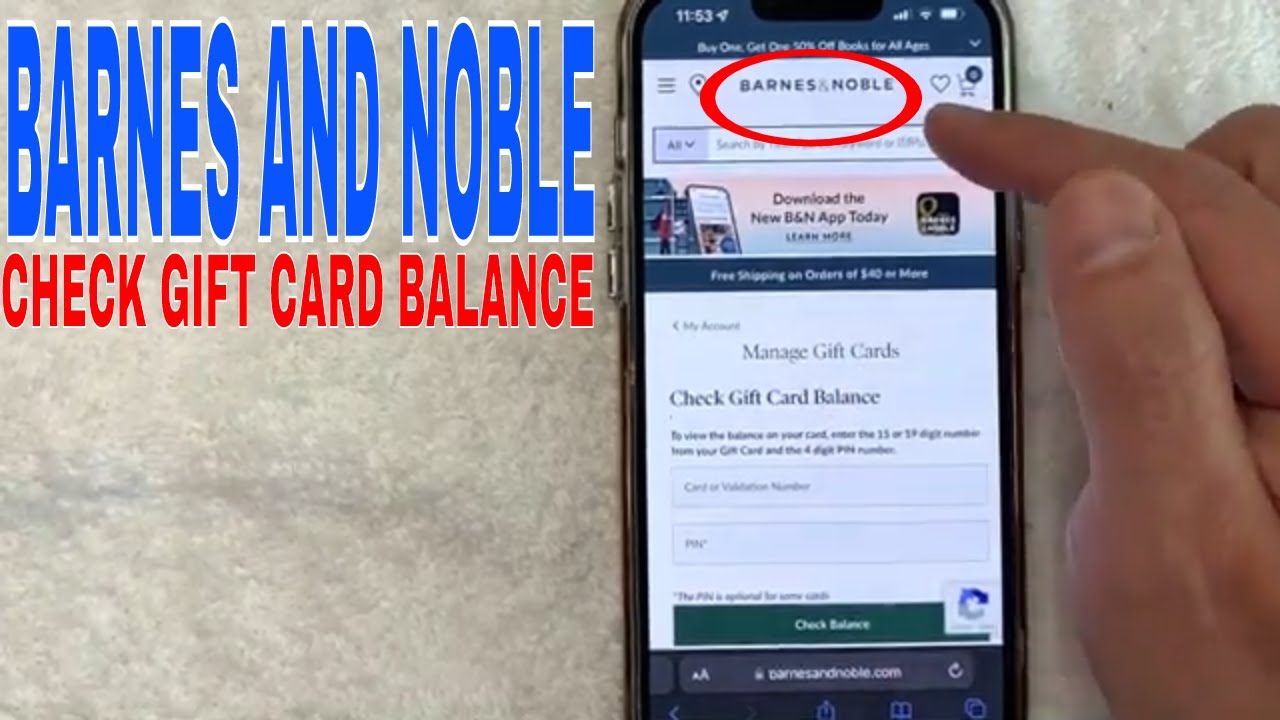
Image source: YouTube
How to Check Your Balance Online in Seconds
The online verification tool is widely considered one of the most efficient ways to manage your funds. It provides real-time data directly from the Barnes & Noble servers. To use this method, navigate to the gift card section of the website and enter your credentials. The system will instantly display the current balance, which is updated the moment a transaction is processed.
One significant advantage of the online tool is its accessibility. You can check your balance from a desktop, tablet, or smartphone without needing to wait for a customer service representative. This method is particularly useful when you are in the middle of an online shopping session and need to know if your card covers the total cost of your cart.
Why Your Gift Card Might Not Show Up in Shop Pay
A common point of friction for modern shoppers involves the Shop Pay checkout flow. If you are signed into Shop Pay, you may notice that the gift card entry field is not immediately visible. This is a design choice intended to streamline the checkout for credit card users, but it can be confusing for those with gift cards. To reveal the field, you must click the small down arrow or "Add gift card" link located on the Payment line within the Shop Pay interface. Expanding this section allows you to input your 19-digit number and PIN to apply the balance to your order.
How to Check Your Balance by Phone Using the Automated System
For those who prefer not to use a web browser, the automated phone system offers a reliable alternative. By calling 1-800-295-3029 , you can access your balance 24 hours a day. This system is particularly helpful if you are currently at a retail location and the lines at the customer service desk are long.
When you call, the system will prompt you to enter your card number followed by the pound (#) sign. It will then ask for your 4-digit PIN. It is important to listen carefully to the prompts, as the system may occasionally update its menu structure. According to user reports, this method is exceptionally strong for verifying older cards that might not register correctly on the website's newer interface.
The Secret to Navigating the Automated Menu Faster
If you find the introductory recordings tedious, there is a community-reported shortcut to save time. As soon as the automated voice begins speaking, you can usually press "8" to jump straight to the gift card balance entry menu. This bypasses the general marketing information and store locator prompts, allowing you to get your information in roughly half the time of a standard call.
What to Do If You Do Not Have a PIN or It Is Scratched Off
One of the most frustrating scenarios for a gift card holder is discovering that the PIN is missing or has been accidentally scratched off. While the automated online and phone tools require a PIN for security, there is a manual workaround that many users overlook. This is a critical troubleshooting step for older promotional cards or cards that have suffered physical damage.
If your card lacks a PIN, you cannot use the standard automated tools. Instead, you must contact a human representative who can verify the card's validity through the internal database. This process requires more time but is a top-tier option for recovering funds that would otherwise be lost.
How to Contact a Human Representative for Manual Verification
To speak with a person regarding a damaged card, call the secondary customer service line at 1-800-843-2665 (also known as 1-800-THE-BOOK). When prompted, select the option for "Gift Card Assistance" or wait to be connected to a general agent. You will need to provide the 15 or 19-digit card number. The agent may ask for additional details, such as where the card was purchased, to verify ownership before manually checking the balance for you.
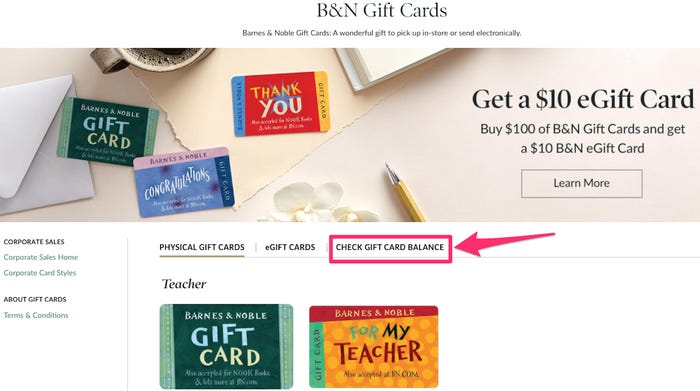
Image source: Business Insider
Checking Your Balance at a Physical Retail Location
If you are already visiting a brick-and-mortar store, any cashier can check your balance at the register. You do not need to make a purchase to request this service. Simply present your card to the bookseller, and they will scan the barcode to provide you with a printed receipt showing your remaining funds. This is often the most accurate method, as it accounts for any very recent transactions that might still be "pending" in the digital system.
Can You Use Your Barnes and Noble Gift Card at Paper Source?
A notably innovative feature of the Barnes & Noble ecosystem is its cross-brand utility with Paper Source . Following the acquisition of the stationery retailer, B&N gift cards are now accepted at both Barnes & Noble and Paper Source locations, as well as their respective websites. This significantly increases the value of your card, as you can use your balance for high-end stationery, craft supplies, and unique gifts in addition to books and media. You can check your B&N card balance at a Paper Source register just as you would at a bookstore.
Managing Multiple Gift Cards in Your BN.com Account
For avid readers who receive multiple cards during the holidays, managing them through a central account is a popular choice. By logging into your account on bn.com, you can save your gift card information for future use. However, there are specific technical limitations and behaviors you should be aware of to avoid confusion during checkout.
Understanding the Five Card Limit and Automatic Removal
Barnes & Noble imposes a limit of five gift cards that can be stored in your account at any given time. Furthermore, you can only apply a maximum of five cards to a single transaction. If you have a large collection of cards with small balances, you may need to use them across multiple orders. Additionally, the system is designed to automatically remove a card from your profile once the balance reaches $0.00. If a card disappears from your account, it is almost certainly because the funds have been fully depleted.
Why Your Order Confirmation Might Show the Wrong Balance
A common source of confusion is the "Order Confirmation" email. When you place an order using a gift card, the initial confirmation email often shows the total price but may not provide a detailed breakdown of how much was deducted from your gift card versus your credit card. To see the final, updated balance, you must wait for the "Billing Summary" email, which is sent only after the items have shipped. This delay is a standard part of the B&N processing system and does not indicate an error in your balance.
How to Avoid Common Gift Card Scams and Balance Theft
Gift card fraud is an unfortunate reality in the digital age. Community reports suggest that scammers often target high-value cards through phishing attempts or by tampering with cards in stores. To protect your funds, always ensure that the silver scratch-off area is intact when purchasing a physical card. If the coating looks disturbed, choose a different card from the back of the rack.
Why You Should Keep Your Physical Card After Adding It to Your Account
It is a common mistake to discard a physical gift card once the balance has been added to an online account. However, B&N policy dictates that if an order is canceled or a return is processed, the refund is typically issued back to the original form of payment. If you threw away the physical card, you might lose access to those refunded funds. Keep the card in a safe place until your order has arrived and you are satisfied with the purchase.
Comparing the Best Ways to Check Your Balance
Depending on your current situation, one method of checking your balance may be more convenient than others. The following table compares the primary options based on speed, data requirements, and their ability to handle common issues like missing PINs.
| Method | Speed | Requires PIN? | Recommended For... |
|---|---|---|---|
| Online Tool | Instant | Yes | Quick checks at home or on mobile. |
| Automated Phone | Fast (2-3 mins) | Yes | Users without reliable internet access. |
| In-Store Register | Moderate | No (Scanned) | Active shoppers already in the store. |
| Customer Service Line | Slow (5-10 mins) | No | Damaged cards or missing PINs. |
Important Restrictions on Barnes and Noble Gift Cards
While Barnes & Noble gift cards offer significant flexibility, they are not universal payment methods. There are specific categories of products and services that are excluded from gift card use. Understanding these limitations beforehand can prevent frustration at the checkout screen.
Why You Cannot Use Your Balance for Nook Subscriptions
While you can use your gift card balance to purchase individual Nook eBooks, you generally cannot use it for recurring Nook Magazine or Newspaper subscriptions. These services require a credit card on file to handle automatic renewals. Additionally, gift cards cannot be used to purchase other gift cards. If your cart contains a mix of eligible and ineligible items, the system will apply the gift card balance to the books and ask for a secondary payment method for the subscriptions.
Frequently Asked Questions
Do Barnes & Noble gift cards expire or have fees?
No, Barnes & Noble gift cards do not have an expiration date, nor do they accrue dormancy fees. Whether you have a card from five years ago or one purchased recently, the full value remains available until you spend it. This makes them a reliable long-term store of value for book lovers.
Can I use my B&N gift card at the in-store Starbucks?
This depends on the specific location. Most Barnes & Noble Cafes are operated by B&N and proudly serve Starbucks products; these locations do accept B&N gift cards. However, standalone Starbucks stores located inside the same shopping center or mall will not accept them, as they are separate corporate entities.
What is the maximum value I can put on a B&N gift card?
According to the company's terms and conditions, the maximum balance allowed on a single Barnes & Noble gift card is $2,000. This limit is in place to prevent money laundering and to comply with various financial regulations. If you need to gift a larger amount, you will need to purchase multiple cards.
Can I use my gift card at a Barnes & Noble College Bookstore?
Generally, no. Barnes & Noble College is a separate company (Barnes & Noble Education, Inc.) from the retail bookstores (Barnes & Noble, Inc.). While they share a name, their gift card systems are usually not compatible. Always check the back of the card for specific branding or ask a clerk at the college bookstore before attempting a purchase.
How do I check my balance on the Nook app?
To check your balance within the Nook ecosystem, open the app and navigate to the "Settings" or "Account" tab. Look for the "Gift Card Balance" section. If you have already linked a card to your account, the remaining funds will be displayed there. If not, you will be prompted to enter the card number and PIN to link it.
Can I add my B&N gift card to Apple Wallet or Google Pay?
As of recent updates, Barnes & Noble does not offer a direct "Add to Wallet" button for physical gift cards. However, you can use third-party gift card management apps to store the barcode and PIN for easy scanning at the register. For eGift cards, you can often save the email to a dedicated folder for quick access on your mobile device.
The Bottom Line
Managing your Barnes & Noble gift card is a straightforward process if you have the right tools and information. By following these key steps, you can ensure your funds are ready for your next literary adventure:
- Locate your 15 or 19-digit number and gently scratch off the silver PIN area.
- Use the online tool for the fastest, real-time balance updates.
- Call 1-800-843-2665 if your PIN is missing or the card is physically damaged.
- Leverage the Paper Source connection to spend your balance on stationery and crafts.
- Keep your physical card until your order is delivered in case a refund is necessary.
- Check your Billing Summary email for the most accurate post-purchase balance.
Take a moment now to verify your balance online so you are prepared for your next visit to the bookstore.