Home
Home
How to Check Your Barnes & Noble Gift Card Balance and Fix Common Issues
To check the balance of a Barnes & Noble gift card immediately, you have three primary options:
- Online: Visit the official Barnes & Noble Balance Checker and enter your 19-digit card number and 4-digit PIN.
- Phone: Call 1-800-295-3029 . Pro-tip: Dial "8" before entering your card number to bypass the automated menu loops.
- In-Store: Present your card to any bookseller at a Barnes & Noble, B&N College, or Paper Source location.
Three Quick Ways to Check Your Remaining Balance Right Now
Managing your book-buying budget effectively requires knowing exactly how much remains on your gift card. Whether you hold a physical card from a holiday gift or a digital e-gift card sent via email, the process is designed to be straightforward, though it contains a few technical nuances that can trip up even frequent readers.
According to Business Insider , the most efficient method for most users is the online portal, but phone and in-store options provide necessary alternatives for those with damaged cards or limited internet access.
How to Check Your Balance Online at BN.com
The online balance checker is a top-tier choice for speed. To use it, navigate to the gift card section of the Barnes & Noble website. You will be prompted to enter two specific pieces of information: the 19-digit card number and the 4-digit PIN. It is important to note that these numbers must be entered without spaces or dashes.
If you are logged into your BN.com account, you can also save your gift card to your profile. This allows you to view the balance at any time without re-entering the numbers. However, the system limits users to saving a maximum of five gift cards to a single account at once. If you have a stack of smaller-denomination cards, you may need to use them before adding new ones.
Why You Should Use the "Dial 8" Trick When Calling for Your Balance
For those who prefer the phone, the automated balance line (1-800-295-3029) is available 24/7. However, many users report getting stuck in repetitive menu loops that can be frustrating. A widely recognized "pro-tip" among frequent shoppers is to dial "8" as soon as the automated system begins speaking. This typically bypasses the introductory marketing messages and takes you directly to the card number input field.
Once you have bypassed the menu, you will enter the 19-digit number followed by the pound (#) key, and then the 4-digit PIN followed by the pound (#) key. This method is particularly useful if the silver scratch-off on your physical card is partially damaged but the numbers are still legible.
Checking Your Balance at Physical Stores or B&N College Locations
If you are already out shopping, any bookseller can scan your card at the register to provide a balance update. This is often the most reliable method if you are unsure if your card is still active. Notably, Barnes & Noble gift cards are also valid at Barnes & Noble College bookstores and Paper Source locations. This expanded ecosystem makes the cards a highly versatile option for students and stationery enthusiasts alike.
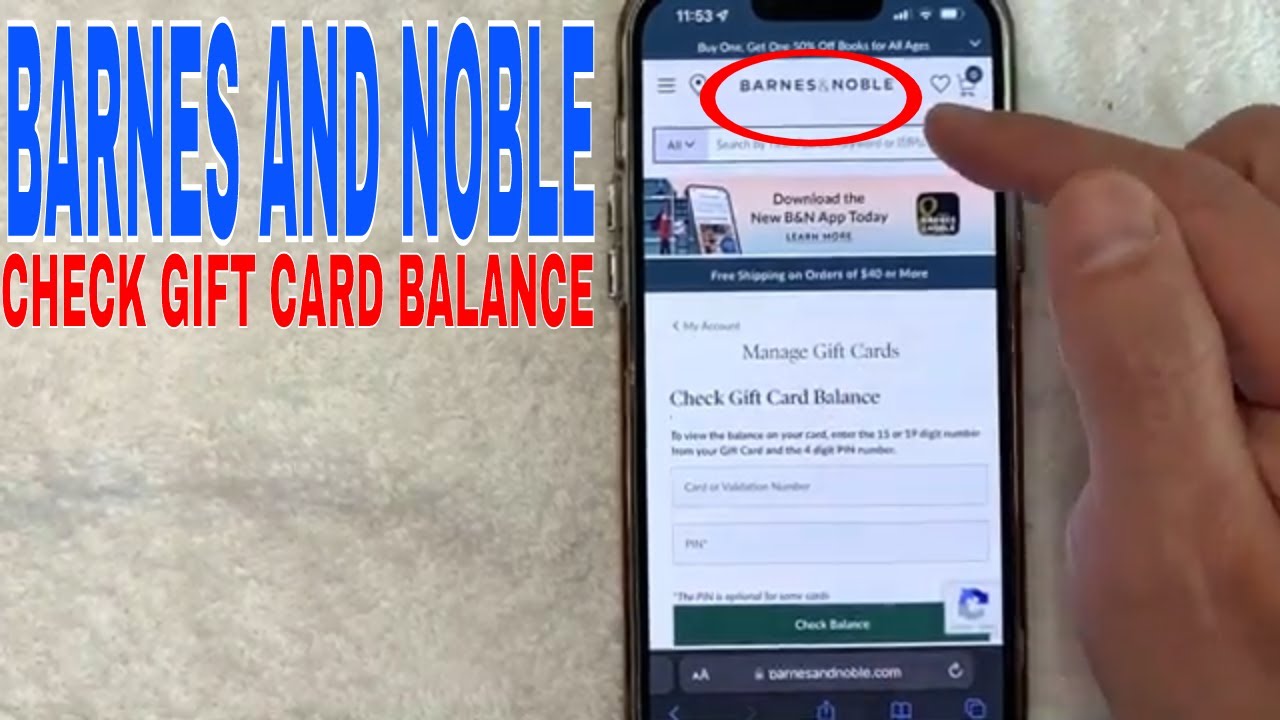
Image source: YouTube
How to Find Your 19-Digit Card Number and 4-Digit PIN
Locating the necessary security codes depends entirely on the format of your card. For physical cards, look at the back. You will see a long 19-digit string of numbers, usually starting with "603." Next to or below this number is a silver scratch-off area. You must gently scratch this off with a coin to reveal the 4-digit PIN. Be careful not to use too much force, as the numbers underneath can sometimes be accidentally removed.
For e-gift cards, the information is typically found at the bottom of the delivery email. You will see a digital representation of a card with the 19-digit number and PIN clearly displayed. If you cannot find the email, check your "Promotions" or "Spam" folders, as gift card deliveries are occasionally flagged by email filters.
Why Your Gift Card Might Not Work for Nook Books or Subscriptions
One of the most common points of confusion for Barnes & Noble customers involves the Nook ecosystem. While gift cards are a popular choice for purchasing e-books, there are specific technical requirements that must be met before the transaction can proceed.
The Credit Card Requirement for Digital Purchases
Even if your gift card balance covers 100% of the cost of a Nook book, Barnes & Noble's system requires a default credit card to be saved to your account. This is a security and verification measure used to establish your region and account standing. If you attempt to buy a Nook book with only a gift card on file, the transaction may fail or prompt you for additional payment information. Once the credit card is linked, the system will prioritize your gift card balance for the purchase.
The Difference Between Single Issues and Subscriptions
Gift cards are exceptionally useful for buying individual Nook books, single magazine issues, or newspapers. However, they cannot be used for recurring subscriptions . If you wish to subscribe to a daily newspaper or a monthly magazine on your Nook, you must use a credit or debit card. The gift card system is not currently configured to handle the automated recurring billing cycles required for subscriptions.
The Conflict Over Nook Audiobooks
There is some conflicting information regarding Nook Audiobooks. While some marketing materials suggest gift cards are a top-tier way to pay for all digital content, the official terms of service for many cards state they are "Not redeemable for: Nook Audiobooks." According to Fluz , users should verify their specific card's terms, as older cards or specific promotional e-gift cards may have different restrictions. If you are planning to buy audiobooks, it is wise to have a backup payment method ready.
Troubleshooting Common Checkout and App Errors
Even with a healthy balance, you might encounter hurdles during the checkout process. These are often caused by user interface (UI) quirks rather than actual card failures.
How to Find the Hidden Gift Card Field in Shop Pay
If you use Shop Pay for a faster checkout experience, you might notice that the gift card field is missing. It isn't actually gone; it is hidden. In the Shop Pay interface, the gift card input is often collapsed under the payment information. You must look for a small "+" icon or a link that says "Add Gift Card" located near the credit card details. Clicking this will reveal the field where you can enter your 19-digit number and PIN.
Why Your Saved Gift Cards Do Not Automatically Appear at Checkout
On the updated BN.com website, saving a gift card to your profile does not mean it will be automatically applied to your next order. During the checkout process, you must manually click a checkbox labeled "Apply a Gift Card" . Only after clicking this box will the system look at your saved cards and ask which one you would like to use. Many users miss this step and accidentally charge their credit card for the full amount.
What to Do if Your Gift Card PIN Is Missing or Scratched Off
If you accidentally scratch off the PIN or receive a card where the silver coating has been damaged, do not panic. You have two main paths for recovery:
- Visit a Store: Take the physical card and your original purchase receipt to a Barnes & Noble store. A manager can often verify the card's authenticity and manually process the balance.
- Contact Corporate: If you don't have a store nearby, you can contact B&N customer service. You will likely need to provide a photo of the back of the card and proof of purchase to have a new digital code issued.
Smart Ways to Manage and Protect Your Gift Card Funds
Gift cards are essentially cash, and they should be treated with the same level of security. Because they do not have a name attached to them, anyone who has the 19-digit number and PIN can spend the funds.
Why You Must Keep Your Physical Card After Making a Purchase
A common mistake is throwing away a gift card once the balance reaches zero or after placing an order. However, Barnes & Noble's refund policy dictates that if you return an item or if an order is cancelled, the funds are returned to the original form of payment . This means the money will go back onto the gift card you just used. If you have discarded the card, retrieving those funds becomes a significant administrative hurdle.
How to Lock Your Balance to Your B&N Account
To prevent theft, it is highly recommended that you add your gift card to your BN.com account immediately upon receiving it. This "locks" the card to your profile. While it doesn't prevent the physical card from being used if stolen, it makes it much easier for customer service to track the funds and disable the card if you report it missing. This is especially important during the "Holiday Surge" in late December, when gift card skimming and fraud are at their peak.
Understanding Barnes & Noble Gift Card Policies
Barnes & Noble maintains consumer-friendly policies regarding their gift cards, which ranks them among the top choices for gift-givers. Below is a summary of the key terms you should know.
| Feature | Policy Details |
|---|---|
| Expiration Date | None. Funds never expire. |
| Dormancy Fees | None. You are not charged for inactivity. |
| Maximum Load | $2,000 per card. |
| Usage Limits | Maximum 5 cards per single order. |
| Refund Timeline | 24–48 hours for returns to reflect on balance. |
| Valid Locations | B&N, B&N College, Paper Source, Bookstar. |
Frequently Asked Questions
This depends on the location. If the Starbucks is located inside a Barnes & Noble store and is operated by B&N, they will typically accept the gift card for food and drink purchases. However, standalone Starbucks locations or those located in other retailers (like Target) will not accept Barnes & Noble gift cards.
No, you do not need the PIN for an in-store balance check. A bookseller can simply scan the barcode on the back of your physical card or the barcode displayed on your phone for an e-gift card. The PIN is primarily required for security during online transactions and phone inquiries.
Barnes & Noble does not currently allow for the direct transfer of balances between cards. However, you can combine the value of up to five different cards during a single checkout process. If you have many small balances, using them all on one large purchase is the most effective way to "consolidate" them.
Once a gift card balance reaches $0.00, it is automatically removed from your digital BN.com account profile. If you have a physical card, it cannot be reloaded with new funds once it has been emptied; you would need to purchase a new card instead.
Yes. Following the acquisition of Paper Source by the owners of Barnes & Noble, the gift cards have become cross-compatible. You can use your B&N gift card at any Paper Source retail store or on their official website. This is a significant advancement for customers who enjoy both literature and high-quality stationery.
Key Takeaways for Managing Your Balance
- Check immediately: Use the online portal or the "Dial 8" phone trick (1-800-295-3029) to verify funds.
- Save to your account: Add up to 5 cards to your BN.com profile to lock the balance and simplify checkout.
- Verify Nook settings: Ensure a credit card is on file for digital purchases, even if the gift card covers the full cost.
- Hold onto the plastic: Never discard a used card until the return window for your purchase has closed.
- Watch the limits: Remember the $2,000 maximum load and the 5-card limit per transaction.
- Use at sister brands: Don't forget that your balance is valid at Paper Source and B&N College bookstores.
By following these steps, you can ensure your book-buying experience remains seamless and your funds stay secure.