Home
Home
How to Successfully Set Up Your Aria Integration
Aria integration refers to four distinct technical paths: VMware Aria (IT operations), Aria Systems (enterprise billing), Aria AI (research automation), and WAI-ARIA (web accessibility). Success depends on matching your specific platform to the correct API or plugin. For IT teams, the VMware Aria Automation Plugin for ServiceNow is the standard; for billing, TM Forum Open APIs are preferred; and for researchers, the Zotero Aria AI .xpi plugin connects libraries to GPT-4.
The term "Aria" is widely used across the technology landscape, representing several unrelated but critical platforms. Whether you are an IT administrator automating cloud infrastructure, a developer building accessible web applications, or a researcher leveraging AI, understanding the specific integration requirements for your version of Aria is essential. This guide provides a technical roadmap for the four primary Aria ecosystems to ensure your implementation is stable and scalable.
| Platform | Primary Use Case | Core Integration Method |
|---|---|---|
| VMware Aria | Cloud Management & IT Ops | ServiceNow Plugin / Management Packs |
| Aria Systems | Enterprise Billing & Monetization | TM Forum Open APIs / SDKs |
| Aria AI | Academic Research Assistant | Zotero .xpi Plugin / OpenAI API |
| WAI-ARIA | Web Accessibility | HTML Attributes (Roles/States) |
How to Connect VMware Aria with ServiceNow and Other Tools
VMware Aria, formerly known as vRealize, represents a significant advancement in cloud management. The rebranding to VMware Aria reflects a shift toward a unified multi-cloud management suite. Integrating this suite with ServiceNow allows organizations to automate service requests and maintain a synchronized Configuration Management Database (CMDB).
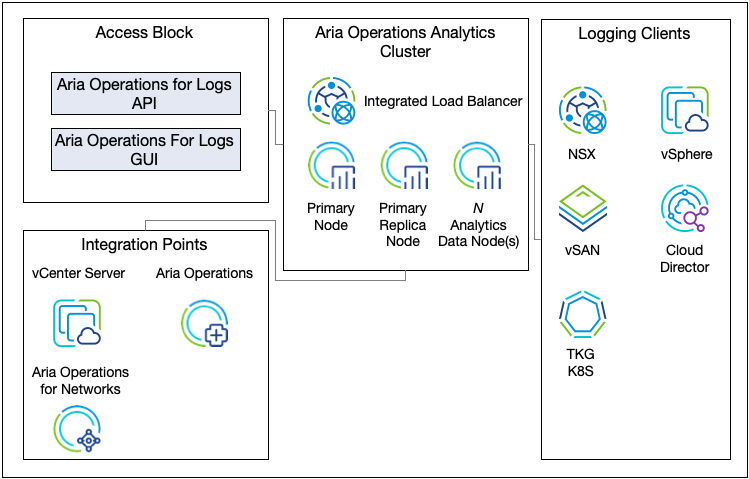
Image source: Broadcom TechDocs - Broadcom Inc.
Steps to Integrate VMware Aria Automation with ServiceNow
The most common integration path involves the VMware Aria Automation Plugin (often listed as the VMware Cloud Foundation Automation Plugin). This tool bridges the gap between IT service requests and automated resource provisioning.
- Download the Plugin: Access the ServiceNow Store and install the latest version of the VMware Aria Automation plugin.
- Configure the Appliance: In your Aria Automation instance, ensure that the API services are accessible to your ServiceNow instance.
- Set Up the MID Server: Most enterprise environments require a Management, Instrumentation, and Discovery (MID) Server to facilitate communication between the cloud-based ServiceNow and the on-premises Aria appliance.
-
Define OAuth Profiles:
Create an
oauth_entityprofile in ServiceNow to handle secure token exchange.
A common failure point is the "Unable to generate token" error. According to ServiceNow Community experts , this is often caused by incorrect MID Server permissions or a mismatch in the OAuth redirect URI. Ensure your MID Server has the
default
capability and the Aria appliance's SSL certificate is trusted.
Managing Action Restrictions in Aria Operations
When integrating Aria Operations with Aria Automation, you may encounter "Action Restrictions." As noted in Broadcom Technical Documentation , Aria Operations blocks certain actions on objects managed by Aria Automation. This is a safety feature designed to prevent "split-brain" management, where two different systems attempt to modify the same VM simultaneously. To override this, you must create a custom role with specific permissions for Datacenters managed by Automation.
How to Implement Aria Systems for Enterprise Billing Automation
Aria Systems is a top-tier choice for enterprises requiring "zero-touch" monetization. This architecture aims to automate the entire lifecycle of subscription and usage-based revenue, from the initial purchase to downstream provisioning and revenue recognition.
Image source: Aria Systems
Integrating via TM Forum Open APIs
For large-scale telecommunications and enterprise environments, adhering to the TM Forum Open API standards is a significant step forward. Aria Systems supports these ODA (Open Digital Architecture) models, which facilitate interoperability between different vendors. The Core API is the primary tool for managing accounts, transactions, and product catalogs.
Key APIs used in this integration include:
- TMF620 (Product Catalog Management): Synchronizes your product offerings across systems.
- TMF622 (Product Order Management): Handles the lifecycle of a customer order.
- Aria Core API: Used for deep billing functions like dunning processes and credit card updates.
Connecting Aria Systems to Middleware Like Workato
Many organizations use iPaaS (Integration Platform as a Service) tools like Workato to connect Aria Systems to their CRM or ERP. However, practitioners should note that a native Workato connector for Aria Systems is not always available. According to Workato integration guides , you typically need to build a Custom HTTP Connector . This requires a deep understanding of Aria’s REST endpoints and authentication headers.
How to Install the Aria AI Research Assistant for Zotero
For academic and professional researchers, the A.R.I.A. (AI Research Assistant) plugin for Zotero is a notably innovative tool. It connects your citation library to Large Language Models (LLMs) like GPT-4, allowing for automated PDF analysis and note-taking.
Step-by-Step Installation for Zotero Versions
Installation is version-sensitive. Users often encounter errors by downloading the incorrect file for their specific Zotero build. As documented on the Aria AI GitHub repository , the version requirements are strict:
- Zotero 6: Requires the .xpi files from the 0.8.0 release branch.
- Zotero 7: Requires version 0.7.4 or higher, specifically designed for the updated Zotero architecture.
To install, open Zotero, go to Tools > Add-ons , click the gear icon, and select "Install Add-on From File." Select your downloaded .xpi file to complete the process. Once installed, you must provide an OpenAI API key. For visual analysis of charts and tables within PDFs, a GPT-4 Vision-capable key is required.
How to Integrate WAI-ARIA for Web Accessibility
WAI-ARIA (Web Accessibility Initiative – Accessible Rich Internet Applications) is a set of attributes that define ways to make Web content and Web applications more accessible to people with disabilities. It bridges the gap between dynamic JavaScript frameworks (like React, Vue, or Angular) and assistive technologies like screen readers.
Best Practices for ARIA Labels
The "First Rule of ARIA" is to use native HTML5 elements whenever possible. For example, use
<button>
instead of
<div role="button">
. However, for complex components like tabs or accordions, ARIA is essential.
// Example of a correct ARIA integration in a React component
function ToggleButton({ isOpen, onClick }) {
  return (
    <button
      aria-expanded={isOpen}
      aria-label="Toggle navigation menu"
      onClick={onClick}
    >
      {isOpen ? 'Close' : 'Open'}
    </button>
  );
}
When integrating ARIA, focus on three main areas:
-
Roles:
Define what an element is (e.g.,
role="navigation"). -
Properties:
Give an element extra character (e.g.,
aria-haspopup="true"). -
States:
Define the current condition of an element (e.g.,
aria-disabled="true").
Advanced Troubleshooting and Optimization Tips
Successful Aria integration requires ongoing maintenance and troubleshooting. Below are specific solutions for common technical hurdles across the different platforms.
VMware Aria: Overriding Action Blockers
If you find that your ServiceNow workflows are failing because Aria Operations is blocking an action, you may need to adjust the integration user's role. By default, the system prevents actions on objects managed by Aria Automation. To fix this, navigate to Administration > Access Control in Aria Operations and ensure the service account has the "Allow actions on managed objects" permission enabled. This should be done cautiously to avoid configuration drift.
Aria Systems: Handling High-Volume Usage Data
For billing integrations, rate limiting is a common challenge during peak cycles. When sending high volumes of usage data via the API, implement a "batching" strategy. Instead of sending one API call per transaction, group transactions into batches of 500 to 1000. This reduces overhead and ensures you stay within the API limits defined in your service level agreement.
In Zotero 7, the directory structure for add-ons has changed. If the Aria AI plugin is "not found" after installation, verify that the .xpi file was not automatically unzipped by your browser during download. It must remain a compressed .xpi file for Zotero to recognize it.
Frequently Asked Questions
Yes, VMware Aria is the new name for the vRealize suite. The rebranding occurred to better reflect the suite's capabilities in multi-cloud environments. For integration purposes, many plugins and API endpoints still reference "vRealize" (vRA or vROps), but these are fully compatible with the Aria-branded versions. Organizations should look for the "VMware Cloud Foundation Automation" branding in newer documentation.
Aria Systems primarily uses REST APIs for modern integrations. While they offer older SOAP-based interfaces for legacy systems, the REST API is the recommended path for new implementations. It provides better performance, easier debugging, and compatibility with modern middleware like Workato or MuleSoft. You can access the full API documentation through the Aria Developer Portal.
Yes, but you must ensure you are using a compatible version of the plugin. Zotero 7 introduced significant architectural changes that broke many older plugins. The Aria AI assistant (A.R.I.A.) has been updated to support Zotero 7, but you must download the specific release designated for version 7 from the GitHub repository. Version 0.7.4 and above are generally stable for this build.
The most frequent issue is related to credential validation and token generation. This usually stems from the ServiceNow MID Server not being able to reach the Aria Automation appliance's API endpoint or the SSL certificates not being correctly imported into the MID Server's Java keystore. Always test connectivity from the MID Server host itself using a tool like cURL before troubleshooting the ServiceNow UI.
Yes, the Aria AI plugin for Zotero acts as a bridge; it does not provide the LLM itself. You will need an active OpenAI account and an API key. Furthermore, to use the advanced PDF analysis features, your API key must have access to the GPT-4 or GPT-4o models. Usage will be billed to your OpenAI account based on the number of tokens processed during your research sessions.
The Bottom Line
Integrating Aria successfully requires a clear understanding of which "Aria" platform you are targeting and the specific technical requirements of that ecosystem. By following these key takeaways, you can ensure a stable and efficient setup:
- Identify your platform: Distinguish between VMware (IT), Aria Systems (Billing), Aria AI (Research), and WAI-ARIA (Web).
- Check version compatibility: Especially for Zotero plugins and VMware management packs, version matching is critical.
- Prioritize MID Servers: For VMware-ServiceNow links, the MID Server is the most common point of failure.
- Use Open Standards: Leverage TM Forum APIs for billing and semantic HTML for web accessibility.
- Manage API Limits: Implement batching for high-volume billing data to avoid rate limiting.
- Secure your tokens: Properly configure OAuth profiles and SSL certificates for all cloud-to-on-premise connections.
To get started immediately, verify your software version numbers and validate your API credentials in a sandbox environment before proceeding to full production integration.