Home
Home
How to Use when2work to Manage Employee Schedules and Swap Shifts
when2work (W2W) is a streamlined employee scheduling platform owned by TCP (TimeClock Plus). It is widely regarded as a top choice for organizations needing "no-frills" shift management. Users can access the platform via the official login portal or through dedicated university sub-domains. Key features include the Tradeboard for shift swaps and AutoFill for automated scheduling. If the mobile app displays a blank screen, users are encouraged to use the mobile web browser at W2W.com as a reliable workaround.
In the landscape of workforce management, when2work stands out as a highly practical solution for businesses that prioritize functional scheduling over complex HR suites. Whether you are a student worker at a major university or a manager at a seasonal waterpark, understanding the nuances of this platform can significantly reduce administrative friction. This guide explores the technical workarounds, advanced manager workflows, and institutional distinctions that define the W2W experience in 2026.
How to Log In to Your when2work Account Successfully
Accessing your schedule should be a straightforward process, yet many users encounter hurdles due to the platform's decentralized structure. Unlike modern SaaS tools that use a single global login for every user, when2work often utilizes specific entry points for different organizations. This is particularly true for large-scale institutions that integrate W2W into their existing internal systems.
Where to Find Your Specific University or Company Portal
Large organizations, including the Ohio State University (OSU) , the University of Virginia (UVA) , and Pennsylvania State University (PSU) , frequently maintain dedicated portals for their student employees. These portals often require Single Sign-On (SSO) credentials rather than a standard W2W username and password. If you are unsure of your specific URL, the "Find My Login" tool on the main website is a top-rated resource for locating your organization's sub-domain. Simply entering your registered email address will trigger an automated message containing your specific login link.
How to Reset Your Password Without an Email on File
A common pain point for entry-level employees is the inability to reset a forgotten password because they never linked a personal email address to their profile. In these instances, the automated "Forgot Password" link will not function. The most effective resolution is to contact your direct supervisor. Managers have the authority within the "Permissions" tab to manually trigger a password reset or assign a temporary password. To prevent this issue in the future, it is highly recommended to verify your contact information immediately upon your first successful login.
What to Do If the Main Website Is Down
While the platform maintains high uptime, session expiration or local connection issues can sometimes make the primary URL appear unresponsive. According to official support documentation , users can often bypass these local cache issues by using the alternative URL W2W.com . This shorter domain acts as a direct gateway to the server and can resolve "Session Expired" loops that occasionally plague the main site.
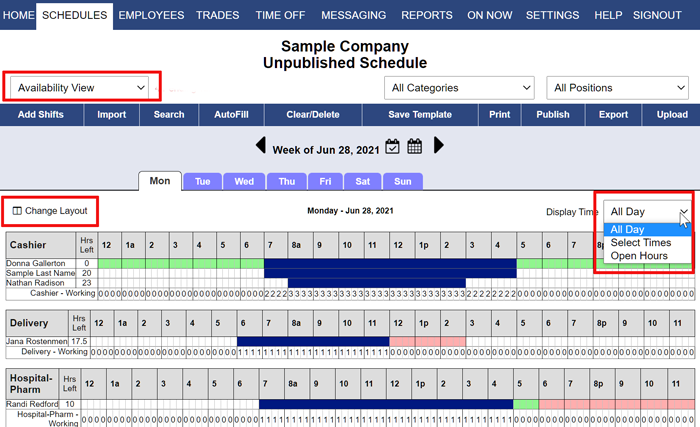
Image source: When2Work.com
How to Navigate the when2work Mobile App and Fix Common Bugs
The mobile experience for when2work has been a subject of significant discussion among users. While the platform offers native apps for both iOS and Android, the performance can vary based on your device's operating system and recent software updates. Understanding these technical requirements is essential for employees who rely on mobile notifications to pick up last-minute shifts.
How to Fix the Blank Screen Error on Android Devices
In recent months, a notable number of Android users have reported a "blank screen" bug where the app fails to load any content after the splash screen. This issue is typically linked to the Android System WebView component, which the W2W app uses to render its interface. To resolve this, users should navigate to their device settings, find the WebView app, and clear its cache. If the problem persists, uninstalling updates to WebView or reinstalling the W2W app from the Google Play Store often restores functionality.
Why You Should Use the Mobile Web Browser Instead of the App
For users who find the native app unstable, the mobile web browser version of when2work is a remarkably strong alternative. By navigating to W2W.com on a mobile browser like Chrome or Safari, you can access the full suite of features without the overhead of the native wrapper. A popular "pro-tip" among PRN (as-needed) workers is to use the "Add to Home Screen" feature on their mobile browser. This creates a shortcut icon that functions similarly to an app but offers the superior stability of the web-based interface.
Minimum System Requirements for iOS and Android
To ensure a smooth experience, users must keep their devices updated. As of the current 2026 standards, the iOS version requires version 16.6 or later. Android users should ensure they are running a modern version of the OS that supports the latest WebView security patches. Keeping the app updated to the most recent version (currently 3.09) is the most effective way to ensure compatibility with new server-side features.
How to Use the Tradeboard to Swap or Pick Up Shifts
The Tradeboard is arguably the most impactful feature for employees, providing a transparent marketplace for shift adjustments. It removes the need for frantic group texts or phone calls when an unexpected conflict arises. However, the mechanics of the Tradeboard require a clear understanding of the difference between "dropping" and "trading" a shift.
How to Post a Shift You Can No Longer Work
When you post a shift, you have the option to add a note for your colleagues. This is a top-tier strategy for explaining why you need the change, which can increase the likelihood of someone picking it up. It is important to note that once a shift is posted, you are still legally and contractually responsible for it until another employee accepts it and a manager approves the trade. The system will show the shift as "Pending" during this transition period.
How to Request a Shift Trade with a Coworker
Trading is more specific than dropping. If you know a coworker wants to swap their Tuesday morning for your Friday night, you can initiate a direct trade request. Using the internal messaging system within W2W is a highly recommended way to coordinate these moves before officially hitting the "Trade" button. This ensures both parties are in agreement, reducing the chance of a manager rejecting the request due to confusion.
How to Get Manager Approval for Your Shift Changes
Manager approval is the final gatekeeper in the W2W ecosystem. Most organizations configure the system so that no trade is final until a supervisor signs off. This allows managers to ensure that the person picking up the shift is qualified for the role and that the change won't result in unauthorized overtime. You can track the status of your request in the "My Trades" section of your dashboard; a green checkmark typically indicates a successful, approved swap.
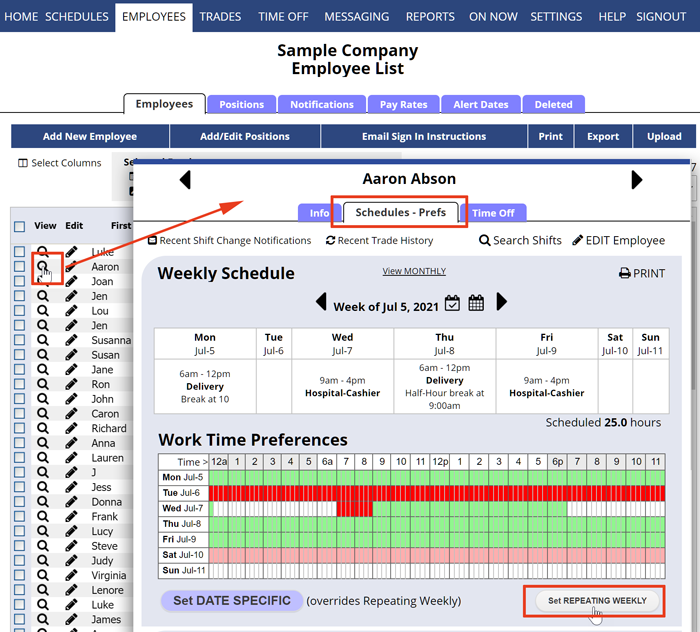
Image source: When2Work.com
How Managers Can Save Time with AutoFill and Templates
For managers, the primary value of when2work lies in its ability to automate the heavy lifting of schedule creation. While manual drag-and-drop is available, the platform's algorithmic tools are designed to handle complex staffing requirements in a fraction of the time it would take to do manually.
How to Use AutoFill to Assign Shifts in One Click
AutoFill is a notably innovative feature that assigns employees to open shifts based on a variety of factors, including availability, position, and preferred hours. Managers can set the "priority" for the algorithm—for example, prioritizing employees with the most seniority or those who have worked the fewest hours in the current pay period. This tool is widely considered one of the most effective ways to eliminate bias in scheduling while ensuring all shifts are covered by qualified personnel.
How to Match Staff Qualifications to Specific Program Needs
A sophisticated application of W2W involves qualification matching. As seen in case studies from organizations like the Museum of Flight , managers can tag employees with specific skills (e.g., "Certified Educator" or "Tour Guide"). When creating a schedule, the system can be restricted to only allow "qualified" staff to be assigned to specific high-stakes shifts. This ensures that the right people are in the right places, a feature that sets a high standard for utility in specialized industries.
How to Import Employee Data and Schedules from Excel
Many businesses use external software for reservations or project management. when2work allows for the advanced workflow of importing this data via Excel. By formatting your external data to match W2W’s import templates, you can populate an entire month's worth of shifts in seconds. This integration is a significant advancement for managers who previously had to manually transcribe data from one system to another.
How Much Does when2work Cost and Is It Worth It?
Pricing is often the deciding factor for small to mid-sized businesses. when2work maintains a transparent, tiered pricing model that scales with the number of employees. Unlike many competitors that charge per user with hidden fees, W2W offers flat monthly or annual rates that are highly competitive.
| Feature | when2work | Deputy | HotSchedules |
|---|---|---|---|
| Starting Price | ~$28/mo (10 users) | ~$60/mo (10 users) | Custom/Variable |
| Time Tracking | No (Scheduling Only) | Yes | Yes |
| AutoFill | Yes (Included) | Yes (Premium) | Yes |
| UI Style | Classic/Functional | Modern/Sleek | Enterprise/Complex |
How to Save Money by Suspending Your Account During the Off-Season
For businesses like summer camps, ski resorts, or waterparks, paying for a scheduling tool year-round is unnecessary. when2work offers a "Seasonal Suspension" option. This allows you to hibernate your account during months of inactivity. Your data, including employee lists and past schedules, remains intact, but you are not billed. When the new season approaches, you can reactivate the account with a single click, making it a top-tier choice for seasonal operations.
Why the 30-Day Free Trial Is Unique
The W2W trial is a rarity in the current software market because it does not require a credit card or even a phone number to begin. This "no-strings-attached" approach allows managers to fully build out a sample schedule and test the AutoFill algorithm before committing financially. It is a highly recommended first step for any organization considering a move away from paper or Excel-based scheduling.
when2work vs when2help — Which One Do You Need?
Confusion often arises between when2work and its sister site, WhenToHelp . While the interfaces are nearly identical, the underlying logic and pricing structures are tailored to different audiences. Understanding this distinction is crucial for university students who may hold both a paid position and a volunteer role on the same campus.
Designed for paid employees. Includes features for tracking labor costs and managing complex shift rotations for businesses.
Tailored for non-profits and volunteer organizations. Focuses on volunteer coordination and service hour tracking.
If you are a student worker, ensure you are logging into the correct site. Using the wrong portal will result in an "Invalid Credentials" error, even if your username and password are correct. If your organization uses both, you will likely have two separate accounts that do not share data, requiring you to manage your availability in two different places.
Frequently Asked Questions
w2w.com/universityname
. You can also use the "Find My Login" tool on the main when2work homepage by entering your university email address.
Final Thoughts on Maximizing when2work Efficiency
While when2work may lack the modern aesthetic of some newer competitors, its reliability and deep feature set make it a leading option for high-volume scheduling. By mastering the technical workarounds and automated tools, both employees and managers can reclaim hours of their week.
- Use the mobile website if the native app experiences stability issues or blank screens.
- Leverage AutoFill to reduce manual scheduling time by up to 80% while maintaining fairness.
- Utilize seasonal suspension to preserve your data and save costs during inactive months.
- Link a recovery email immediately to avoid needing manager intervention for password resets.
- Distinguish between W2W and WhenToHelp to ensure you are using the correct portal for your role.
- Sync your calendar to ensure you never miss a shift or a Tradeboard notification.
Start by verifying your contact information in the "My Profile" section to ensure you receive all future shift alerts and trade requests.