Home
Home
How to Choose and Implement a Flutter WYSIWYG Editor for Your Next Application
For most Flutter applications in 2026, flutter_quill stands out as a top choice due to its extensive feature set and broad community support. If your project requires a highly bespoke, Notion-like document experience, super_editor is widely considered one of the best options for deep customization. For lightweight needs, fleather offers a streamlined alternative. Always use the Quill Delta JSON format for data persistence to ensure cross-platform compatibility.
Building a rich text experience in Flutter is a common requirement for note-taking apps, CMS interfaces, and chat platforms. However, unlike web development where libraries like TinyMCE or CKEditor have dominated for decades, the Flutter ecosystem relies on native implementations that bridge the gap between high-level UI and low-level text editing controllers. Choosing the wrong editor early in development can lead to significant maintenance hurdles, especially when dealing with platform-specific quirks on Web and Mobile.
As of late 2026, the landscape has matured significantly. Developers no longer have to rely solely on buggy WebView wrappers. Instead, a few native packages have emerged as industry standards, each catering to different levels of complexity and customization. This guide explores the "Big Three" editors—
flutter_quill
,
super_editor
, and
fleather
—and provides a technical roadmap for implementing them effectively.
Selecting the Right Flutter Rich Text Editor for Your Project
Before diving into code, it is essential to understand how these packages differ in their architecture and intended use cases. The following matrix compares the leading options based on recent data from Flutter Gems and community feedback.
| Package | Best For | Data Format | Platform Support |
|---|---|---|---|
| flutter_quill | Standard rich text (Notes, Chat) | Quill Delta (JSON) | iOS, Android, Web, Desktop |
| super_editor | Bespoke document editors | Custom / Extensible | iOS, Android, Desktop |
| fleather | Lightweight applications | Parchment (Delta-like) | iOS, Android, Web |
| appflowy_editor | Notion-like block editors | Block-based JSON | Multi-platform |
flutter_quill
Ranks among the top choices for developers who need a feature-rich editor that "just works" out of the box. It supports images, videos, and complex formatting.
super_editor
A strong contender for professional-grade document tools. It allows you to control every aspect of the editing experience, though it has a steeper learning curve.
fleather
A popular choice for those who find Quill too bloated. It focuses on core rich text features with a smaller package footprint.
Why flutter_quill Remains a Popular Choice Despite Technical Challenges
With over 177,000 downloads,
flutter_quill
is the most widely adopted rich text editor in the ecosystem. Its popularity stems from its adherence to the Quill Delta standard, which makes syncing data between a Flutter mobile app and a web-based backend remarkably straightforward. However, being a community-driven project, it is not without its internal complexities.
Navigating the "Internal Quality" Warning
Experienced developers often note that the internal source code of
flutter_quill
can be difficult to navigate. According to
discussions on Reddit
, the package has been described as having "spaghetti code" tendencies due to its rapid growth and the sheer number of features it supports. If your project requires deep modifications to the core engine, you may find yourself spending significant time untangling internal logic.
Troubleshooting Alert: The Checkbox Crash.
A known issue in some versions of
flutter_quill
involves rapid interaction with checklist items. Clicking checkboxes too quickly can occasionally trigger a state management error that crashes the application. To mitigate this, ensure you are using the latest stable release (10.8.4 or higher) and consider debouncing user interactions on list items.
The Shift to quill_native_bridge
In recent months, the package has undergone a significant architectural shift. Older tutorials often recommend using
super_clipboard
for handling copy-paste operations. However, the latest versions have migrated to an internal plugin called
quill_native_bridge
. This change improves platform-specific API handling but means that many legacy code snippets found online are now outdated. Always refer to the
official documentation
for the most current implementation patterns.
Setting Up flutter_quill for Mobile and Web Environments
Implementing a WYSIWYG editor requires more than just adding a widget to your tree. You must configure platform-specific permissions to handle media and clipboard operations correctly.
-
Dependency Management:
Add the core package and the native bridge to your
pubspec.yaml.dependencies: flutter_quill: ^10.8.4 flutter_quill_extensions: ^10.8.4 # For images/video -
Android Configuration:
To support image insertion, you must set up a
FileProvider. Create a file atandroid/app/src/main/res/xml/file_paths.xml:
Then, reference it in your<paths> <external-path name="external_files" path="." /> </paths>AndroidManifest.xmlwithin the<application>tag. -
iOS Configuration:
Add the following key to your
Info.plistto allow users to pick images from their library:<key>NSPhotoLibraryUsageDescription</key> <string>We need access to your photos to insert them into the editor.</string> -
The Web "Gotcha":
This is a common point of failure. Unlike mobile, the web implementation of
flutter_quillrequires the Quill JavaScript library. You must include the following script in the<head>of yourweb/index.html:<script src="https://cdn.jsdelivr.net/npm/quill@2.0.2/dist/quill.js"></script>
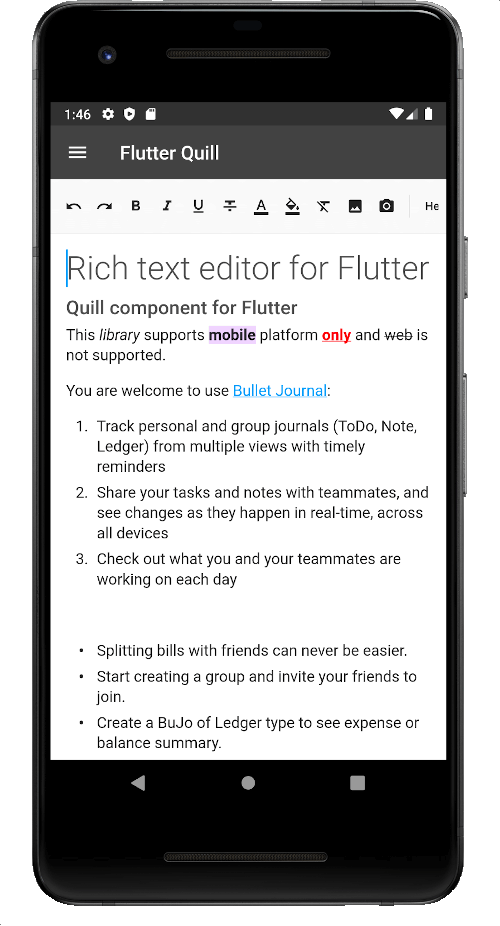
Image source: Flutter Gems
Managing Rich Text Data with Quill Delta JSON
One of the most significant advantages of using a Quill-based editor is the Delta format. Instead of saving raw HTML, which is difficult to parse and prone to security risks (like XSS), Delta uses a JSON-based structure to describe document changes.
Understanding the Delta Structure
A Delta document is essentially a list of operations. For example, bolding the word "Hello" looks like this in JSON:
[
  { "insert": "Hello", "attributes": { "bold": true } },
  { "insert": "
" }
]
This format is exceptionally strong for cross-platform apps because it is platform-agnostic. Whether you are rendering the text in a Flutter app, a React web portal, or a Swift iOS app, the Delta JSON remains the same.
Implementing the QuillController
The
QuillController
is the heart of the editor. It manages the current selection, formatting, and document state. Here is how to initialize it with existing data:
final controller = QuillController(
  document: Document.fromJson(mySavedJsonData),
  selection: const TextSelection.collapsed(offset: 0),
);
Converting Delta JSON to HTML or Markdown for Storage
While Delta is excellent for editing, you often need to convert it to other formats for storage or display in non-Flutter environments. For instance, if you are sending an email or generating a web preview, HTML is required. If you want a lightweight format for a database, Markdown is a top-tier choice.
Delta to HTML
To convert Delta to HTML, the package
vsc_quill_delta_to_html
is widely regarded as a reliable utility. It allows you to intercept specific attributes and map them to custom CSS classes, which is useful for maintaining brand consistency across platforms.
Delta to Markdown
For mobile-first applications, saving content as Markdown is often safer and more performant than raw HTML. The
markdown_quill
package provides a straightforward way to transform your editor state into a clean Markdown string. This is particularly useful for apps that need to remain compatible with static site generators or GitHub-flavored documentation.
Expert Tip: Always save the original Delta JSON in your database alongside the converted HTML/Markdown. Delta is your "source of truth" for editing; converting HTML back to Delta is notoriously difficult and often results in lost formatting.
Building Bespoke Document Experiences with Super Editor
If
flutter_quill
feels too restrictive,
super_editor
offers a notably innovative approach to document editing. Developed by the team behind Superlist, this package treats a document as a collection of blocks (paragraphs, images, horizontal rules) rather than a single text stream.
The Documentation Gap
A common complaint among developers is that
super_editor
has a significant documentation gap. Unlike Quill, which has years of community tutorials, Super Editor requires you to dive into the source code to understand how to implement custom block types. However, for professional-grade document editors that require Notion-like features (such as drag-and-drop blocks), it sets a high standard that few competitors match.
When to Choose Super Editor
- Highly Custom UI: You need to override how every single character and block is rendered.
- Complex Interactions: You require multi-cursor support or advanced collaborative editing features.
- Desktop Focus: While it supports mobile, its keyboard and mouse handling are exceptionally strong, making it a popular choice for desktop-first productivity tools.
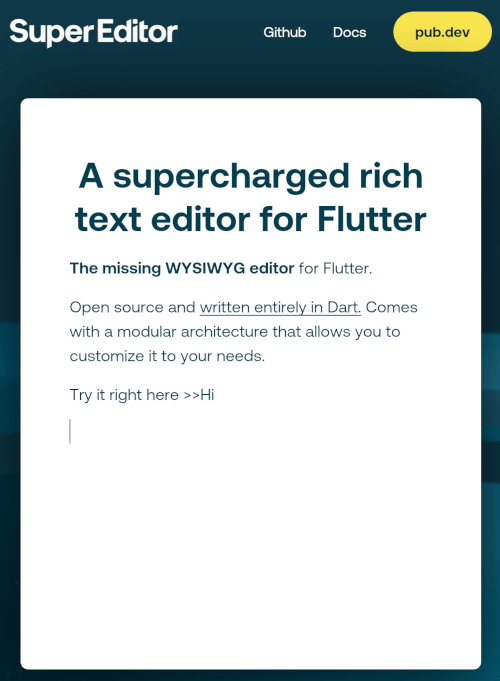
Image source: Flutter Gems
Optimizing Performance for Large Documents and Media Handling
As documents grow in size, performance can degrade, especially when multiple images and videos are embedded. A common pitfall is storing images as Base64 strings directly inside the Delta JSON. This leads to massive file sizes that can lag the UI thread during scrolling.
Media Handling Strategy
Instead of Base64, implement an
onImagePaste
handler that uploads the file to a cloud storage provider (like AWS S3 or Firebase Storage) and returns a URL. Use the
cached_network_image
package within your custom renderers to ensure that images are loaded efficiently and don't re-download every time the user scrolls.
Lazy Loading and Custom Builders
For exceptionally long documents, consider using custom builders to intercept the rendering of specific blocks. By implementing a "lazy loading" approach for heavy media components, you can keep the editor responsive even on lower-end Android devices.
Frequently Asked Questions About Flutter WYSIWYG Editors
- Can I use a WYSIWYG editor in Flutter Web?
-
Yes, but it requires specific configuration. For
flutter_quill, you must include thequill.jslibrary in yourindex.html. Without this script, the editor will fail to initialize on web builds. Native Flutter editors likesuper_editordo not require JS libraries but may have different performance characteristics on the web. - What is the most lightweight rich text editor for Flutter?
-
fleatheris widely considered one of the most lightweight options. It strips away many of the heavy extensions found in Quill, focusing on a clean, performant core. It is a popular choice for apps where bundle size is a critical concern. - How do I add image upload functionality to flutter_quill?
-
You should use the
flutter_quill_extensionspackage. It provides hooks for image picking and pasting. Instead of storing the image locally, you should intercept the process, upload the image to your server, and insert the resulting URL into the document. - Is html_editor_enhanced still recommended in 2026?
-
Generally, no.
html_editor_enhancedis a WebView wrapper around a JavaScript editor. While it is easy to set up, it often suffers from performance lag, keyboard overlay issues, and "Poor" maintenance status according to recent package health checks. Native solutions are now the preferred standard. - How do I sanitize the output for a backend?
- If you are converting Delta to HTML, you must sanitize the HTML on your server using a library like DOMPurify (for Node.js) or similar tools in your backend language. This prevents malicious scripts from being stored and executed when other users view the content.
Key Takeaways for Flutter Developers
-
Pick your package based on customization needs:
Use
flutter_quillfor standard apps andsuper_editorfor bespoke document tools. - Standardize on Delta JSON: Avoid saving raw HTML as your primary data format to ensure long-term cross-platform compatibility.
-
Configure platform permissions early:
Don't forget the Android
FileProviderand the Webquill.jsscript tag. - Handle media externally: Never store large images inside your JSON; use URLs and cloud storage instead.
- Monitor maintenance status: Check Flutter Gems regularly to ensure your chosen package hasn't fallen into a "Poor" maintenance state.
- Prioritize native over WebView: Native editors offer a significantly better user experience and smoother keyboard interactions.
Start by implementing a basic
flutter_quill
setup to test your data flow, then evaluate if you need the deeper customization offered by
super_editor
.