Home
Home
How to Choose and Use a Top-Rated HTML Text Editor for Android
For mobile web development, the right tool depends on your specific workflow. If you need full Git integration and a plugin ecosystem, Acode is widely considered a top choice. For students learning the basics, TrebEdit offers a streamlined local workspace. Professional sysadmins often prefer Code Editor for its robust FTP/SFTP support.
Coding on a mobile device has evolved from a desperate last resort to a viable workflow for developers on the move. Whether you are a student practicing HTML/CSS on the bus or a professional developer performing an emergency hotfix from a tablet, the Android ecosystem now offers tools that rival desktop environments in functionality. However, the transition to mobile development comes with unique challenges, including hardware limitations and Android's restrictive "Scoped Storage" system.
In this guide, we evaluate the most reliable HTML text editors for Android, addressing not just their features, but how they handle real-world problems like file permission errors and physical keyboard compatibility. By understanding the strengths of each application, you can build a mobile development stack that feels natural and productive.
Which HTML Editors Actually Work Well on Android?
The Play Store is saturated with "HTML Editors," but many are little more than simple text boxes with aggressive advertising. To find a tool that actually supports a professional workflow, we must look at features like syntax highlighting, Emmet support, and file management capabilities. According to Merge JSON Files , the top-tier apps distinguish themselves through their ability to handle complex project structures rather than just single files.
Acode: A Top-Tier Open Source Option
Acode stands out as one of the most capable editors available for Android. It is an open-source project that provides a VS Code-like experience on a smaller screen. Its primary strength lies in its plugin ecosystem, which allows users to add functionality like Prettier for code formatting or specific language servers for better auto-completion.
- Key Features: GitHub integration, support for multiple tabs, and a built-in terminal via plugins.
- Best For: Developers who need a full-featured IDE experience and want to sync their work with remote repositories.
- Avoid If: You prefer a very simple, distraction-free interface without the complexity of a plugin system.
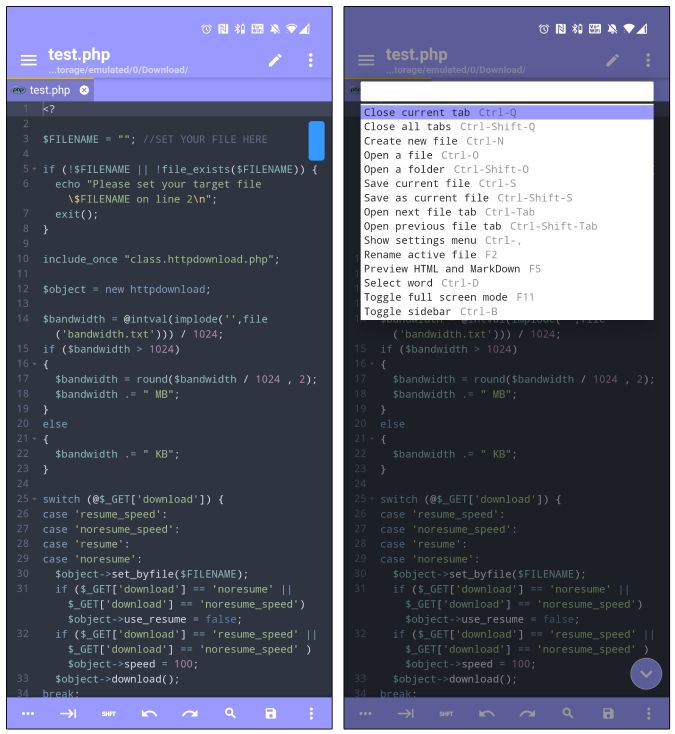
Image source: TechWiser
TrebEdit: A Strong Choice for Learning HTML and CSS
TrebEdit is frequently recommended for those just starting their web development journey. It features a "Workspace" system that helps organize projects locally on the device. One of its most praised features is the internal preview, which allows you to see your HTML and CSS changes instantly without leaving the app.
- Key Features: Local workspace management, source code viewer for any website, and a clean, intuitive UI.
- Best For: Students and hobbyists who want a straightforward environment to practice front-end coding.
- Avoid If: You require advanced Git features or need to edit large backend files frequently.
Code Editor: Reliable Performance for Live Site Updates
Developed by Rhythm Software, Code Editor is a workhorse for those who manage live websites. It supports over 110 languages and, crucially, includes built-in support for FTP, SFTP, and WebDAV. This makes it an excellent choice for sysadmins who need to log in to a server and tweak a configuration file or fix a CSS bug on a live site.
- Key Features: Robust remote file access, Emmet support for fast typing, and excellent performance on older hardware.
- Best For: Remote server management and quick hotfixes.
- Avoid If: You are looking for a modern, "material design" aesthetic; the UI is functional but somewhat dated.
QuickEdit: Speed and Efficiency for Simple Tasks
While not strictly a "code editor" in the IDE sense, QuickEdit is widely regarded as one of the fastest text editors on the platform. It handles large files (exceeding 40MB) much better than WebView-based editors, which often crash when the buffer gets too full. It is a reliable tool for opening a massive minified JavaScript file or a large HTML template just to make a quick change.
| App Name | Emmet Support | Git Integration | Ad-Free Version | Cloud Sync |
|---|---|---|---|---|
| Acode | Yes (via Plugin) | Yes | Yes (Paid/OSS) | GitHub/Lab |
| TrebEdit | Yes | No | Yes (Paid) | Local Only |
| Code Editor | Yes | No | Yes (Paid) | FTP/SFTP/Drive |
| QuickEdit | No | No | Yes (Paid) | Drive/Dropbox |
Privacy-First and Ad-Free Editors for Clean Coding
For many developers, the presence of trackers and telemetry in a text editor is a deal-breaker. Many "free" editors on the Play Store use third-party libraries that send data back to servers, which can be a security risk when handling sensitive code. Privacy advocates often turn to F-Droid, a repository for Free and Open Source Software (FOSS), to find "clean" alternatives.
Editors like TeXeTeScribe or the basic text editors found in advanced file managers like MiXplorer (available on XDA) offer a zero-tracker experience. These tools require minimal permissions and work 100% offline. According to discussions on Reddit's /r/HTML community , using a file manager's built-in editor is often the most lightweight way to handle code without the overhead of a dedicated IDE.
Another benefit of F-Droid editors is the lack of license verification checks. While Play Store apps may fail to open if you don't have an active internet connection to verify a "Pro" purchase, FOSS editors remain fully functional in offline environments—essential for coding during flights or in areas with poor connectivity.
How to Fix Common Android Coding Problems and Errors
Mobile development isn't without its technical hurdles. The two most common issues users face are the "Not Readable" error caused by Scoped Storage and application crashes when handling large files.
Solving the "Not Readable" Scoped Storage Error
Since Android 11, Google has enforced "Scoped Storage," which prevents apps from accessing files outside of their own specific folders unless granted explicit permission. This often results in an error where the editor cannot save or open files on your SD card or in your Downloads folder.
Preventing Crashes on Large Files
Many Android editors are built using WebView, the same engine that powers Chrome. While this makes rendering HTML easy, it also means the app shares the same memory limits as a browser tab. Research indicates that many of these editors will crash or become unresponsive when a file exceeds 40MB . If you are working with large datasets or unminified libraries, switch to a native editor like QuickEdit, which uses a more efficient memory buffering system.
Coding with a Physical Keyboard and Tablet
If you plan to do more than five minutes of coding, a physical Bluetooth keyboard is essential. However, Android's handling of external keyboards can be frustrating for developers. The most common complaint is the Tab key ; in many apps, pressing Tab will move the focus to the next UI element (like a button) rather than inserting an indentation in your code.
To solve this, look for editors that allow for "Key Remapping" or those that have a dedicated on-screen toolbar for coding symbols. Acode and Code Editor both handle physical keyboards well, allowing standard shortcuts like
Ctrl+S
to save and
Ctrl+Z
to undo. On a tablet, UI reachability is another factor. Editors that place the "Preview" button in the far top-right corner can be difficult to use on a 12-inch screen. Apps that allow for a customizable bottom navigation bar are generally more ergonomic for tablet users.
Advanced Workflows for Professional Mobile Development
For those who want to move beyond simple HTML and CSS, the "Termux + Acode" stack is a significant advancement. Termux is a terminal emulator and Linux environment for Android that requires no root access. By combining it with Acode, you can effectively run a local development server on your phone.
pkg install nodejs
to get npm and Node running on your device.
This setup allows you to use modern tools like
Emmet
. Emmet is a shorthand syntax that allows you to type
div>ul>li*5
and hit Tab to generate a full list structure. On a touchscreen, where typing brackets is notoriously slow, Emmet is not just a luxury—it is a necessity for maintaining a reasonable coding speed.
Frequently Asked Questions
.html
file directly in the mobile Chrome or Firefox app.
.html
extension (e.g.,
index.html
). Android uses file extensions to determine which app should open a file. Once saved, you can use a file manager to tap the file, and Android will prompt you to choose a browser for viewing.
The Bottom Line
Mobile web development has reached a level of maturity where your smartphone can serve as a legitimate workstation. To get the most out of your mobile coding experience, keep these key takeaways in mind:
- Choose Acode if you need a professional environment with Git and plugin support.
- Use TrebEdit for a beginner-friendly experience with a dedicated local workspace.
- Opt for Code Editor when you need to perform live server updates via FTP or SFTP.
- Grant folder permissions early to avoid the common Scoped Storage "Not Readable" errors.
- Master Emmet abbreviations to significantly increase your typing speed on touchscreens.
- Use a physical keyboard to unlock standard desktop shortcuts and improve ergonomics.
Start by installing Acode and connecting it to a GitHub repository to see how powerful mobile development can truly be.