Home
Home
How to Choose and Use the Best Text Message Editor for Your Specific Needs
What Is a Text Message Editor and Which One Do You Need?
In the modern digital landscape, the term "text message editor" is no longer a single-purpose utility. Depending on whether you are a casual smartphone user, a social media influencer, or a B2B marketer, your requirements will vary significantly. Understanding these distinctions is the first step toward selecting the right tool for your workflow.
Broadly, these tools fall into three distinct categories. First are Native Editors , which are integrated directly into mobile operating systems like iOS 16+ and recent versions of Android. These allow users to fix typos or clarify statements in real-time conversations. Second are Mockup Generators , which are web-based platforms used to build "fake" chat screenshots. These are widely used by creators for storytelling, pranks, or educational skits. Finally, Professional AI Editors are specialized B2B platforms designed to refine SMS copy for high conversion rates while ensuring legal compliance.
| Editor Type | Primary Use Case | Key Platforms | Typical Cost |
|---|---|---|---|
| Native (iOS/Android) | Correcting typos in live chats | iPhone, Google Pixel, Samsung | Free (Built-in) |
| Mockup Generator | Social media content & skits | Web, Android Apps | Free / Freemium |
| Professional AI | Marketing & Customer Support | SaaS (Heymarket, DailyStory) | Subscription-based |
Intent analysis of current search trends indicates that users are often looking for a way to manipulate the visual appearance of a conversation rather than just fixing a spelling error. This split in user needs means that a "one size fits all" recommendation is rarely effective. Instead, we must look at the specific technical capabilities of each category.
How to Edit Sent Messages on iPhone and Android Devices
The ability to edit a sent message was one of the most requested features for years, and as of 2026, it is a standard component of the mobile experience. However, it is governed by strict technical rules to prevent abuse and ensure transparency between participants.
The 15-Minute Rule
Both Apple and Google have converged on a specific timeframe for message modification. According to Google Messages tutorials , users typically have a 15-minute window to edit a sent message. Once this window closes, the message becomes permanent. This limitation exists to maintain the integrity of conversations, ensuring that users cannot gaslight others by changing the context of a discussion hours or days later.
Editing only works for "Blue Bubbles" (iMessage) or RCS (Rich Communication Services) on Android. If your message is a "Green Bubble" (standard SMS/MMS), it cannot be edited because the underlying cellular protocol does not support it.
Step-by-Step: Editing on iOS (iMessage)
- Long-press the message bubble: Locate the specific text you wish to change and hold your finger on it until the context menu appears.
- Select "Edit": This will open the text field, allowing you to rewrite the content.
- Confirm the change: Tap the blue checkmark. The recipient will see an "Edited" label below the bubble.
- View History: Be aware that iOS allows recipients to tap the "Edited" label to see the original version of the message.
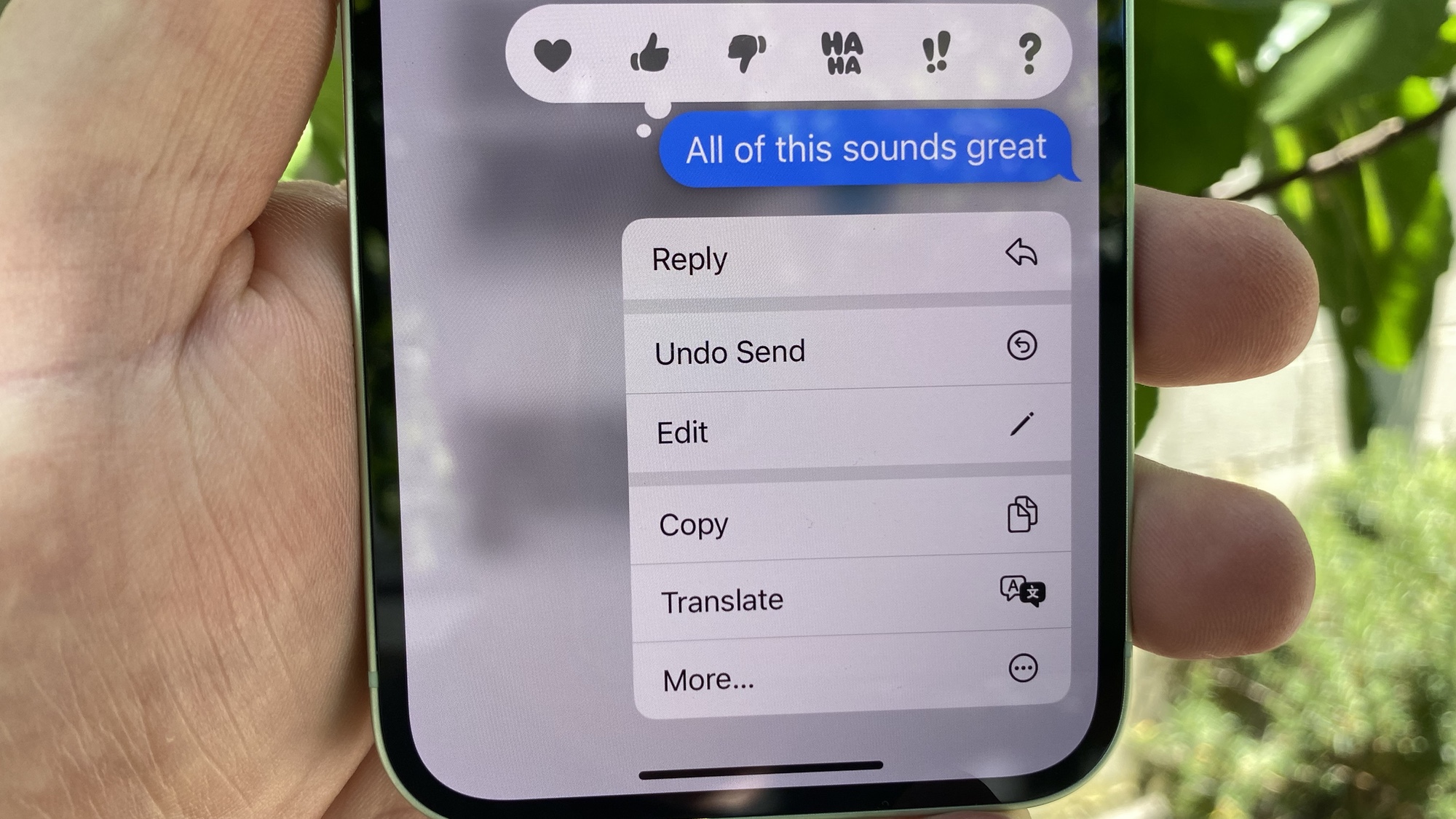
Image source: Tom's Guide
Step-by-Step: Editing on Android (Google Messages)
For Android users, the process is remarkably similar but requires RCS to be enabled. If you are texting someone who does not have RCS (such as an older device or a carrier that hasn't fully transitioned), the edit option will not appear.
- Tap and hold the message: A toolbar will appear at the top of the screen.
- Tap the Pencil Icon: This enters the editing mode.
- Modify and Resend: After you save your changes, the message is updated on both devices, provided the recipient is online.
Top Free Tools to Create Realistic Fake Text Message Mockups
When the goal is not to fix a real conversation but to create a visual representation of one, mockup generators stand out as a top choice. These tools are essential for marketers creating "social proof" or creators building narrative-driven content for platforms like TikTok and Instagram.
TheFake
Widely regarded as a top-tier option for professional designers. It supports over 25 chat layouts and allows for granular control over system UI elements like battery percentage and WiFi signal strength.
Postfully
A popular choice for quick iMessage-style screenshots. While it is easy to use, many users note that the free version includes a watermark in the text input bar that requires a workaround to remove.
Text Message Creator
With over 5 million users on the Play Store, this app is a leading choice for mobile-first creators who need to generate chats on the go without a desktop computer.
Advanced Customization Features
What separates a mediocre mockup from a convincing one is the attention to detail. Leading tools like TheFake Design Tool allow you to toggle read receipts, typing indicators, and even specific timestamps. This level of detail is crucial for maintaining the "suspension of disbelief" in creative storytelling.
According to discussions in community forums, many free generators struggle with "newlines" (line breaks). To fix this, use the "Shift+Enter" keyboard shortcut or copy-paste a specific character code from a notepad app to force the bubble to expand correctly.
How to Use AI to Write and Refine Professional SMS Campaigns
In the B2B sector, a text message editor is often an AI-powered interface within a CRM. These tools are designed to solve the "160-character challenge." Standard SMS messages are limited to 160 characters; exceeding this limit causes the message to be split into multiple segments, which can double or triple your sending costs.
Tone Adjustment and Polishing
Platforms like Heymarket use AI to help users rewrite rough drafts. For example, a customer support agent might write a blunt response that the AI then "polishes" to be more empathetic or "shortens" to fit within a single SMS segment. This ensures that the brand voice remains consistent across thousands of individual interactions.
MMS vs. SMS Editing
A significant advancement in professional editors is the handling of MMS (Multimedia Messaging Service). According to DailyStory documentation , there is a technical nuance regarding "Clickable Images." While iOS users can often click directly on an image to follow a link, Android users may see the image and link as two separate entities. Professional editors allow marketers to preview these differences before hitting "send."
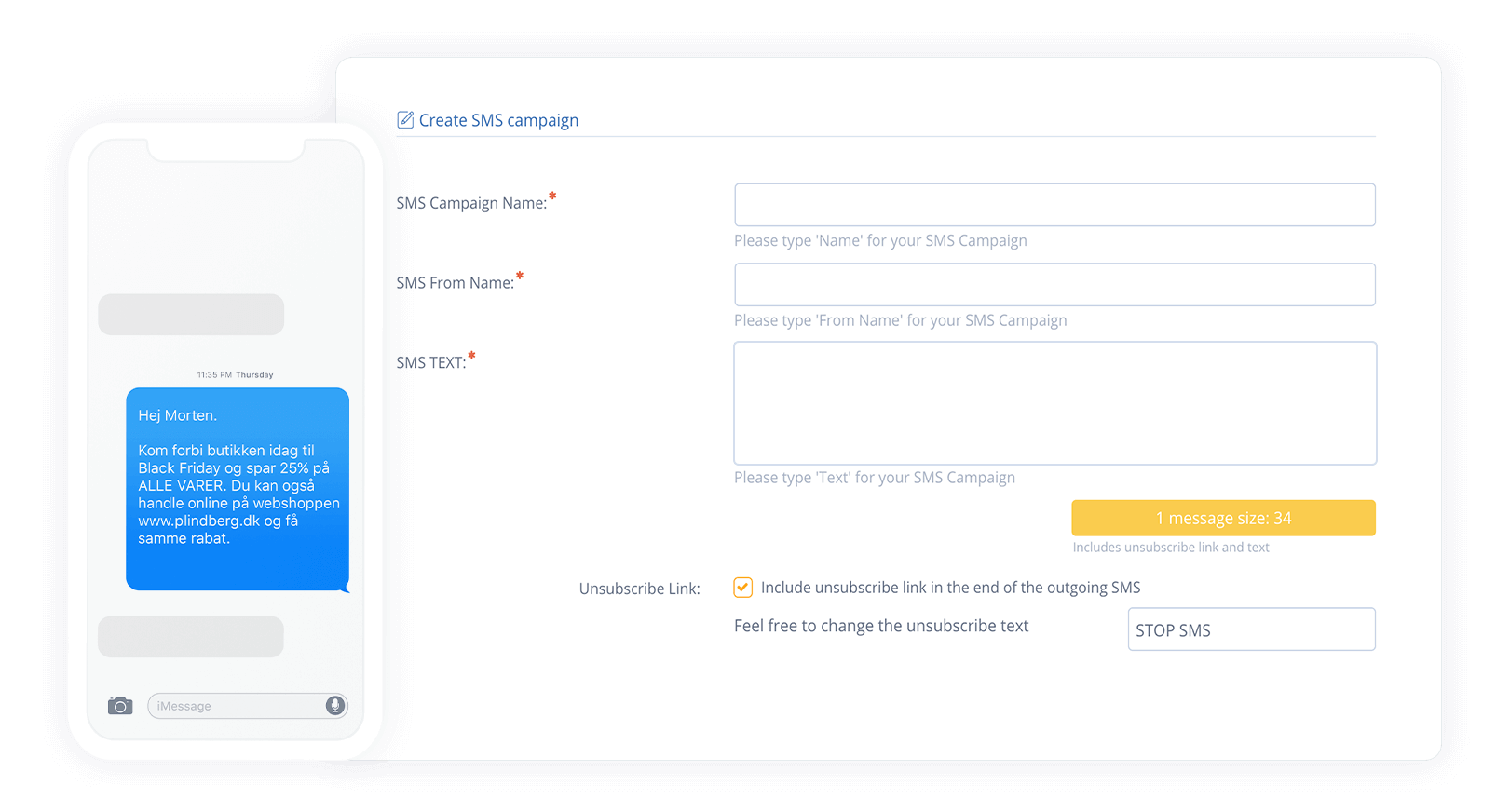
Image source: MarketingPlatform
A Professional Workflow for Creating Viral Text Message Content
Creating a viral "text story" video requires more than just a screenshot. It involves a multi-step strategy that bridges the gap between professional writing and creative execution.
- Step 1: Scripting with AI: Start by using a professional editor to draft the dialogue. Aim for a "Transition Word" density of roughly 30% to ensure the conversation feels natural and flows well for the reader.
- Step 2: Polishing for Engagement: Remove unnecessary fluff. In the world of social media, every character counts. If a message bubble takes more than three seconds to read, you risk losing the viewer's attention.
- Step 3: Generating the Visual: Input your polished script into a mockup tool. Ensure the "Battery %" and "Time" are consistent across multiple screenshots to avoid "continuity errors" that eagle-eyed viewers will spot.
- Step 4: Exporting for Social Media: Choose a 9:16 vertical format. Some advanced tools now offer typing animations, which are exceptionally strong for keeping viewers engaged on platforms like TikTok.
Legal and Ethical Rules for Using Text Message Generators
While text message editors are powerful creative tools, they carry significant ethical responsibilities. The ease with which one can fabricate a conversation makes these tools a potential weapon for fraud or defamation.
The "Evidence" Warning: It is critical to understand that using a text message editor to fabricate legal evidence, commit harassment, or engage in financial fraud is a serious crime. Leading tools explicitly include disclaimers stating that their software is for entertainment and educational purposes only.
However, there are highly positive use cases for these tools beyond entertainment. For instance, they are used in Digital Literacy Training . Security teams use fake text generators to create realistic "Smishing" (SMS Phishing) examples to teach employees how to spot dangerous links and social engineering tactics. By showing exactly how a scammer might craft a message, organizations can significantly improve their defensive posture.
Common Problems With Text Message Editors and How to Fix Them
Even the most robust tools have limitations. Understanding these common pitfalls can save you hours of frustration during the content creation process.
The Watermark Problem
Many free web-based tools place a watermark (e.g., "Made with Postfully") in the message input area. Community feedback suggests that while some users try to crop these out, a more effective method is to use the "Inspect Element" tool in your browser to hide the watermark div, or simply support the developers by opting for a pro version that offers clean exports.
Broken APK Features
A common mistake is downloading "SMS Editor" APKs from unverified third-party sites. Reports from platforms like Softonic indicate that many of these apps have broken buttons—such as call icons that do nothing—or, worse, hidden malware. Always stick to verified app stores or reputable web-based tools to ensure your device's security.
Android Frame Requests
A frequent complaint among Android users is that most mockup generators default to an iPhone/iMessage aesthetic. If you need a realistic Android mockup, look for tools that specifically offer "Material Design" or "Google Messages" templates. This ensures that the notification bar, font (Roboto), and bubble shapes match the target device perfectly.
The Bottom Line
Choosing the right text message editor depends entirely on your end goal. Whether you are fixing a typo or building a viral marketing campaign, keep these key takeaways in mind:
- Native editing is for quick corrections: You generally have a 15-minute window for iMessage and RCS edits.
- Mockup generators are for storytelling: Use tools like TheFake for high-fidelity social media content.
- AI editors optimize B2B costs: Professional tools help you stay under the 160-character SMS limit.
- Transparency is key: Recipients can often see the edit history on native platforms.
- Ethics matter: Never use these tools to fabricate evidence or commit fraud.
- Check your frames: Ensure your mockup matches the specific OS (iOS vs. Android) you are simulating.
- Avoid unverified APKs: Stick to web tools or official app store listings to prevent security risks.
For your next project, start by defining your platform requirements and then select the tool that offers the specific customization depth you need.
Frequently Asked Questions
- Can I edit a text message I sent an hour ago?
- No, most native platforms like iMessage and Google Messages enforce a strict 15-minute time limit for editing sent messages. Once this window has passed, the message is permanent and cannot be modified. If you made a significant error, your only option is to delete the message (if supported) or send a follow-up correction.
- Is there a free text message editor without watermarks?
- While many tools are "freemium," finding a completely free tool without watermarks can be challenging. Some web-based generators allow you to create the mockup for free but add a small watermark in the corner or the text bar. Users often find that the most reliable way to get a clean, high-resolution export is to use a reputable paid tool or a mobile app that offers ad-supported free exports.
- Can the recipient see my original message after I edit it?
- On iOS, yes. When you edit an iMessage, the recipient sees an "Edited" label. If they tap that label, they can view the entire version history, including the original text. On Android (Google Messages), the recipient will see that the message was edited, but the original version is typically overwritten and not as easily accessible as it is on iPhone.
- Do fake text generators work for both Android and iPhone?
- Yes, most leading mockup tools offer templates for both iOS and Android. However, many default to the iMessage (iPhone) style. If you specifically need an Android look, you should look for a tool that allows you to toggle the "Device Frame" or "UI Style" to match the Google Messages or Samsung Messages aesthetic.
- Is it illegal to use a fake text message generator?
- Using these tools for entertainment, parody, or educational training is generally legal. However, using them to create fraudulent documents, fabricate evidence for a court case, or harass individuals is a criminal offense. Always use these tools ethically and within the bounds of the law.
- How do I add a profile picture to a fake chat?
- Most advanced mockup editors have a "Settings" or "Contact" tab where you can upload an image from your device. This image will then be automatically cropped into a circle and placed next to the message bubbles or at the top of the chat header, depending on the platform you are simulating.
Copyright Disclaimer: All trademarks, copyrighted content, and quoted material referenced in this article belong to their respective owners. Brief excerpts are used under fair use (17 U.S.C. § 107) for purposes of commentary, criticism, and informational reporting. This article is not affiliated with or endorsed by Apple Inc., Google LLC, or any other mentioned software providers.