Home
Home
How to Use a BBCode Text Editor to Format Forum Posts and Game Profiles
Master the art of Bulletin Board Code to create stunning layouts for Steam, osu!, and modern community forums. From basic bolding to advanced nested tables, this guide covers the technical nuances of the web's most resilient formatting language.
Try Our Real-Time BBCode Editor and Preview Tool
Using a dedicated BBCode text editor is a highly effective way to ensure your posts look exactly as intended. Most modern tools utilize a dual-pane interface: you type your code in the left pane, and the right pane provides a live HTML-rendered preview. This immediate feedback loop is critical for complex layouts involving tables or nested lists.
According to Ilma's BBCode documentation , professional editors often include features like "BBCode Compression." This is particularly useful for platforms with strict character limits, such as the rhythm game osu! . By stripping unnecessary whitespace and merging adjacent tags, you can fit significantly more information into a limited profile space.
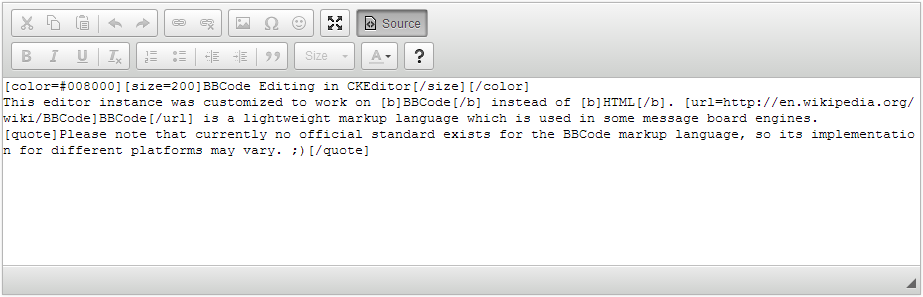
Image source: CKEditor
When choosing an editor, look for one that supports the specific flavor of BBCode used by your target platform. While the core tags are universal, some engines like Godot or specific forum plugins may add custom tags for anchors, spoilers, or specialized media embeds.
What Is BBCode and Why Do We Still Use It?
BBCode, or Bulletin Board Code, was born out of a necessity for security. In the early days of the internet, forums allowed users to post raw HTML. However, this opened the door to Cross-Site Scripting (XSS) attacks, where a user could inject a
<script>
tag to steal cookies or redirect visitors. BBCode solved this by replacing dangerous HTML tags with safe, bracketed alternatives that the server parses into safe HTML before display.
BBCode vs Markdown: The Key Differences
While Markdown has become the standard for developers on platforms like GitHub and Discord, BBCode remains a top choice for traditional community hubs. The primary distinction lies in the syntax: Markdown uses symbols like asterisks and hashtags, whereas BBCode uses explicit tags like
[b]
and
[h1]
. Many users find BBCode more intuitive for complex structures like tables because the opening and closing tags clearly define the boundaries of the content.
As noted by Neocities' BBCode philosophy , the language is "human-oriented." It was designed to be readable by humans even in its raw form, unlike heavy XML or complex CSS-in-JS solutions. This readability makes it easier for community moderators to scan for inappropriate content without needing to render the full page.
How to Master Basic BBCode Formatting Tags
Mastering the basics is the first step toward creating professional-looking posts. Most editors provide buttons for these, but knowing the manual syntax allows for faster editing and troubleshooting.
-
Text Styling:
Use
[b]Bold[/b],[i]Italics[/i],[u]Underline[/u], and[s]Strikethrough[/s]to emphasize your points. -
Hyperlinks:
The standard format is
[url=https://example.com]Link Text[/url]. Always ensure the URL includes the protocol (http/https). -
Images:
Embed visuals using
[img]image-url.jpg[/img]. Some forums allow you to set dimensions like[img=100x100]. -
Lists:
Create unordered lists with
[list][*]Item 1[*]Item 2[/list]. For numbered lists, use[list=1].
[b][i]Text[/i][/b]
is correct, while
[b][i]Text[/b][/i]
will likely break the rendering on many platforms.
How to Create Advanced Tables and Callout Boxes
For power users, BBCode offers layout capabilities that rival basic HTML. One of the most effective ways to organize data or highlight important information is through the use of tables and "callout boxes."
Building Structured Tables for Data
Tables in BBCode follow a logic similar to HTML's
<table>
,
<tr>
, and
<td>
tags. While the syntax can look intimidating, it provides a high degree of control over your layout. According to community guides at
CivFanatics
, you can even nest tables to create sidebars or complex grid systems.
Using In-Page Anchors for Navigation
If you are writing a long-form guide or a massive forum post, in-page navigation is essential. The
[anchor]
tag allows you to create a "Table of Contents" that jumps to specific sections of your post. You define the destination with
[anchor=section1]
and link to it using
[url=#section1]Go to Section 1[/url]
. This significantly improves the user experience for mobile readers who don't want to scroll through thousands of words to find one specific detail.
Formatting for Specific Platforms Like Steam and osu!
Not all BBCode is created equal. Different platforms use different "parsers," meaning a tag that works on one site might not work on another. Understanding these nuances is key to profile customization.
| Platform | Unique Feature | Common Limitation |
|---|---|---|
| Steam | Supports basic styling and lists in "About Me." | Does not support tables or custom font sizes. |
| osu! | Highly customizable with tools like OSUWME. | Strict character limits require code compression. |
| Godot Engine | Uses RichTextLabel for dynamic in-game UI. |
Requires
bbcode_enabled = true
in settings.
|
| phpBB Forums | Extensive support for custom media embeds. | Varies wildly based on administrator settings. |
For osu! players, using a specialized editor like OSUWME is a popular choice. These tools are designed specifically to handle the game's unique character limit constraints, offering one-click compression that removes redundant tags without changing the visual output.
Developer Guide to Implementing BBCode Libraries
If you are building an application that requires user-generated content, implementing a BBCode library is a significant advancement over raw text areas. It provides a familiar interface for users while maintaining the security benefits of a parsed language.
Choosing the Right Library
For web applications, SCEditor stands out as a top choice. It is a lightweight, open-source WYSIWYG editor that supports both BBCode and XHTML. It is notably innovative because it allows developers to define custom tags easily, making it adaptable to any community's needs. Alternatively, CKEditor offers a BBCode plugin for those who need a more robust, enterprise-grade solution.
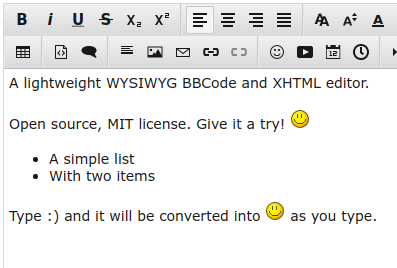
Image source: www.sceditor.com
Handling BBCode Injection and Stripping
Developers must also consider how to handle BBCode when it *shouldn't* be rendered. For example, if you want to show a preview of a post in a tooltip, you need to strip the tags. A common RegEx pattern for this is
\\[.*?\\]
, which identifies and removes anything inside brackets. Furthermore, to prevent "BBCode injection" in game chats, the
Godot Engine documentation
suggests escaping brackets by replacing
[
with
[lb]
(left bracket).
How to Avoid Common BBCode Errors and Rendering Breaks
Even experienced users encounter rendering issues. Most of these stem from three common pitfalls: tag entanglement, unclosed tags, and the "whitespace trap."
Tag Entanglement: As mentioned earlier, tags must be nested like Russian dolls. If you open a Bold tag and then an Italics tag, you must close the Italics tag before closing the Bold tag. Failure to do this can cause the parser to "give up," resulting in raw code being displayed to the reader.
The Whitespace Trap: Unlike HTML, which collapses multiple spaces into one, many BBCode parsers (especially in game engines like Godot) preserve every space and newline. If your layout looks "stretched," check for trailing spaces at the end of your lines or duplicate newlines between tags.
How to Work Offline Without Losing Your Progress
Writing a 5,000-word guide directly in a browser is risky. A single crash or accidental tab closure can wipe out hours of work. A highly recommended strategy is to use a local text editor (like VS Code or Notepad++) and a "Localhost" testing environment.
Setting up a local
phpBB
or
XenForo
server allows you to test complex BBCodes and custom styles in a private environment before taking them live. This is especially useful for developers creating custom BBCode tags for their communities. Additionally, some online editors allow you to load external files via URL parameters, enabling you to save your work as a
.txt
file on your computer and reload it into the editor whenever you need to make changes.
Key Takeaways for Mastering BBCode Formatting
BBCode remains a vital tool for secure, human-readable community content. By following these principles, you can ensure your posts are both beautiful and functional:
- Use a real-time previewer to catch syntax errors and tag entanglement before publishing.
- Always close tags in the reverse order they were opened to maintain proper nesting.
- Leverage compression tools for platforms like osu! to maximize content within character limits.
- Implement anchors for long-form guides to improve navigation and mobile readability.
- Check platform documentation as tag support varies between Steam, Godot, and different forum engines.
-
Escape brackets
in developer environments using
[lb]to prevent accidental formatting injection. - Work offline for major projects to avoid losing progress due to browser or connection issues.
Start by experimenting with basic tags in a sandbox editor to build the muscle memory needed for more complex layouts.
Frequently Asked Questions
Does Discord support BBCode formatting?
No, Discord uses a variation of Markdown for its text formatting. While they share some visual similarities (like using symbols for bold and italics), the syntax is different. For example, Discord uses
**text**
for bold, whereas BBCode uses
[b]text[/b]
. If you try to use BBCode on Discord, it will simply appear as plain text with brackets.
How do I convert HTML to BBCode automatically?
There are several online converters that can translate basic HTML tags into BBCode. However, these tools often struggle with complex CSS-based layouts or nested divs. The most reliable method is to use a WYSIWYG editor like SCEditor, which allows you to toggle between HTML and BBCode modes, ensuring the conversion is handled by a consistent parser.
Why is my BBCode not showing up correctly on a forum?
This is usually caused by one of three things: an unclosed tag, a typo in the tag name (e.g.,
[url]
vs
[ulr]
), or the forum administrator has disabled that specific tag for security reasons. Always check the forum's "Help" or "FAQ" section to see a list of supported tags and their specific syntax requirements.
Can I use BBCode in WordPress posts or comments?
By default, WordPress does not support BBCode. However, you can enable it by installing specific plugins like "BBCode" or "Shortcodes Ultimate." This is a popular choice for site owners who are migrating from a forum-based community to a blog-based one and want to keep their existing content formatting intact.
What is the character limit for BBCode on Steam?
Steam profiles typically have a character limit of around 8,000 to 10,000 characters for the "About Me" section. It is important to note that the BBCode tags themselves count toward this limit. If you have a very long profile, using a BBCode text editor to remove unnecessary spaces and redundant tags is a highly effective way to stay under the limit.