Home
Home
How to Download and Use Ladik’s MPQ Editor for Blizzard Game Modding
Ladik’s MPQ Editor (created by Ladislav Zezula) is a top-tier utility for managing MoPaq archives used in legacy Blizzard titles like World of Warcraft (up to MoP), Diablo II , and Warcraft III . As of 2026, the current stable version is 4.0.0.937 . It allows users to extract, add, and modify game files, provided a proper listfile is used to resolve internal file hashes into readable names.
For decades, the modding communities surrounding Blizzard Entertainment's classic titles have relied on specialized tools to peer inside the proprietary data structures of their favorite games. The MPQ (MoPaq) format, named after its creator Mike O'Brien (Mo-Paq), served as the backbone for game data storage from the original Diablo through the early expansions of World of Warcraft . While Blizzard has since transitioned to the CASC format for modern titles, the legacy of MPQ modding remains vibrant.
Among the various tools developed to handle these archives, Ladik’s MPQ Editor stands out as a top choice for both novices and veteran developers. Built upon the robust StormLib library , this editor provides a familiar Windows Explorer-style interface that simplifies the complex task of archive manipulation. Whether you are looking to swap textures in Warcraft III or modify data tables in Diablo II , understanding this tool is the first step in your modding journey.
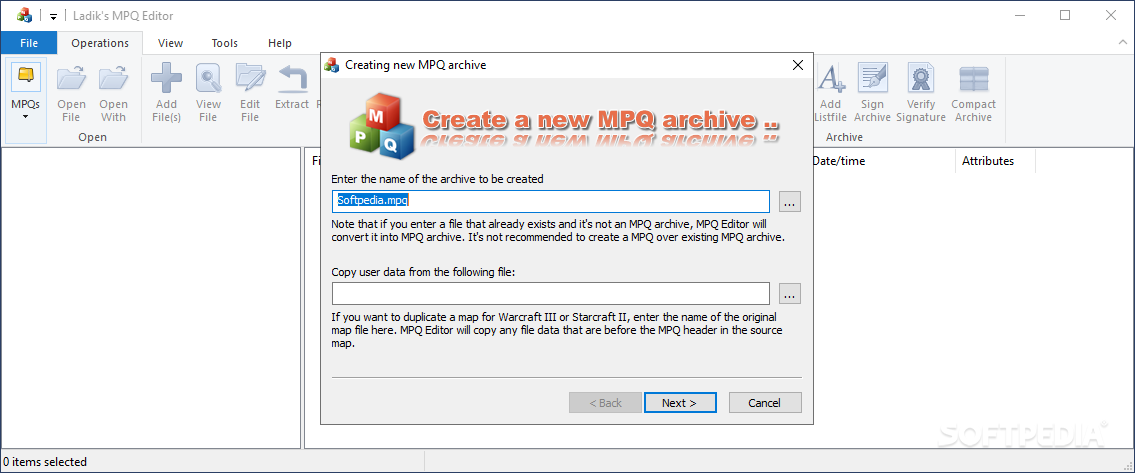
Image source: Softpedia
Where to Safely Download Ladik’s MPQ Editor
Finding a clean, safe version of modding tools can be challenging due to the proliferation of mirror sites. To ensure you are getting the official, unadulterated software, you should prioritize the developer's official website or highly reputable community hubs.
Official Sources and Community Repositories
The primary source for the editor is Zezula.net . This site is maintained by the author, Ladislav Zezula, and hosts the most recent builds of both the editor and the StormLib API. For those who prefer community-vetted mirrors, the Hive Workshop is a highly recommended alternative, particularly for Warcraft III modders.
Choosing the Right Version
While version 4.0.0.937 is the current standard, some modders still keep a copy of the legacy version 3.5.1.823 . The reason for this is the "Name Breaker" tool, which was included in older builds to help brute-force unknown filenames within an archive. If you are working with a heavily customized or "protected" MPQ where the filenames are hidden, the legacy version might offer specific utility that the streamlined 4.0 version lacks.
How to Install the Editor on Modern Windows and Linux
Ladik’s MPQ Editor is a lightweight, portable application, meaning it does not require a traditional installation process. However, running it on modern operating systems requires a few specific adjustments to ensure full functionality.
Running on Windows 10 and 11
On Windows 10 and 11, the most frequent issue users encounter is "Access Denied" errors when trying to save changes to an MPQ located within the
C:\Program Files
directory. To avoid this, you should always right-click the executable and select
"Run as Administrator."
Alternatively, move your game files to a non-system folder (like
C:\Games\
) to bypass Windows' strict folder permissions.
Setting Up on Linux via Wine
For Linux enthusiasts, Ladik’s MPQ Editor is remarkably stable when run through Wine. Testing on
Kubuntu 24.04
using
Wine 9.0
has shown that the editor performs with near-native speed. Users should ensure they have the
wine-stable
package installed. Simply navigate to the folder containing
MPQEditor.exe
and run
wine MPQEditor.exe
from the terminal. Most UI elements, including the drag-and-drop functionality, remain operational under this setup.
The macOS Alternative
While there is no native macOS build of Ladik's editor, Mac users often turn to MPQExtractor , a command-line tool available on GitHub. While it lacks the graphical interface of Ladik's tool, it is a strong contender for basic extraction tasks on Apple hardware.
Basic Operations for Opening and Extracting Files
Once the editor is running, the workflow is designed to be intuitive. If you have ever used WinRAR or 7-Zip, you will find the environment very familiar.
-
Opening an Archive:
Click
File > Open MPQand navigate to your game directory. For World of Warcraft , these are typically found in theDatafolder (e.g.,common.mpqorpatch.mpq). - Navigating the Tree: The left pane shows the folder structure. Note that if you don't see folders, you likely need a listfile (discussed in the next section).
-
Extracting Data:
Right-click any file (such as a
.blptexture or.dbcdatabase file) and selectExtract. You can choose a destination folder on your desktop for editing. - Adding or Replacing: To mod the game, you can drag your edited file back into the editor window. The tool will ask if you wish to overwrite the existing file.
-
Compacting the Archive:
After adding or deleting many files, the MPQ may contain "wasted" space. Go to
File > Compactto rebuild the archive and reduce its file size.
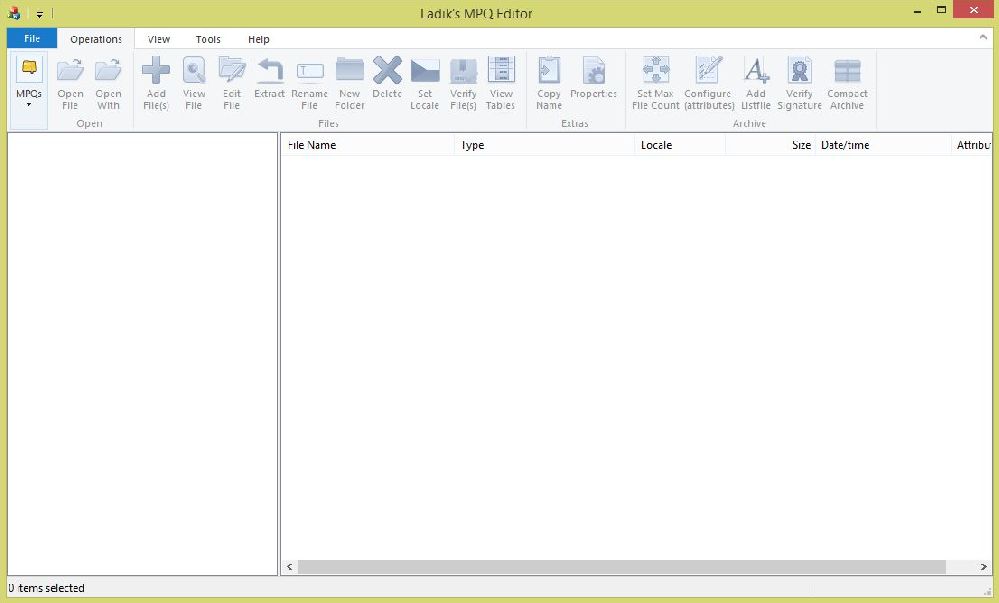
Image source: Hive Workshop
How to Fix the "Unknown" Filename Problem Using Listfiles
One of the most common points of confusion for new modders is opening an MPQ only to see thousands of files named
File000000.xxx
. This is not a bug; it is a result of how the MPQ format functions.
Why Files Appear as "Unknown"
MPQ archives do not store a traditional table of filenames. Instead, they use a hash-based indexing system . When the game engine needs a file, it hashes the name (e.g., "Textures\Grass.blp") and looks for that specific hash in the archive. If you don't know the original name, you cannot easily find the file. A listfile is an external text document that contains a massive list of known filenames used by the game. The editor uses this list to "match" hashes back to readable names.
How to Load a Listfile
To fix the "Unknown" file issue, follow these steps:
- Download a community-maintained listfile for your specific game (e.g., a WotLK listfile for WoW 3.3.5).
-
In the MPQ Editor, go to
Options > Settings. -
Under the "External Listfiles" tab, add your downloaded
.txtfile. - Re-open your MPQ archive. The editor will now cross-reference the hashes and display the correct folder structure.
Advanced Workflow Modes for Power Users
For those managing large-scale modding projects, Ladik’s MPQ Editor offers advanced modes that go beyond simple file extraction. These modes mimic how the game engine itself interacts with data.
| Mode | Command/Setting | Best Use Case |
|---|---|---|
| Standard Mode | Default | Editing a single, specific archive file. |
| Merged Mode |
/merged
|
Viewing multiple MPQs as a single virtual directory (useful for WoW). |
| Patch Mode |
/patch
|
Automatically extracting the latest version of a file across multiple patches. |
| Console Mode |
/console
|
Running batch scripts for automated file processing. |
Using Merged and Patch Modes
In games like
World of Warcraft
, the client reads data from
common.mpq
, then
expansion.mpq
, and finally various
patch-X.mpq
files. If a file exists in both the common and the patch archive, the game uses the one in the patch. By using the
Merged Mode
, you can see the final state of the game data without manually checking every archive. This is a significant advancement for troubleshooting conflicting mods.
Specific Steps for Modding Diablo 2 Without Corrupting Files
Diablo II
(Legacy) modding is notoriously sensitive to archive changes. Many users report that their game crashes at the character selection screen after they have edited the
Patch_D2.mpq
. This is usually due to a misunderstanding of how the game handles data tables.
The .bin File Requirement
When you edit a
.txt
file in
Diablo II
(like
Armor.txt
), the game generates a corresponding
.bin
file. A common mistake is only importing the edited
.txt
file back into the MPQ. For the mod to work correctly, you must include
all
newly generated
.bin
files. Failing to do so causes a mismatch between the archive's index and the game's expectations, leading to an immediate crash.
Compacting Nuance in D2
When you compact a
Diablo II
MPQ, you might notice the file size drops by 40% or more. Do not be alarmed; this is a standard result of the editor's efficient compression algorithms. As long as you have maintained the internal folder structure (e.g.,
data\global\excel\
), the game will read the compacted file perfectly fine.
The Modder’s Stack: Tools to Use Alongside MPQ Editor
The MPQ Editor is a gateway, but it is rarely the only tool you will need. Modding is a multi-step process that requires a "stack" of specialized software.
Texture and Data Editing
Blizzard games rarely use standard formats like
.png
or
.json
. Instead, you will likely encounter
.blp
(textures) and
.dbc
(database strings). A typical workflow looks like this:
-
Extract:
Use Ladik’s MPQ Editor to pull the
.blpfile. -
Convert:
Use
BLPConverter
or
BLPLab
to turn the file into a
.pngor.tga. - Edit: Modify the image in Photoshop or GIMP.
-
Re-convert:
Turn the image back into a
.blp. - Import: Use the MPQ Editor to replace the original file in the archive.
Database Management
For
World of Warcraft
.dbc
files, using a hex editor is inefficient and prone to error. Instead, tools like
WDBX Editor
or
SpellEditor
are highly recommended. these tools allow you to view the data in a spreadsheet-like format, making it much easier to adjust item stats, spell effects, or NPC behavior.
Why Isn't There an Online MPQ Editor?
In an era of browser-based tools, users often ask why they must download a desktop application to edit MPQs. There are two primary reasons for this: file size and security .
A standard World of Warcraft archive can exceed 2GB in size. Uploading such a massive file to a web server just to change a single texture is impractical for most users. Furthermore, MPQ archives can contain scripts and executable data. Processing these on a remote server poses significant security risks for the host. Local editors like Ladik's remain the most efficient and secure way to handle these legacy formats.
Frequently Asked Questions
Is Ladik's MPQ Editor free to use?
Does this tool work with StarCraft II files?
How do I fix "Access Denied" errors when saving?
Can I use this to edit World of Warcraft Retail files?
What is the maximum file limit for a new MPQ?
Key Takeaways for MPQ Modding
- ✅ Official Source: Always download from Zezula.net to ensure you have the latest, safest version (4.0.0.937).
- ✅ Admin Rights: Run the editor as an administrator to avoid common file permission errors on Windows 10/11.
- ✅ Listfile Necessity: Use a community listfile to convert "Unknown" hash names into readable folder structures.
- ✅ Linux Compatibility: Use Wine 9.0 or newer for a stable experience on Linux distributions like Kubuntu.
- ✅ Archive Maintenance: Use the "Compact" feature regularly to remove wasted space and optimize your mod's file size.
- ✅ Diablo II Specifics: Always include both .txt and .bin files when modding D2 to prevent character selection crashes.
- ✅ Tool Synergy: Combine the editor with BLP converters and DBC editors for a complete modding workflow.
Start your project by creating a backup of your original game archives before making any modifications.