Home
Home
How to Edit SWF Files and Modify Flash Assets Safely in 2026
To edit a SWF file in 2026, the most reliable method is using JPEXS Free Flash Decompiler (FFDec) . Unlike standard documents, SWF files are compiled binaries; you should use Tag Tree Editing to modify specific assets (images, text, or sounds) without breaking the underlying ActionScript logic. For modern systems like Windows 11, ensure you have Java 11 or higher installed to run these legacy tools safely.
Understanding Why SWF Editing Differs from Standard Document Modification
Editing a SWF (Small Web Format) file is fundamentally different from opening a Word document or a Photoshop file. As a "rendered" or "compiled" format, the SWF is the final output of a project, not the source. According to Adobe's official documentation , SWF files are designed for playback, meaning much of the original project structure—such as layers, folders, and editable text fields—is flattened or discarded during the compilation process.
When you attempt to use a swf editor , you are essentially performing "reverse engineering." You are taking a finished product and trying to inject new data into its binary structure. This is why simply importing a SWF back into Adobe Animate often results in a "broken" file where animations don't play correctly and ActionScript code is missing. To succeed, you must use tools that can read the "tags" within the file—the specific blocks of data that define shapes, sounds, and scripts.
In the current landscape of 2026, SWF editing has transitioned from a mainstream web development task to a specialized skill used primarily by digital archivists, legacy software maintainers, and the gaming modding community. Because the format uses DEFLATE compression , which is a non-patented lossless method, the vector assets inside remain high-quality, making them prime targets for recovery and modification.
Top-Rated SWF Editor Tools for Modern Workflows
Selecting the right tool depends on whether you need to change a single image, extract source code, or completely overhaul a legacy interface. While many commercial tools have disappeared since Adobe Flash reached its end-of-life, several open-source and legacy options remain highly functional.
| Tool Name | Primary Strength | OS Compatibility | ActionScript Support |
|---|---|---|---|
| JPEXS (FFDec) | Comprehensive Decompilation | Windows, macOS, Linux | AS1, AS2, AS3 |
| Sothink SWF Editor | Tag-Level Precision | Windows (Legacy) | AS2, AS3 |
| Decompiler.com | Quick Web Extraction | Browser-based | Basic Code Only |
| SWF Creator | Lightweight C++ Build | Windows, Linux | Limited AS3 |
JPEXS Free Flash Decompiler (A Leading Industry Standard)
JPEXS, often referred to as FFDec, stands out as a top choice for almost any SWF-related task. Because it is Java-based and actively maintained on GitHub , it remains compatible with modern operating systems. It allows users to view the internal structure of a SWF, export assets to various formats (SVG, PNG, MP3), and even edit ActionScript directly through its built-in compiler.
One of its most impactful features is the "Resource Replacement" function. If you are modding a game and simply want to change a character's texture, you don't need to decompile the whole file. You can locate the specific
DefineBits
tag, right-click, and replace the image. This method is widely regarded as one of the safest ways to modify a SWF without introducing recompilation errors.

Image source: AnyMP4
Sothink SWF Editor for Precise Tag-Level Changes
While JPEXS is excellent for broad edits, Sothink SWF Editor is often preferred by power users who need to perform surgical strikes on the binary data. It presents the SWF as a "Tag Tree," allowing you to see the exact hex values and header information for every element. This is particularly useful for debugging files that refuse to open in other players or for changing hard-coded variables that aren't easily accessible via standard decompilation.
How to Modify SWF Files Without Corrupting the Source Code
The biggest mistake beginners make is trying to decompile a SWF into an FLA file, editing it in Adobe Animate, and then re-exporting it. This process is prone to failure because decompilers rarely reconstruct 100% of the original project logic. Instead, use the Tag Tree Workflow , which maintains the integrity of the original binary.
Follow these steps for a safe modification process:
- 1 Open the File: Load your SWF into JPEXS or Sothink.
-
2
Locate the Target Tag:
Use the search function to find specific tags. For images, look for
DefineBits; for text, look forDefineText; for logic, look forDoAction(AS2) orDoABC(AS3). - 3 Export for Reference: Before editing, export the asset to your desktop to ensure you have the correct dimensions and format for the replacement.
- 4 Replace and Save: Right-click the tag, select "Replace," and choose your new file. The editor will automatically handle the re-insertion into the binary stream.
- 5 Test in Standalone Player: Use a standalone Flash Player projector (like version 32.0) to verify the changes before deploying the file.
Running Legacy Flash Tools on Windows 11 and macOS Sonoma
Most SWF editors were developed during the peak of the Flash era (circa 2005–2015). Consequently, running them on Windows 11 or macOS Sonoma requires specific configurations. JPEXS is the most adaptable tool in this regard because it runs on the Java Virtual Machine (JVM).
Configuring the Java Environment
To run JPEXS on a modern PC, you typically need Java 11 or higher. However, some users report better stability with OpenJDK 17. If you encounter "UI scaling" issues on high-resolution 4K monitors, you can fix this by right-clicking the
ffdec.exe
, going to Properties > Compatibility > Change high DPI settings, and overriding the scaling behavior.
macOS and Docker Workarounds
For macOS users, especially those on Apple Silicon (M1/M2/M3), running legacy Windows-based editors can be challenging. A notably innovative solution is using the JPEXS Dockerfile . This allows you to run the decompiler in a headless Linux container, which is exceptionally strong for batch-processing SWF files or extracting assets without needing a full Windows virtual machine.
Modding Skyrim and Fallout UI Files with Specialized Editors
A significant portion of SWF editing traffic today comes from the Bethesda modding community. Games like The Elder Scrolls V: Skyrim and Fallout 4 use SWF files for their user interfaces (UI). For example, the Pip-Boy menu and the inventory screens are essentially Flash applications running inside the game engine.
According to discussions on the
Nexus Mods forums
, modders frequently use JPEXS to edit
inventorymenu.swf
to add new categories or change the font size. The key here is understanding
ActionScript 3 (AS3)
. Unlike simple web banners, these UI files contain complex logic that communicates with the game's engine via "ExternalInterface" calls. If you modify the code, you must ensure that the function names remain identical, or the game will fail to populate the menu with items.
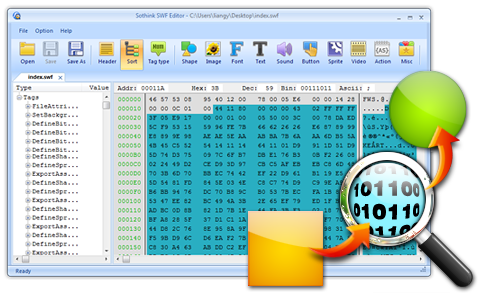
Image source: Sothink.com
Recovering High-Quality Vector Assets from Compiled SWF Files
One of the most valuable uses for a swf editor is asset recovery. Because SWF was built on vector technology, the shapes inside are not pixel-based; they are mathematical paths. This means you can extract a logo or character illustration from a 20-year-old SWF and scale it to 8K resolution without any loss in quality.
- Vector Extraction (SVG/FXG)
- JPEXS allows you to export "Shapes" directly to SVG (Scalable Vector Graphics). This is a top-tier option for designers looking to migrate old Flash assets into modern HTML5 Canvas or Adobe Illustrator projects.
- Sound and Video Rip
- Audio in SWFs is usually stored as MP3 or ADPCM. A good decompiler can extract these as raw files, preserving the original bit rate used by the creator.
- ActionScript Deobfuscation
- Some SWFs are "protected" or "obfuscated" to prevent editing. Modern editors include basic deobfuscation scripts that can rename garbled variables into readable formats, though this remains a complex task.
Common Pitfalls and Troubleshooting During the Editing Process
Even with the right tools, SWF editing is fraught with technical hurdles. Understanding these common issues can save hours of frustration.
The "Blank Screen" Recompilation Error
This is the most frequent issue encountered when using a swf editor . It usually happens when the ActionScript compiler in the editor (like the one in JPEXS) uses a slightly different version of the Flex SDK than the original file. To avoid this, try to use "Direct Edit" on the P-code (bytecode) rather than recompiling the entire source code. This changes the logic at the binary level without triggering a full rebuild.
The Android "Lua" Misconception
There is a common misconception that you can edit SWF files on Android using "APK Editors." As noted in community research, many guides claiming to show SWF editing on mobile are actually discussing Lua or Luac files used in modern mobile wrappers. Pure SWF editing is almost exclusively a desktop-class task; do not trust mobile apps that claim to provide full Flash decompilation, as they are often wrappers for simple asset viewers or, worse, malicious software.
Key Takeaways for Successful SWF Editing
Editing SWF files in 2026 is a specialized but highly rewarding process for those looking to preserve digital history or customize their favorite games. By following the right workflows, you can modify these legacy binaries with high precision.
- Use JPEXS FFDec as your primary tool for its modern OS compatibility and robust feature set.
- Prioritize Tag Editing over full decompilation to maintain the structural integrity of the file.
- Install Java 11+ to ensure legacy tools run correctly on Windows 11 and macOS.
- Verify ActionScript versions (AS2 vs AS3) before attempting to write new logic.
- Leverage vector extraction to recover high-quality assets for modern HTML5 projects.
- Test in standalone projectors to bypass browser-based Flash limitations.
- Always maintain backups of the original binary before performing any "Replace" operations.
Start by opening your target file in a decompiler to explore its tag structure before making any permanent changes.
Frequently Asked Questions
Can I edit a SWF file without converting it to FLA?
Yes, you can edit a SWF file directly using a tag editor like JPEXS or Sothink. This method allows you to swap images, change text strings, and modify ActionScript bytecode without needing the original source FLA file. In many cases, direct tag editing is actually safer than conversion because it avoids the errors that often occur during the decompilation process.
Is JPEXS Free Flash Decompiler safe to use?
JPEXS is widely considered safe, provided you download it from its official GitHub repository. As an open-source tool, its code is transparent and audited by the community. However, you should always be cautious when downloading legacy software from third-party "free download" sites, as these versions may contain unwanted bundled software or malware.
Why can't Adobe Animate open my SWF file for editing?
Adobe Animate is designed to create SWF files, not to edit them. Once a project is exported to SWF, the data is "compiled" and flattened. Animate can "import" a SWF to the stage as a graphic, but it cannot reconstruct the original timeline, layers, or editable scripts. To edit the file, you must use a decompiler to extract the assets or convert them back into a format Animate can understand.
What is the best free SWF editor for Windows 11?
JPEXS Free Flash Decompiler ranks among the top choices for Windows 11 users. It is free, open-source, and handles ActionScript 3, which is the version used in most modern Flash applications and game UIs. Its ability to run on the latest Java Runtime Environments makes it a reliable choice for current hardware.
Does Ruffle support edited SWF files?
Ruffle, the modern Flash Player emulator, supports edited SWF files as long as the modifications do not use unsupported ActionScript features. Since Ruffle is still in active development, it has better support for AS1 and AS2 than AS3. If you edit a file's tags correctly, Ruffle will generally play the modified version just as it would the original.