Home
Home
How to Redeem and Use a Tremendous Gift Card Without Losing Your Money
A Tremendous gift card is a legitimate corporate reward used by companies like Google and Intel. To use it effectively, redeem the link in your email and choose between a Virtual Visa or a brand-specific card (like Amazon). For virtual Visas, add the card to Apple Pay or Google Wallet to spend it in stores, or use the Amazon Reload trick to spend small remaining balances. Be aware that virtual Visas typically expire 6 months after activation.
What Is a Tremendous Gift Card and Why Did You Receive One?
If you recently found an email from "Tremendous" in your inbox, you are likely the recipient of a corporate incentive, survey reward, or perhaps a class-action settlement payout. Tremendous is a specialized B2B (business-to-business) payouts platform that simplifies how organizations send money to individuals globally. Unlike a traditional gift card you might buy at a grocery store, these rewards are distributed at scale by over 25,000 businesses, including major tech giants and research institutions.
According to official Tremendous data , the platform supports rewards in over 200 countries and offers a catalog of more than 2,500 redemption options. Companies prefer this system because it eliminates the logistical nightmare of mailing physical checks or managing individual gift card inventories. Instead, they send a digital link, and you—the recipient—get to choose how you want to receive your funds.
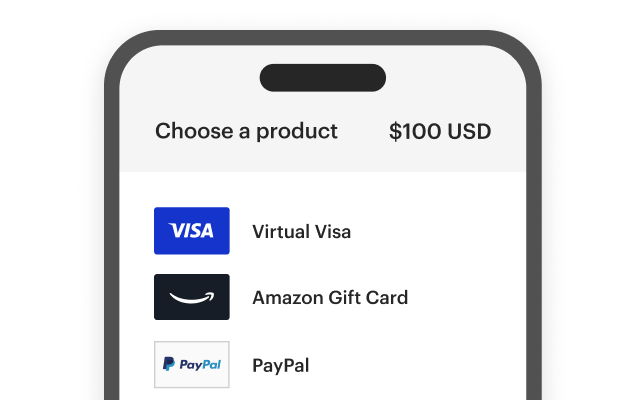
Image source: www.tremendous.com
Common reasons for receiving a Tremendous reward include:
- Market Research: Compensation for participating in a focus group or online survey.
- Employee Recognition: A "spot bonus" or holiday gift from your employer.
- Customer Loyalty: A rebate or referral bonus for using a specific service.
- Legal Settlements: Payouts from class-action lawsuits where the settlement administrator uses digital distribution.
Is the Tremendous Gift Card Email a Scam or Legitimate?
It is natural to be skeptical of unexpected emails offering money. However, Tremendous is a highly legitimate financial services platform. It maintains SOC 2 Type II compliance, which is a rigorous security standard for handling sensitive data, and currently holds a 3.9/5 rating on Trustpilot based on thousands of user reviews.
While the platform itself is safe, bad actors can sometimes spoof legitimate brands. To verify that your reward is real, check the following indicators:
-
Sender Domain:
Ensure the email comes from a
tremendous.comaddress or a verified partner domain. -
The Link:
Hover over the "Redeem" button. The URL should lead to
rewards.tremendous.com. - No Personal Info Requested: A legitimate Tremendous link will never ask for your Social Security number or bank login credentials just to view your reward options.
How to Redeem Your Reward and Choose the Best Option
The redemption process is designed to be intuitive, but the choice you make at the "Catalog" stage determines how easily you can spend your money. Once you click the link in your email, you will be presented with a variety of options based on your region.
The Step-by-Step Redemption Flow
- Access the Catalog: Click the "Redeem" button in your email to open your unique reward portal.
- Select Your Reward: Browse the options. You will typically see Virtual Visa/Mastercard, Amazon, Starbucks, and various retail brands.
- Confirm Details: For a Virtual Visa, you may need to provide a name and address for the digital card registration.
- Activate: Once selected, the card details (16-digit number, CVV, and expiry) will be displayed on the screen and sent to your email.
Virtual Visa vs. Brand Gift Cards
| Feature | Virtual Visa Card | Brand Gift Card (e.g., Amazon) |
|---|---|---|
| Versatility | High (Use anywhere Visa is accepted) | Low (Locked to one retailer) |
| Expiration | Usually 6 months | Often never expires |
| Ease of Use | Moderate (Requires AVS matching) | High (Simple code entry) |
| Mobile Wallet | Yes (Apple/Google Pay) | No (Store app only) |
How to Add Your Virtual Tremendous Card to Apple Pay or Google Wallet
One of the most common complaints about virtual cards is the difficulty of using them in physical stores. Because you don't have a plastic card to swipe, you are often limited to online shopping. However, you can bypass this by adding the card to your smartphone's mobile wallet.
Adding the card allows you to use "Tap to Pay" at grocery stores, pharmacies, and retail outlets. This is often a more reliable way to spend the balance than online shopping, as physical terminals are less likely to trigger the strict Address Verification System (AVS) errors that plague online checkouts.
Integration Steps
- Open your Wallet App: Launch Apple Wallet (iPhone) or Google Wallet (Android).
- Add a New Card: Select the "+" icon or "Add to Wallet."
- Enter Details Manually: Do not try to scan the card. Type in the 16-digit number, expiration date, and CVV provided by Tremendous.
- Verify: You may receive a text or email code to verify the card. Once confirmed, the card will appear as a digital payment method.
Why Is My Tremendous Card Being Declined and How Do I Fix It?
It is incredibly frustrating to have a $50 balance and see a "Declined" message. This usually happens for three specific reasons that are unique to prepaid virtual cards.
1. The AVS (Address Verification) Problem
Most online retailers (like Chewy, Steam, or Best Buy) check if the billing address you enter matches the address registered to the card. Because virtual cards are often "unregistered" or use a generic placeholder address, the transaction fails. To fix this, look for an "Edit Profile" or "Register Card" option on the Tremendous redemption page and ensure your current home address is linked to the card.
2. The Gas Station "Hold" Trap
3. Regional and Currency Mismatches
If you receive a reward in USD but try to spend it on a Steam account registered in the UK or Turkey, the transaction will likely fail. As noted in Steam community discussions , prepaid cards are often locked to the currency of the issuing country. If you are shopping internationally, the card issuer may also charge a 1-3% foreign transaction fee, which can cause a decline if you are trying to spend the exact total balance.
Smart Ways to Spend Every Cent and Avoid "Dust" Balances
"Dust" refers to the small, annoying balances left over on a card—like $0.42 or $1.15—that are too small to buy anything but too valuable to throw away. Because Tremendous cards typically expire in 6 months, these small amounts often go back to the issuer.
The Amazon Reload Strategy
This is widely considered one of the most effective ways to drain a virtual card. Amazon allows you to "Reload Your Balance" with a custom amount as low as $0.50.
How to do it:
- Go to "Account" > "Your Payments" on Amazon.
- Add your Tremendous card as a new payment method.
- Go to the "Reload Your Balance" page.
- In the "Amount" box, type the exact remaining balance of your Tremendous card (e.g., $0.87).
- Checkout using the Tremendous card. The balance is now converted into Amazon credit that never expires.
The Utility Bill Hack
Most internet service providers (Comcast, AT&T) and electric companies allow "one-time payments" of any amount. You can log into your utility portal and pay exactly $14.32 (or whatever is left on your card). These merchants rarely have strict AVS requirements, making them a top choice for using up reward balances.
Can You Transfer a Tremendous Gift Card to PayPal or Your Bank Account?
Tremendous does not provide a direct "Transfer to Bank" button for their Visa rewards. However, power users have developed workarounds to liquidate these cards into actual cash, though these methods often involve small fees.
The PayPal "Invoice" Method
You can add your Tremendous card to a PayPal account and use it to "Send Money" to a friend or family member. They can then send the money back to you or transfer it to your bank.
Note: PayPal will treat this as a "Goods and Services" or "Personal" payment and will likely deduct a ~3% processing fee.
Venmo and Cash App
You can add the virtual Visa as a payment source in Venmo. However, Venmo often flags prepaid cards as high-risk. If it works, you can pay a trusted person the balance of the card. Be careful: if the transaction is flagged as a "cash advance," it may be blocked by the card issuer.
Important Rules About Expiration Dates and Lost Funds
Understanding the fine print is crucial to ensuring you don't lose your reward. Tremendous operates under strict B2B contracts that differ from consumer gift cards you buy at retail.
- The 6-Month Clock: Most virtual Visas issued through Tremendous expire 6 months after the date they are activated. Once that date passes, the funds are typically forfeited and returned to the company that sent the reward.
- No Recourse Policy: According to Intel's support documentation regarding Tremendous rewards, once a card is issued, it is treated like cash. If your email is hacked and the card is spent by someone else, Tremendous generally will not replace the funds.
- Fraud Prevention: Tremendous reports that roughly 10% of incentive budgets are targeted by fraud. This is why they may occasionally lock a card if they see suspicious activity, such as multiple failed attempts at different international retailers.
Frequently Asked Questions
How do I check my Tremendous gift card balance?
Can I use a Tremendous card for recurring subscriptions like Netflix?
What should I do if I deleted the reward email?
Does Tremendous charge fees for inactivity?
Can I use the card at an ATM to withdraw cash?
The Bottom Line
A Tremendous gift card is a highly versatile reward, but it requires a bit of strategy to use fully. Follow this checklist to ensure you get every cent:
- Verify the sender to ensure the email is legitimate and not a phishing attempt.
- Choose a Brand Card (like Amazon or Target) if you want to avoid the 6-month expiration of the Visa.
- Register your address on the card portal to prevent AVS declines during online shopping.
- Add to a mobile wallet for the most seamless experience at physical retail stores.
- Use the Amazon Reload trick to drain those final few cents before the card expires.
- Avoid gas pumps and recurring subscriptions to prevent funds from being frozen.
Treat your virtual card like physical cash and aim to spend the full balance within the first 30 days to avoid expiration issues.