Home
Home
How to Set Up, Wear, and Maintain Your New Hearing Aids Every Day
To successfully use your new hearing aids, follow these four pillars: Proper Insertion (ensure the dome is seated deep enough), Consistent Wear (aim for 12 hours daily), Daily Hygiene (brush away wax every night), and Smart Connectivity (pair via Bluetooth for app control). Most users require 2-4 weeks for the brain to fully acclimate to new sounds.
Adjusting to new hearing aids is a significant transition that involves both physical handling and neurological adaptation. Whether you are using a Receiver-in-Ear (RIC), Behind-the-Ear (BTE), or In-the-Ear (ITE) model, understanding the nuances of your device is essential for long-term success. This guide provides a roadmap for daily use, technical setup, and troubleshooting based on clinical standards and real-world user experiences.
How to Put in Your Hearing Aids Correctly
Proper insertion is the foundation of clear sound and comfort. If a hearing aid is not seated correctly, you may experience whistling (feedback) or a sensation that the device is falling out. For the popular Receiver-in-Ear (RIC) models, the process involves three distinct movements.
First, place the body of the hearing aid over the top of your ear. It should rest comfortably against the side of your head. Second, hold the receiver wire near the bend—close to where it enters the ear canal. Gently guide the dome (the soft tip) into your ear canal. Finally, use your fingertip to push the dome in until the wire lies flush against the side of your face. If your device has a retention lock (a thin plastic "tail"), tuck it into the bowl of your outer ear to secure the fit.
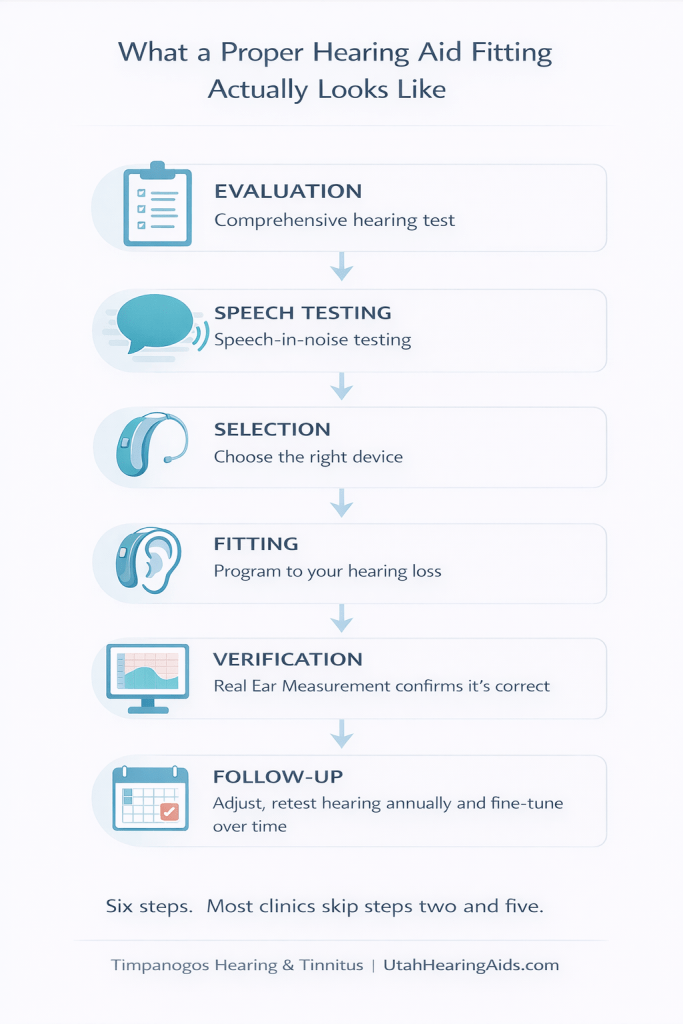
Image source: Timpanogos Hearing & Tinnitus
Visual cues are your best tool for verifying a good fit. Look in a mirror: the wire should not be bowing outward or looping away from your skin. If you see a large gap between the wire and your ear, the dome is likely not deep enough. According to ReSound clinical guidelines , a secure fit is necessary not just for comfort, but to ensure the microphones are oriented correctly to capture speech.
How to Turn Your Devices On and Off
Power management differs significantly between traditional battery-operated models and modern rechargeable units. Understanding these differences prevents unnecessary battery drain and ensures your devices are ready when you need them.
Battery-Door Models
For devices using zinc-air batteries (sizes 10, 312, 13, or 675), the battery door acts as the power switch. Closing the door turns the device on; opening it turns the device off. It is recommended to leave the battery door open at night to allow moisture to evaporate and to preserve battery life. When inserting a new battery, remember the "1-minute rule": remove the adhesive tab and let the battery sit for at least 60 seconds before closing the door. This allows oxygen to activate the zinc, ensuring full voltage.
Rechargeable Models
Most rechargeable hearing aids turn on automatically when removed from the charger and turn off when placed back in. However, if you are away from your charger, you can typically use the multi-function button. A long press (usually 3-5 seconds) will toggle the power. Pay attention to the LED indicators: a green light typically signifies the device is powering on or fully charged, while an amber or red light indicates a low battery or that the device is powering down. Brands like Unitron and Phonak use these color codes consistently across their newer platforms.
How to Pair Your Hearing Aids with a Smartphone
Connecting your hearing aids to a smartphone unlocks features like remote control, fine-tuning, and direct audio streaming. The pairing process follows a universal sequence, though the internal menus differ between iPhone and Android.
For iPhone users, the "Made for iPhone" (MFi) protocol is highly integrated, allowing you to control volume by triple-clicking the side button of your phone. Android users typically rely on the ASHA (Audio Streaming for Hearing Aids) protocol, which is supported by most modern devices running Android 10 or higher. If your phone does not support ASHA, you may still be able to use the manufacturer's app for remote control, even if direct audio streaming is unavailable.
Why Your Android App Might Look Different Than the iPhone Version
A common point of confusion for new users is the "App Disparity." Many manufacturers develop their software for iOS first, leading to a more robust feature set on iPhones compared to Android devices. For example, a Signia or Phonak user on an iPhone might have access to a full 3-band equalizer and multiple manual programs like "Music" or "Cafe."
In contrast, Android users—particularly those on older hardware—may find their app restricted to a simple volume slider and a single "Automatic" mode. This isn't necessarily a bug; it is often a limitation of how the Android operating system handles low-energy Bluetooth data. Furthermore, Android's fragmented ecosystem means that a feature working on a Samsung Galaxy might not appear on a Google Pixel or a Motorola device. If you find your app lacks specific features mentioned in the manual, check the manufacturer's compatibility list to see if your specific phone model supports the full software suite.
The Daily Cleaning Routine to Prevent Wax Buildup
Earwax (cerumen) is the leading cause of hearing aid failure. Because these devices sit in a warm, moist environment, they are prone to clogging. A consistent nightly routine can extend the life of your devices by years.
- Wipe the exterior: Use a soft, dry cloth to remove oils and moisture from the body of the aid.
- Brush the microphones: Gently brush the small openings on the back of the device to prevent dust from blocking the sound entry.
- Inspect the dome: Check the tip for wax. If you see debris, use a small brush or a wax loop to clear it.
- Check the wax guard: This is the tiny white filter inside the receiver. If it looks yellow or the sound is muffled, replace it immediately.
Where to Safely Store Your Devices Every Night
Storage is just as important as cleaning. Many users instinctively store their hearing aids on the bathroom counter, but this is a significant mistake. The high humidity from showers and the heat from hair dryers can corrode the internal components and shorten battery life. According to Hearing Systems Inc. , the ideal storage location is a cool, dry place like a nightstand drawer or a dedicated storage case.
For those living in humid climates, using a dehumidifier or "dry jar" is highly recommended. These containers use desiccant beads to pull moisture out of the devices overnight. If you use rechargeable aids, the charging station often serves as the storage unit, but ensure the charger itself is kept in a dry room rather than the bathroom.
Managing Power and Battery Life
Modern hearing aids are highly capable computers, and their power consumption varies based on your usage. Streaming audio via Bluetooth (music, phone calls, or TV) is the most significant drain on battery life. If you find your rechargeable aids are not lasting through the evening, consider reducing streaming time or using a dedicated TV streamer accessory, which is often more power-efficient than a direct phone connection.
For zinc-air battery users, battery life typically ranges from 3 to 10 days depending on the battery size. Size 10 (yellow tab) is the smallest and has the shortest life, while size 13 (orange tab) or 675 (blue tab) offers much longer runtimes. Always carry a spare pack of batteries in your wallet or purse. Avoid storing spare batteries in the refrigerator; a room-temperature, dry drawer is sufficient to maintain their shelf life.
Why You Should Aim for 12 Hours of Wear Time Daily
One of the biggest hurdles for new users is the "acclimation period." When you first start wearing hearing aids, your brain is suddenly bombarded with sounds it hasn't processed in years—the hum of the refrigerator, the rustle of paper, or the sound of your own footsteps. This can be overwhelming, leading some users to only wear their aids "when they need them."
However, clinical data suggests that part-time wear actually hinders progress. The brain needs consistent input to relearn which sounds are important and which should be filtered out. Audiologists generally recommend a goal of 12 hours of wear time daily. By wearing them all day, you allow your auditory cortex to adapt, eventually making these "background noises" fade into the subconscious. If you find 12 hours too difficult at first, start with 4 hours and increase the duration by one hour each day.
Understanding the Clicking Sound and AI Situational Cues
Many modern hearing aids, such as those from Starkey or Phonak , utilize Artificial Intelligence to analyze your environment. You may occasionally hear a faint "click" or a subtle shift in sound quality when moving from a quiet room to a noisy street. This is not a defect; it is the device's AI switching programs.
The AI identifies "situational cues"—such as the rhythmic pattern of wind or the specific frequency of human speech—and adjusts the microphones accordingly. For example, if you enter a restaurant, the AI may transition from "Omnidirectional" (hearing everything) to "Directional" (focusing on the person in front of you). Instead of manually changing the volume, try to give the AI a few seconds to settle into the new environment. Some apps allow you to "train" the AI by providing feedback on whether the sound is too sharp or too muffled in specific locations.
Open vs. Closed Domes and How They Affect Your Sound
The type of dome (the tip that enters your ear) significantly impacts your sound quality and physical comfort. The choice is usually based on your specific hearing loss profile.
| Dome Type | Best For | Pros | Cons |
|---|---|---|---|
| Open Dome | High-frequency loss / "Cookie Bite" loss | Natural sound; no "plugged" feeling | Prone to whistling; less bass |
| Closed Dome | Moderate to severe loss | Better speech clarity in noise; more bass | Can feel "occluded" (like being underwater) |
| Power/Double Dome | Severe to profound loss | Maximum volume; no feedback | Can be uncomfortable; blocks natural sound |
For users with "Cookie Bite" hearing loss (where mid-frequencies are lost but highs and lows remain intact), an open dome is often a top choice. It allows natural low-frequency sounds to enter the ear normally while the hearing aid amplifies only the missing mid-range. If you feel like your own voice is echoing inside your head (the occlusion effect), you may need a dome with more venting.
What to Do If Your Hearing Aid Whistles
Whistling, also known as feedback, occurs when amplified sound escapes the ear canal and is picked up again by the hearing aid's microphones. While modern devices have "feedback cancellers," they can still whistle under certain conditions. The most common cause is improper insertion—if the dome isn't deep enough, sound leaks out easily. Check your fit in a mirror first.
Another common cause is earwax buildup. If your ear canal is blocked with wax, the sound hits the wax and bounces back out toward the microphones. If you've checked your fit and cleaned your device but the whistling persists, you may need a professional ear cleaning. Finally, be aware of "Automatic Volume" conflicts. Some devices are programmed to increase gain automatically in quiet rooms; if you then put your hand near your ear or hug someone, the proximity can trigger a momentary whistle.
When to Seek Medical Help for Your Ears
While hearing aids are generally safe, there are specific "Red Flags" defined by the FDA that require a medical consultation with an Ear, Nose, and Throat (ENT) specialist. If you experience sudden hearing loss in one ear, persistent dizziness, or fluid drainage, stop using your aids and see a doctor immediately.
Where to Find the Official Manual for Your Brand
While this guide covers universal principles, every brand has unique button configurations and app features. You can find the specific operations manual for your device at the following official support hubs:
- Phonak Support & Manuals
- Starkey Operations Manuals
- Signia User Guides
- Unitron Support Center
- Miracle-Ear Manual Directory
Key Takeaways for Success
- Master the insertion by ensuring the wire lies flush against your skin and the dome is seated deep in the canal.
- Commit to the 12-hour rule to allow your brain to acclimate to new sounds and filter out background noise.
- Clean your devices nightly using a dry brush and cloth, and replace wax guards whenever the sound seems muffled.
- Avoid the bathroom for storage; use a dry drawer or a dedicated dehumidifier to prevent moisture damage.
- Understand your app limitations , especially if using an Android device, as features may vary by phone model.
- Respect the feedback loop by checking your fit if whistling occurs and seeking professional help for earwax buildup.
- Prioritize safety by never attempting to remove a stuck dome yourself and watching for FDA red flags like sudden hearing loss.
Start your journey today by wearing your aids in a quiet environment for at least four hours to begin the acclimation process.
Frequently Asked Questions
All trademarks, copyrighted content, and quoted material referenced in this article belong to their respective owners. Brief excerpts are used under fair use (17 U.S.C. § 107) for purposes of commentary, criticism, and informational reporting. This article is not affiliated with or endorsed by Phonak, Starkey, Signia, or other mentioned manufacturers.