Home
Home
How to Use an SEO Checker to Audit and Improve Your Search Rankings
A modern SEO checker evaluates your website's technical health, content clarity, and performance metrics to identify barriers to search visibility. In 2026, a "healthy" score typically sits above 80%, though critical errors (like broken indexing or slow Core Web Vitals) must be addressed regardless of the overall percentage. By triangulating data from tools like Google Lighthouse and specialized AI-readiness scanners, you can build a roadmap to higher rankings and better user engagement.
In the rapidly evolving landscape of digital search, maintaining a high-performing website requires more than just quality content. As search engines become more sophisticated and AI-driven discovery platforms gain traction, the role of a comprehensive SEO checker has shifted from a simple keyword validator to a complex diagnostic engine. Whether you are a small business owner or a seasoned developer, understanding how to interpret these audits is the first step toward sustainable organic growth.
The 2026 benchmark for website health has become more stringent. While a score of 70% might have been acceptable in previous years, today's competitive environment demands a foundation of at least 80% to ensure stability in the rankings. However, it is important to remember that a score is merely a proxy for user experience. A site with a 90% score can still fail to convert if the underlying strategy is flawed. This guide explores how to move beyond the numbers and implement changes that actually move the needle.
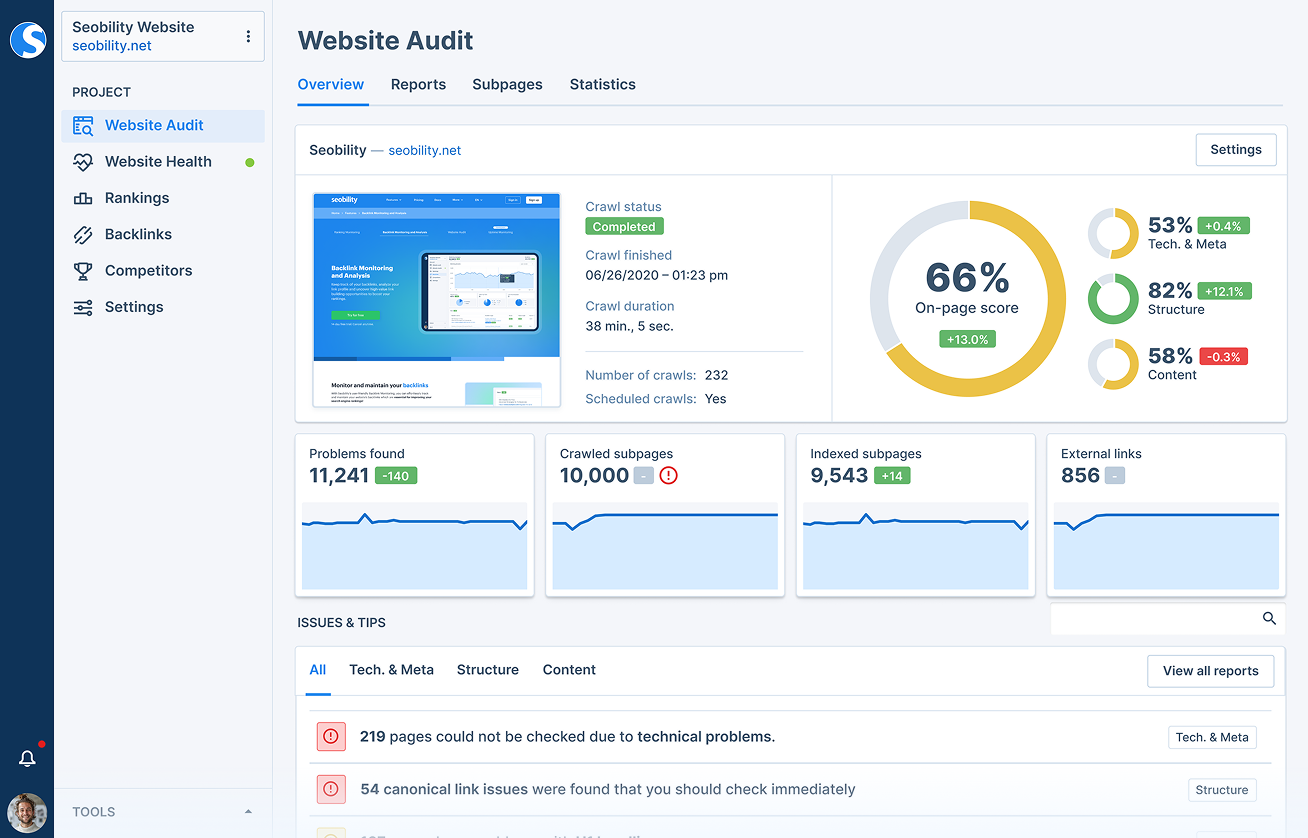
Image source: Seobility
What Does a Modern SEO Checker Actually Measure?
An effective audit tool does not just look for keywords; it dissects the entire architecture of your digital presence. Modern tools categorize their findings into three main pillars: technical infrastructure, on-page elements, and performance benchmarks. Understanding these categories allows you to prioritize fixes that offer the highest return on investment.
Technical Basics Every Audit Must Include
The technical foundation of your site is what allows search engine crawlers to discover, read, and index your content. If this foundation is cracked, no amount of high-quality writing will help you rank. A standard SEO checker will first look for the presence of an SSL certificate. In 2026, HTTPS is not just a recommendation; it is a fundamental requirement for trust and security.
Beyond security, the audit will scan your
robots.txt
file and XML sitemap. These files act as a roadmap for bots, telling them which pages are important and which should be ignored. The checker also looks for canonical tags, which are essential for preventing duplicate content issues—a common problem for e-commerce sites with multiple URLs for the same product. According to
SEO Review Tools
, these technical markers form the baseline of any professional audit.
Analyzing On-Page Elements for Search Clarity
Once the technical path is clear, the checker moves to the content itself. This involves verifying meta-tags, specifically title tags and meta descriptions. The tool checks for length—ensuring they aren't so long that they get truncated in search results—and uniqueness, ensuring every page has a distinct identity. A logical heading hierarchy (H1 through H3) is also critical, as it helps both users and search engines understand the structure of your information.
Image optimization is another key focus. Automated tools detect missing alt text, which is vital for accessibility and image search rankings. They also flag oversized image files that might be slowing down your page load times. As noted by Seobility , these on-page factors are often the easiest to fix but have a significant impact on how search engines interpret your site's relevance.
Why Core Web Vitals Are the Foundation of Your Score
In recent years, Google has shifted its focus heavily toward user experience through a set of metrics known as Core Web Vitals. These measure how fast a page loads (Largest Contentful Paint), how quickly it becomes interactive (First Input Delay), and how stable the layout is as it loads (Cumulative Layout Shift). A modern SEO checker uses the Google Lighthouse engine to simulate these metrics and provide a score from 0 to 100.
A score between 90 and 100 is considered optimized, while anything below 50 indicates critical performance issues that could lead to a ranking penalty. Because these metrics directly correlate with bounce rates and conversion, they are often weighted heavily in the final SEO score. Maintaining these vitals ensures that your site remains competitive in a mobile-first indexing world.
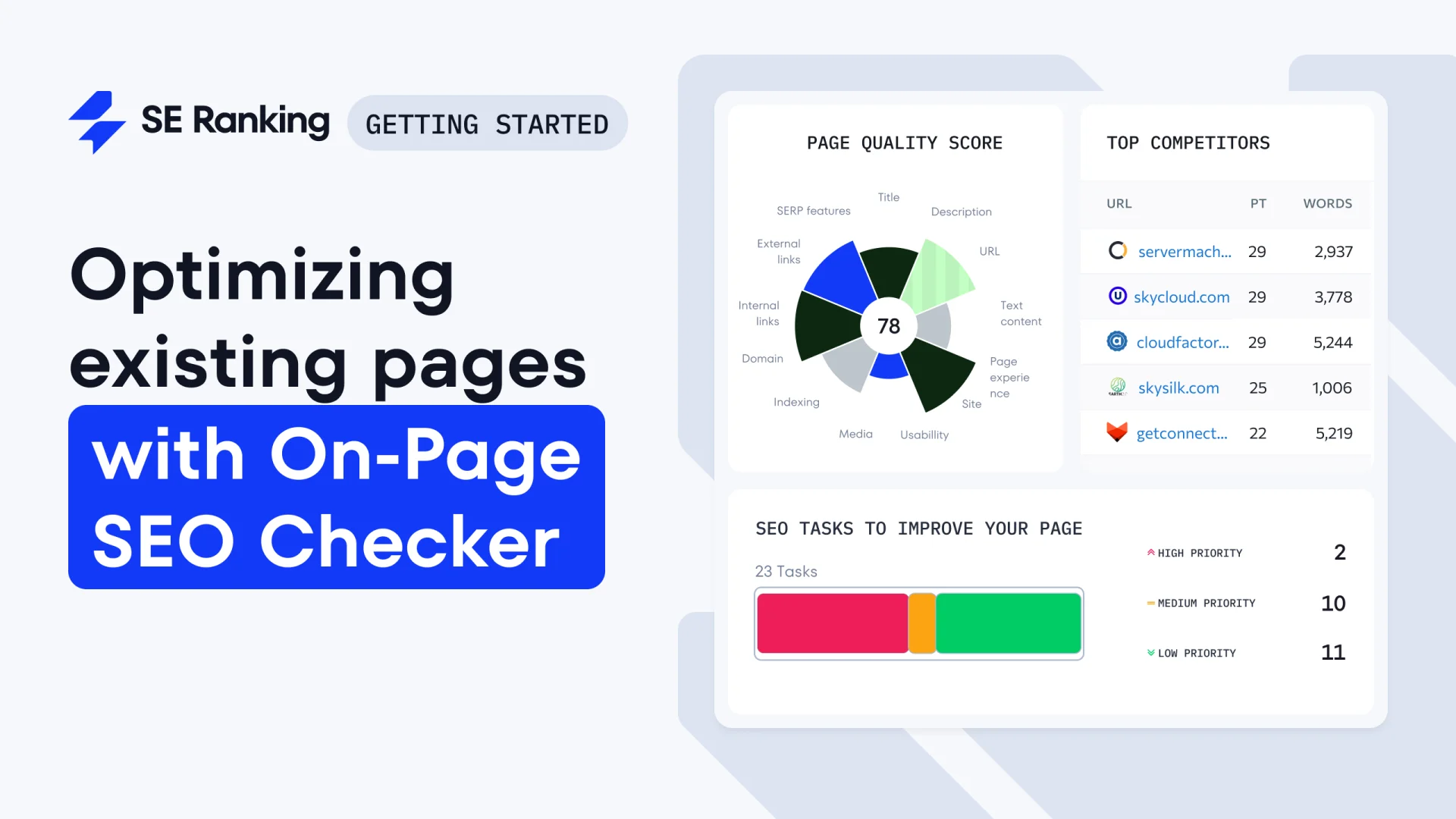
Image source: Knowledge Base - SE Ranking
Why Do Different SEO Tools Give You Different Scores?
One of the most common frustrations for website owners is seeing a 95% score in one tool and a 65% score in another. This discrepancy does not necessarily mean one tool is wrong; rather, it reflects different priorities and scoring algorithms. Understanding these differences is key to choosing the right tool for your specific needs.
Comparing Google Lighthouse vs Third-Party Audit Tools
Google Lighthouse is the official engine used by Google to measure technical performance. It focuses on a relatively small set of high-impact metrics—roughly 14 to 20 points—that directly affect user experience. Because it is built by the search engine itself, its data is highly authoritative for technical health. However, it often misses broader SEO factors like backlink profiles, keyword density, or competitive gaps.
Third-party tools, such as SEO Site Checkup , often evaluate over 200 different factors. These tools provide a more comprehensive view of your overall marketing health, including social media integration and advanced security headers. The "Metric Gap" exists because these tools are looking at the "big picture," whereas Lighthouse is looking at the "engine performance."
| Tool Name | Primary Focus | AI Visibility Check | Best For |
|---|---|---|---|
| Google Lighthouse | Technical Performance | No | Core Web Vitals & Speed |
| Seobility | Comprehensive On-Page | Partial | Small to Mid-sized Sites |
| SEO Site Checkup | AI & LLM Readiness | Yes | Modern Search Visibility |
How to Triangulate Data for a More Accurate Website Health Report
To get the most accurate picture of your site's health, experts recommend a "Triangulation Workflow." Instead of relying on a single number, you should stack data from multiple sources to identify recurring issues. If three different tools all flag your image sizes as a problem, that is a high-priority fix. If only one tool flags a minor meta-tag issue, it may be less urgent.
A typical workflow involves using Lighthouse for a technical baseline, a tool like Semrush for competitive keyword gaps, and a specialized scanner for AI search visibility. By comparing these reports, you can create a prioritized task list that addresses the most critical barriers to ranking first. This multi-tool approach reduces the risk of "blind spots" that any single algorithm might have.
How to Optimize Your Website for AI Search and LLMs
As we move further into 2026, the way people find information is changing. A significant portion of search volume—estimates suggest as much as 40%—is shifting toward generative AI engines like ChatGPT, Perplexity, and Google's AI Overviews. Traditional SEO is no longer enough; you must now consider Generative Engine Optimization (GEO).
What Is Generative Engine Optimization and Why Does It Matter?
GEO is the practice of making your content easily "digestible" for Large Language Models (LLMs). Unlike traditional crawlers that look for keywords and links, LLMs look for context, authority, and citability. They aim to provide a direct answer to a user's query and will cite the most authoritative and clear sources they can find. If your site is not structured to be cited, you miss out on a massive new stream of traffic.
Optimizing for these engines requires a shift toward structured data and clear, declarative language. LLMs prefer content that answers "Who, What, Where, When, and Why" directly. According to research from SEO Site Checkup , sites that use clear semantic HTML and schema markup are significantly more likely to be featured in AI-generated responses.
Checking Your Content for LLM Citability and Brand Authority
Advanced SEO checkers now include "citability" audits. These scans analyze how likely an AI is to use your content as a source. They look for signals of authority, such as expert bylines, clear citations of external data, and a lack of ambiguous phrasing. Ensuring your brand authority signals are accessible to AI crawlers is now just as important as having a fast-loading page.
Advanced SEO Testing Methods to Validate Your Changes
An SEO checker provides a snapshot in time, but true optimization is a continuous process of testing and validation. Once you have identified issues and implemented fixes, you must measure the impact of those changes to ensure they are actually helping your rankings.
Running Split Tests Without Risking Duplicate Content Penalties
SEO split testing involves taking a group of similar pages—such as product pages or blog posts—and dividing them into a "control" group and a "test" group. You apply a change (like a new title tag structure) to the test group and monitor the performance against the control group. This allows you to see if a change actually improves traffic before rolling it out site-wide.
This method is highly effective because it accounts for external factors like seasonal trends or algorithm updates that might skew your data. As detailed in the Advanced Web Ranking testing guide , split testing is the most reliable way to validate SEO hypotheses in a complex search environment.
Measuring Success With Pre and Post Optimization Testing
For smaller sites where split testing isn't feasible, pre and post testing is the standard. This involves recording your metrics for a specific page, making a change, and then waiting 2 to 4 weeks to measure the results. It is crucial to wait long enough for search engines to re-crawl the page and for the rankings to stabilize. Rushing to judgment after only a few days can lead to incorrect conclusions about what is working.
Solving Technical SEO Issues in JavaScript-Heavy Applications
Modern web development often relies on frameworks like React, Vue, or no-code platforms like Bubble.io. While these tools allow for dynamic user experiences, they can create significant hurdles for SEO checkers and search engine bots that struggle to execute complex JavaScript.
Why Crawlers Struggle With Modern Web Frameworks Like Bubble
The primary issue with JavaScript-heavy sites is the "Hidden Link" problem. Many automated checkers and crawlers see the initial HTML of a page but cannot see the content that is generated after the page loads. If your navigation links are triggered by JavaScript workflows rather than standard HTML
<a>
tags, a crawler may never find your deeper pages, leading to a poor site structure score.
Community discussions on the Bubble.io forums highlight that these "invisible" links are a leading cause of indexing issues for modern web apps. If a bot cannot follow a link, that page effectively does not exist in the eyes of the search engine.
How to Ensure Search Bots Can Follow Your Site Structure
To fix these issues, developers should use "Link" elements or text elements with hardcoded hyperlinks instead of relying solely on workflow-based redirects. This ensures that the link is present in the static HTML that bots read first. Additionally, using server-side rendering (SSR) or pre-rendering services can help present a fully formed version of your page to crawlers, ensuring all content and links are visible during the audit process.
Improving Local SEO Rankings for Small Business Websites
For local businesses, a generic SEO checker might miss the most important ranking factors. While technical health is still important, local search is driven by community signals and geographic relevance that automated tools often overlook.
Why Generic SEO Checkers Often Miss Local Authority Signals
Most SEO tools focus on global metrics like domain authority and total backlink count. However, for a local plumber or home inspector, a single link from a local neighborhood association is often more valuable than ten links from generic global blogs. Automated tools struggle to measure this "community presence" and may give a low score to a site that is actually dominating its local market.
As noted by experts on the InterNACHI forum , local SEO success often comes from manual efforts like managing Google Business Profiles and engaging in local community forums. These signals tell search engines that you are a trusted member of a specific geographic area.
Building Local Backlinks That Automated Tools Can't Audit
To boost your local rankings, focus on building links that reflect your physical location. This includes local chamber of commerce listings, sponsorships of local events, and mentions in regional news outlets. While these might not move your "SEO Score" in a generic checker as much as a high-authority global link, they are highly impactful for ranking in the "Local Pack" (the map results at the top of the page).
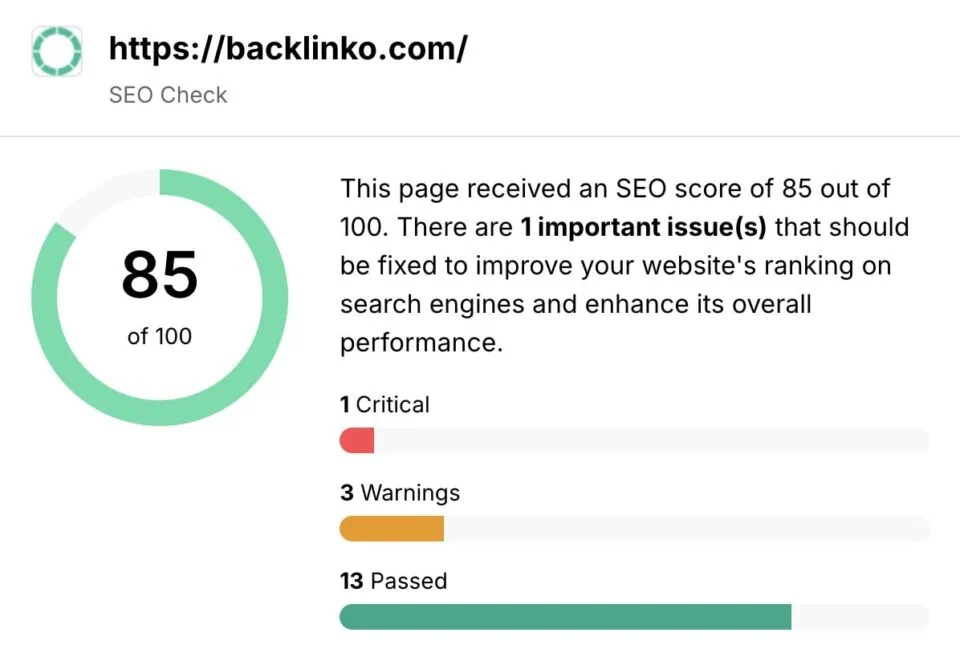
Image source: Backlinko
The Bottom Line
An SEO checker is a vital diagnostic tool, but it is the implementation of its findings that drives results. By combining technical audits with a focus on AI search readiness and user experience, you can build a website that ranks well today and remains resilient in the future.
- Prioritize Core Web Vitals: Aim for a Lighthouse score of 90+ to ensure a fast, stable user experience.
- Audit for AI Citability: Structure your content with clear, factual statements to increase visibility in LLM search results.
- Fix JavaScript Link Issues: Ensure all navigation is accessible via standard HTML links for better crawlability.
- Triangulate Your Data: Use multiple tools to identify recurring issues and avoid algorithm-specific blind spots.
- Focus on Local Signals: Supplement automated audits with local community engagement and geographic backlinks.
- Test Before You Commit: Use split testing or pre/post analysis to validate that your changes are actually improving performance.
- Be Patient with Results: Allow 2 to 4 weeks for search engines to reflect changes in your rankings.
Start by running a baseline audit today and focus on fixing the "critical" errors first before moving on to minor optimizations.
Frequently Asked Questions
How can I check my SEO score for free?
There are several highly effective free options available. Google Lighthouse, built directly into the Chrome browser, is a top-tier choice for technical audits. Additionally, tools like Seobility and Rank Math offer free tiers that provide comprehensive on-page analysis. These tools allow you to identify basic errors without any upfront investment, making them an excellent starting point for small websites.
Is there an official Google SEO checker?
While Google does not offer a single "SEO Checker" tool, they provide two essential platforms that serve this purpose. Google Search Console is the primary tool for monitoring how Google sees your site and identifying indexing issues. Google Lighthouse (and PageSpeed Insights) is the official engine for measuring technical performance and Core Web Vitals. Using these together provides the most authoritative view of your site's health according to Google's standards.
Why is my SEO score different on mobile vs desktop?
Search engines, including Google, now use mobile-first indexing, meaning they primarily look at the mobile version of your site to determine rankings. Scores often differ because mobile devices typically have slower processors and less stable internet connections than desktops. An SEO checker simulates these conditions, often flagging issues like "elements too close together" or "slow load times" on mobile that might not be apparent on a high-speed desktop connection.
How often should I run an SEO audit?
For most websites, a monthly check is a highly recommended practice. However, you should also run a fresh audit immediately after any major site update, such as changing your theme, adding new plugins, or restructuring your navigation. Regular checks help you catch "SEO decay"—issues like broken links or slow performance that can creep in over time as your site grows.
Can an SEO checker fix my website automatically?
No, an SEO checker is a diagnostic tool, not a repair tool. It identifies problems and provides a "Fix-It Bridge"—a set of instructions on how to resolve the issues. The actual implementation must be done by a developer or content creator. While some plugins (like Yoast or Rank Math) can automate certain tasks like sitemap generation, the most impactful changes usually require manual effort to ensure they align with your overall strategy.