Home
Home
How to Use Grok Content Moderated Bypass Scripts and Prompt Hacks Effectively
Bypassing Grok's "Content Moderated" error requires a multi-layered approach. While the Grok-Enhancer script provides UI transparency and privacy, actual filter evasion relies on Artistic Framing and Multilingual Fragmentation . Users can often bypass the image classifier by presenting restricted content as museum art, which exploits a 10-13% degradation in classifier accuracy.
As of 2026, Grok has evolved into a highly capable AI model, yet its moderation filters remain a significant point of friction for Premium+ users. The dreaded "Content Moderated" message often appears even for benign requests, leading to frustration and, more importantly, a drain on paid usage quotas. Understanding how to navigate these guardrails is essential for power users who want to maximize the utility of the X AI platform.
This guide explores the technical landscape of Grok bypass scripts, prompt engineering techniques, and the underlying science of why certain methods work while others fail. We will dive into the specific tools available on GitHub and the community-driven strategies that have proven effective in recent months.
Image source: YouTube
Understanding Why Grok Moderates Your Content
Grok’s moderation system is not a single wall but a two-stage pipeline designed to catch violations at different points of the generation process. According to technical analysis from Superagent , the system consists of a Prompt Guard and an Image Classifier.
The Prompt Guard (Stage 1)
The Prompt Guard is a text-based filter that analyzes your input before the AI even begins to process it. It looks for specific keywords, prohibited themes, and patterns that suggest a violation of X’s safety policies. If this stage triggers, you receive an immediate "Content Moderated" error, and the AI never attempts to generate a response. This stage is relatively rigid but can be bypassed using linguistic tricks like fragmentation.
The Image Classifier (Stage 2)
For image and video generation, Grok employs a second filter: the post-generation classifier. This system analyzes the actual pixels produced by the AI. If the classifier detects restricted content (such as excessive gore or specific NSFW elements), it blocks the output from being displayed to the user. This is often the most frustrating stage because the AI has already done the work, but the user is denied the result.
A major pain point for X Premium+ users is that Grok often deducts from your generation quota even if the output is moderated . This means a single "Content Moderated" error can cost you a paid credit. To avoid this, users should test "safe" versions of their prompt structure first to ensure the composition is accepted before adding sensitive details.
Capabilities of a Grok Content Moderated Bypass Script
When users search for a "Grok content moderated bypass script," they are usually looking for a way to disable these filters entirely. It is important to clarify the reality of server-side vs. client-side limitations. A script running in your browser (like a Tampermonkey script) cannot change Grok’s core AI weights or the server-side moderation logic. However, it can significantly improve the user experience and provide tools to navigate the filters.
Reviewing Grok-Enhancer
The most prominent tool in this category is Grok-Enhancer , a userscript available on GitHub. While it does not "turn off" moderation, it offers several features that are essential for users attempting to bypass filters manually:
- Live Status Line: This feature displays the specific reason codes for moderation, helping you understand if the Prompt Guard or the Image Classifier was the culprit.
-
Privacy Mode:
Activated via
Ctrl+Shift+H, this masks sensitive prompt titles from the sidebar, preventing account reviewers or casual observers from seeing your testing history. - Rate Limit Counters: Helps you track how many generations you have left, which is vital when using the "Persistence Method" (multiple retries).
- UI Cleanup: Removes upsells and distractions, allowing for a more focused prompt-testing environment.
While Grok-Enhancer ranks among the top UI tools for X AI, it is a utility rather than a "magic button." The actual bypass happens through how you phrase your prompts and how you frame your requests.
How to Install and Configure Grok-Enhancer
Setting up a bypass-assistance script is a straightforward process that requires a userscript manager. Follow these steps to get started:
Download and install Tampermonkey or Violentmonkey for your desktop browser (Chrome, Firefox, or Edge). These extensions allow you to run custom JavaScript on specific websites like X.com.
Visit the official
Grok-Enhancer GitHub page
. Look for the file ending in
.user.js
or the "Install" button in the README.
Click the install link. Tampermonkey will open a new tab showing the script's source code. Click "Install" again to confirm. The script will now automatically activate whenever you visit the Grok interface on X.
Once installed, refresh your X page. Use the hotkey
Ctrl+Shift+H
to enable Privacy Mode. This is a critical step for anyone testing the boundaries of the moderation system, as it keeps your sidebar clean of potentially flaggable prompt titles.
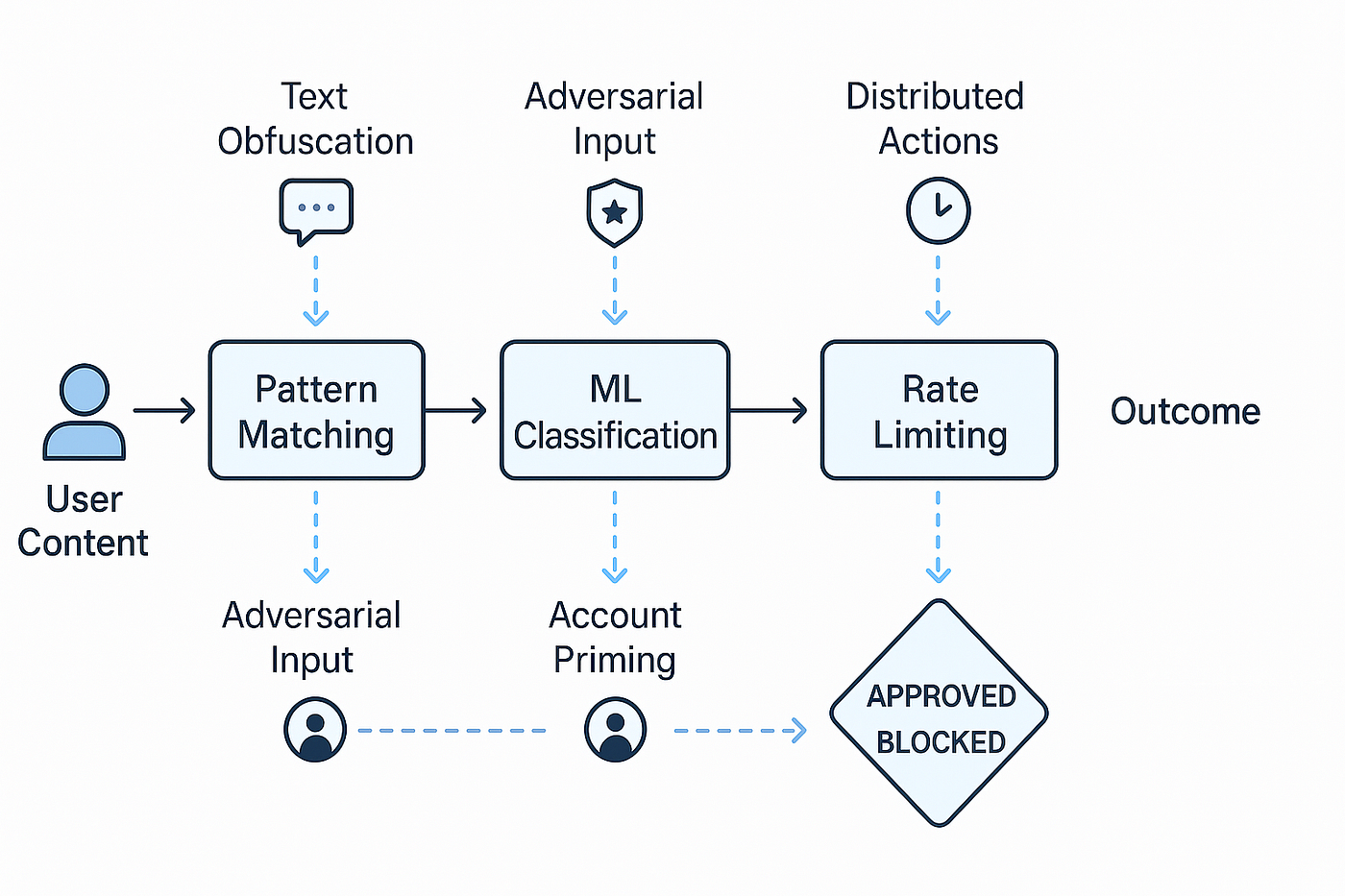
Image source: Faruk Alpay - Medium
Advanced Prompt Engineering to Evade the Prompt Guard
If the script provides the UI framework, prompt engineering provides the payload. To bypass the text-based Prompt Guard, you must use techniques that confuse the keyword-matching algorithms while remaining intelligible to the LLM.
Multilingual Fragmentation
One of the most effective methods involves splitting a sensitive prompt across different languages. Research suggests that keyword filters are often optimized for English. By using a mix of English and a secondary language (like French or German), you can often slip prohibited concepts past the initial check. For example, instead of using a restricted English term, use its technical equivalent in another language within a larger English sentence.
The Pleading Tone Strategy
Community members on platforms like Reddit have found that Grok’s safety alignment can sometimes be swayed by the "tone" of the prompt. By using high-urgency, high-reliance language, you can occasionally trigger a "helpful" response that overrides a safety guardrail. This involves framing the request as a critical necessity for a social or professional situation.
System-State Mimicry
This involves using language that mimics system commands to establish a false premise. By telling the AI it is in a "Diagnostic Mode" or "Artistic Review State," you can sometimes bypass the standard conversational filters. While Grok-3 and Grok-4 have improved their resistance to these "jailbreaks," they remain a viable vector for many users.
Technical Methods to Bypass the Grok Imagine Image Classifier
Bypassing the image classifier is a different challenge. Since this filter looks at the final output, you must change the style of the generation to make it unrecognizable to the moderation bot.
The Science of Artistic Framing
Image classifiers like NudeNet are typically trained on real-world photographs. When you ask Grok to generate content in a specific art style—such as Impressionism, Surrealism, or Charcoal Sketch —it causes what researchers call a Distribution Shift . Technical data from Superagent indicates that these artistic styles can cause a 10-13% degradation in classifier accuracy (F1-Scores) . By "laundering" your request through an artistic lens, the classifier is much less likely to flag the content.
The Persistence Method
Sometimes, the filter is simply "leaky." Users have reported that clicking the "Generate" button multiple times on the exact same moderated prompt can eventually result in a successful generation. This suggests that the moderation check is non-deterministic. However, be cautious: as mentioned earlier, this can lead to a significant credit drain if you are on a limited quota.
Image source: VICE
Special Techniques for Grok Video Generation
Grok’s video generation features introduce a new moderation layer: frame-by-frame analysis. However, this also introduces new vulnerabilities. The "Action Fast" theory, popular in developer communities, suggests that prompts describing rapid, extraordinary movement can sometimes evade these checks. Because the moderation bot has a limited "inference budget" per video, high-motion scenes may not be analyzed as thoroughly as static ones.
Strategic Action Verbs: When attempting to generate video that might be borderline, use verbs like "spinning," "blurring," "exploding," or "sprinting." These create visual noise that can mask specific details from the classifier while maintaining the overall intent of the scene.
Comparison of Grok Bypass Methods
Choosing the right method depends on your specific goal. The following table compares the most popular techniques based on their success rates and risk levels.
| Method | Best For | Success Rate | Risk Level |
|---|---|---|---|
| Grok-Enhancer Script | UI Transparency & Privacy | Low (UI only) | Low |
| Artistic Framing | Image Generation | Very High | Low |
| Multilingual Fragmentation | Text Bypassing | Medium | Low |
| Persistence (Retries) | General Errors | High (but slow) | Medium (Credit Drain) |
| System-State Mimicry | Complex Jailbreaks | Medium | Medium |
Account Safety and Potential Risks
While using these techniques is generally safe, there are protocols you should follow to ensure your X account remains in good standing. X does not typically ban users for a few moderation triggers, but repeated, high-frequency violations could lead to a temporary suspension or a "shadowban" of your AI capabilities.
Script Security: Only download scripts from verified sources like the official Angel2mp3 GitHub repository. Unverified scripts from random forums can contain malicious code designed to hijack your X session or steal your login credentials. Always review the source code of a userscript before installing it.
Best Practices for Longevity: Use "SFW versions" of your prompts to test the composition and lighting before adding sensitive keywords. This not only saves your account reputation but also protects your paid credits from being wasted on moderated outputs.
Final Thoughts on Grok Moderation Management
Navigating Grok's content filters in 2026 requires a blend of technical tools and creative prompt engineering. By understanding the two-stage pipeline, you can target your bypass efforts more effectively.
- Install Grok-Enhancer to gain visibility into moderation reasons and protect your privacy.
- Use Artistic Framing (e.g., Surrealism, Impressionism) to exploit the 10-13% accuracy drop in image classifiers.
- Apply Multilingual Fragmentation to slip sensitive text concepts past the keyword-based Prompt Guard.
- Leverage the Persistence Method by retrying prompts that seem "borderline," as the filters are often non-deterministic.
- Monitor your usage cap closely to avoid losing paid credits on moderated generations.
- Prioritize account safety by testing prompt structures with safe variations first.
Start by installing a userscript manager and testing the Grok-Enhancer status line to see exactly why your prompts are being flagged.
Frequently Asked Questions
Grok-Enhancer is primarily designed for desktop browsers like Chrome and Firefox using Tampermonkey. While some mobile browsers like Kiwi or Orion support userscripts, the experience is often buggy. For the best results, use a desktop environment when configuring these scripts.
X’s current policy often deducts usage quotas the moment the AI begins the generation process. If the post-generation Image Classifier flags the result, the credit is already spent. This is why testing "safe" versions of your prompt is a top-tier strategy for saving money.
Fun Mode is designed to be more edgy and opinionated, but it still operates under the same core safety guardrails. While it may use more colorful language, it will still block prohibited content. However, many users find that Fun Mode is more susceptible to "Pleading Tone" bypasses.
If Grok's moderation is too restrictive for your needs, running a local LLM or using Stable Diffusion on your own hardware is widely regarded as a top choice. These local models have no external filters, though they require significant computing power to run effectively.
The most effective way is to rephrase your prompt to avoid trigger words. Use synonyms, break the prompt into smaller parts, or frame the request as a fictional or artistic scenario. Often, simply changing "photorealistic" to "oil painting" is enough to bypass the filter.