Home
Home
How to Use Spck Editor to Build Professional Web Projects on Mobile and PC
Spck Editor is a mobile-first Integrated Development Environment (IDE) designed for professional web development. It stands out as a top choice for developers who need desktop-grade features like Git integration , TypeScript Intellisense , and AI pair programming on Android and iOS. While it lacks a native Windows installer, the Spck CLI allows you to bridge your mobile device to a PC for remote editing, making it a highly versatile tool for coding on the go in 2026.
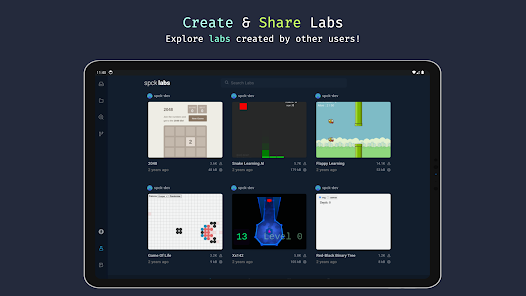
Image source: Google Play
What Is Spck Editor and Why Is It Leading Mobile Development?
Spck Editor, developed by Zeb Zhao of Leaf Stack Studio, has evolved into one of the most capable mobile IDEs available today. Unlike basic text editors that merely offer syntax highlighting, Spck is built to handle the complexities of modern web architecture. It provides a robust environment for developers who need to maintain professional standards while working away from a traditional workstation.
The core strength of Spck lies in its "Full Support" tier. For languages like JavaScript, TypeScript, TSX, JSX, CSS, Less, SCSS, and HTML, the editor provides deep Intellisense and autocompletion. This means the editor understands the context of your code, suggesting variable names, function signatures, and CSS properties as you type. This functionality is powered by the same TypeScript libraries that drive VS Code, ensuring that the mobile experience remains remarkably close to desktop standards.
Beyond the primary web stack, Spck Editor offers syntax highlighting for over 20 other languages, including Python, Java, Rust, C++, and Go. While these languages do not currently feature full Intellisense, the highlighting makes the editor a strong contender for multi-language developers who need to review or make quick edits to diverse codebases. According to Google Play data , the app has garnered significant praise for its ability to handle large projects without the lag typical of mobile web-based editors.
The target audience for Spck is broad. It serves professional web developers who need to push emergency hotfixes via Git, students learning to code without access to a laptop, and niche communities like interactive fiction writers. By bridging the gap between mobile portability and professional utility, Spck has established itself as a premier option in the mobile IDE market.
Key Features That Enable Professional Coding on a Phone
Transitioning from a keyboard and mouse to a touchscreen can be challenging, but Spck Editor addresses these hurdles through thoughtful UI design and powerful backend integrations. The following features are what elevate it from a simple app to a professional tool.
The VS Code Connection
One of the most significant technical achievements of Spck Editor is its integration of the Monaco editor's core logic. By leveraging the same TypeScript engine used in VS Code, Spck provides a level of code intelligence that few competitors match. When you open a TypeScript project, the editor parses your entire folder structure, allowing for cross-file navigation and accurate refactoring suggestions. This is not just simple keyword matching; it is a full semantic understanding of your project.
Integrated Git Client
For professional workflows, Git is non-negotiable. Spck Editor includes a built-in Git client that supports cloning, committing, pushing, and pulling from major providers like GitHub, GitLab, Bitbucket, and Azure DevOps. It handles SSH keys and Personal Access Tokens (PATs) securely, allowing you to interact with private repositories as easily as you would on a PC. The diff viewer is particularly well-designed for small screens, making it easy to review changes before a commit.
AI Pair Programming in 2026
As of late 2026, Spck has significantly advanced its AI capabilities. The editor now features a folder-scoped AI chat assistant. Unlike generic AI tools that only see the current file, Spck’s assistant can reference your entire project structure to provide context-aware suggestions. If you ask the AI to "refactor the API call in this component," it can look at your `services` folder to ensure the new code aligns with your existing architecture. This makes it an exceptionally strong companion for rapid prototyping.
The Extra Keyboard Row
Mobile keyboards are notoriously poor for coding because symbols like `{`, `}`, `[`, `]`, and `;` are often buried behind multiple taps. Spck solves this by adding a customizable row of symbols directly above the standard keyboard. This small UI adjustment significantly increases typing speed and reduces the frustration of mobile development. Users can customize this row to include the symbols they use most frequently, tailoring the experience to their specific programming language.
How to Run Spck Editor on Your PC or Mac
A common question among users is whether a native "Spck Editor for PC" exists. While there is no direct `.exe` or `.dmg` installer for Windows or Linux, the developer has provided a professional workaround via the Spck CLI . This tool allows you to use your mobile device as a remote interface for files stored on your computer.
Step-by-Step CLI Setup
The Spck CLI uses a secure WebSocket connection to bridge your devices. This is a top-tier solution for developers who want to use the Spck interface while leveraging the processing power and file system of a desktop machine.
Native Support for Apple Silicon
For users in the Apple ecosystem, the experience is even more seamless. If you own a Mac with an M1, M2, or M3 chip, you can install the iOS version of Spck Editor directly from the Mac App Store. According to the App Store listing , the app is compatible with macOS 12.5 or later. This provides a native desktop experience without the need for a CLI bridge, making it an excellent choice for cross-platform developers.
Comparison Table — Spck Editor vs. Acode vs. TrebEdit
Choosing the right mobile IDE depends on your specific needs. Below is a technical comparison of the three most popular options in 2026.
| Feature | Spck Editor | Acode | TrebEdit |
|---|---|---|---|
| Git Integration | Built-in (Advanced) | Plugin-based | Basic |
| AI Coding Assistant | Folder-Scoped Chat | Limited Plugins | None |
| CLI / Remote Dev | Yes (Official) | No | No |
| Desktop/Mac App | Yes (M1/M2 Native) | No | No |
| Price (2026) | Free / $1.99+ Gold | Paid / Free Versions | Free / Ad-supported |
Advanced Workflows for Power Users
For those who use Spck Editor as their primary development tool, several advanced techniques can significantly improve productivity and performance.
H3: Boosting Search Speed by 100x with Ripgrep
When working on large projects via the Spck CLI, searching through thousands of files can become slow. To solve this, you can install ripgrep (version 15.0.0+) on your host PC. The Spck CLI is designed to detect ripgrep automatically. When present, it offloads all file searches to this high-performance tool, resulting in near-instantaneous results even in massive codebases. This integration is a significant advancement for mobile-based remote development.
H3: Connecting to External AI Agents
While Spck has its own AI, power users can bridge the app to local AI agents like Claude Code or Gemini CLI. By using the WebSocket connection provided by the CLI, you can pipe your mobile code edits through these advanced agents on your PC. This allows you to use your own API subscriptions and more powerful models while maintaining the portability of the mobile interface.
H3: JavaScript Labs for Rapid Prototyping
Spck includes a feature called "Labs," which is a top-rated environment for testing small snippets of code. Instead of creating a full project with HTML and CSS files, you can use Labs to run pure JavaScript or TypeScript logic. This is particularly useful for testing algorithms or learning new language features without the overhead of project management.
Real-World Use Case — Writing Interactive Fiction with ChoiceScript
A unique and highly active community using Spck Editor is the ChoiceScript development community. ChoiceScript is a simple programming language used to write text-based interactive novels. Because these projects are primarily text-based but require logical scripting, Spck is widely considered one of the best tools for this niche.
The mobile writer's workflow typically follows these steps:
- Import Source: Download the ChoiceScript source from GitHub and import the ZIP into Spck.
- Scene Editing: Navigate to `web/mygame/scenes` to edit the `.txt` files where the story logic lives.
- Syntax Help: Use Spck's custom syntax highlighting to catch indentation errors, which are critical in ChoiceScript.
- Instant Testing: Use the built-in "Play" button on the `index.html` file to test the game logic in the internal browser immediately.
According to discussions on the Choice of Games forum , Spck's ability to handle the specific file structure of these games makes it a favorite among mobile authors.
Common Problems and How to Fix Them
Even the most robust tools have pitfalls. Understanding these common issues will help you avoid data loss and technical frustration.
H3: The UTF-8 ZIP Encoding Trap
When importing projects as ZIP files, Spck Editor assumes all files use UTF-8 encoding . If you are importing a project created on an older Windows system using legacy encodings (like Windows-1252), your text may appear as gibberish or contain "diamond" question mark symbols. To fix this, ensure all files are converted to UTF-8 on a PC before zipping them for import. Spck does not currently offer an auto-detection feature for legacy encodings.
H3: Preventing Permanent Data Loss
This is the most critical warning for Spck users: Uninstalling the app will delete all local project files. Unlike some apps that store data in a shared user folder, Spck’s local storage is tied directly to the application package. To prevent data loss, you must establish a routine of either pushing your changes to Git or using the "Export to ZIP" feature before performing any app updates or device changes.
H3: Resolving CLI Connection Failures
If the `spck serve` command fails to connect to your phone, the issue is usually related to your local network's firewall or a WebSocket block. Ensure that both your PC and phone are on the same Wi-Fi network. If you are using a VPN on either device, try disabling it, as VPNs often interfere with local WebSocket handshakes. Additionally, ensure that your terminal has the necessary permissions to open ports on your machine.
Frequently Asked Questions
Spck Editor remains a significant step forward for mobile development, offering a bridge between casual coding and professional engineering. To get the most out of the tool, keep these points in mind:
- Prioritize Git: Always use Git for project safety, as uninstalling the app deletes all local data.
- Leverage the CLI: Use the Spck CLI to edit PC files remotely, especially for large-scale projects.
- Optimize Search: Install ripgrep on your host machine to make mobile file searching notably faster.
- Use Apple Silicon: If you are on a Mac, install the iOS version directly for a native desktop experience.
- Master the Keyboard: Customize the extra keyboard row to include your most-used symbols for faster typing.
- Check Encodings: Always ensure your files are in UTF-8 before importing them via ZIP to avoid corruption.
Start by setting up a basic HTML/CSS project and connecting it to a GitHub repository to experience the full power of this mobile IDE.