Home
Home
How to Use TownSq to Manage Your HOA Payments and Community Requests
To access your account, visit the TownSq Login Portal . If you are using a mobile device, search for the "Community" app in the App Store or Google Play, as the icon is not labeled "TownSq." To register without an invite, you will need your property ZIP code and your HOA Account Number , which is typically found on your paper billing statement.
What Is TownSq and How Does It Work for Your Neighborhood?
TownSq functions as a modern "front-end convenience layer" for homeowners and residents. It is important to distinguish that TownSq is not a standalone accounting system; rather, it serves as a digital portal that integrates with a management company's existing database. According to The Gallery HOA , the platform acts as a centralized hub for communication, financial tracking, and maintenance management.
The platform is widely recognized for its relationship with major management firms, most notably Associa . By utilizing a modern API platform, TownSq allows for seamless data synchronization between the manager’s back-end software and the resident’s smartphone. This ensures that when a board member updates a document or a manager assigns a vendor to a work order, the resident receives a notification in real-time.
Communication
A centralized forum for neighbor interactions, community polls, and direct messaging to the board or management team.
Financials
Real-time access to account balances, transaction history, and the ability to pay HOA dues via ACH or credit card.
Maintenance
Submit work orders and architectural change requests with photo uploads, then track the status of the request until completion.
As of 2026, the platform has expanded to include advanced features like digital voting to help communities reach a quorum and resale solutions that streamline the disclosure process during home sales. By consolidating these functions into a single interface, TownSq aims to increase transparency and reduce the administrative burden on volunteer board members.
How to Register and Login to Your TownSq Account
Getting started with TownSq typically happens through one of two methods: an email invitation or manual registration. If your HOA board has already uploaded your contact information, you should receive an automated invite with a unique link. Clicking this link is the most efficient way to join, as it pre-populates your property details.
How to Register Without an Invite
If you have not received an invitation, you can still register manually by following these steps provided by TownSq Support :
-
Navigate to the login page at
app.townsq.io/login. - Look for the "Sign up with an account number" button, usually located at the bottom right of the login box.
- Enter your property ZIP code .
- Enter your Account Number . This is a critical piece of data found on your paper statement or billing notice. If you cannot find it, you must contact your management company directly.
- Verify your identity and set a secure password.
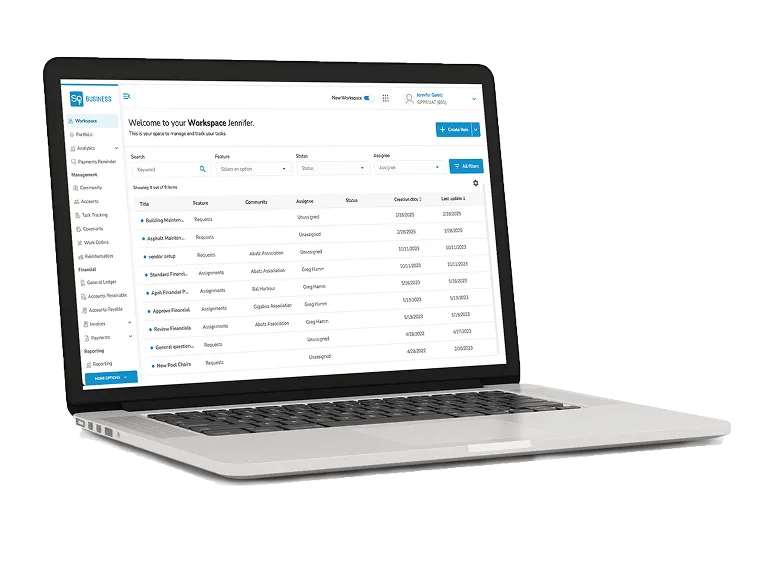
Image source: www.townsq.io
Why Can’t I Find the TownSq App on My Phone?
One of the most frequent points of confusion for new users is the naming convention of the mobile application. While the service is branded as TownSq, the actual application icon in the App Store and Google Play is labeled "Community."
According to user feedback on the Google Play Store , residents often search for "TownSq" and become frustrated when they cannot find a matching icon in their app drawer after installation. To identify the correct app, look for the TownSq logo—a stylized "T" inside a square—but remember that the text underneath will read "Community."
Device Compatibility and Requirements
As of recent 2026 updates, the app requires specific hardware and software standards to function correctly:
- iOS: Requires version 13.0 or later.
- Android: Requires version 8.0 or later for full feature support.
- Mac: Compatible with M1 chips or later.
- Vision Pro: The app is now compatible with Apple Vision for an immersive community management experience.
How to Pay Your HOA Dues and Manage Your Balance
The ability to pay assessments online is the most utilized feature of the platform. However, users should be aware of the fee structures and synchronization delays that can occur between the app and the management company's accounting software.
| Payment Method | Processing Fee | Processing Time | Best For |
|---|---|---|---|
| ACH (Bank Transfer) | $2.95 Convenience Fee | 3-5 Business Days | Low-cost monthly dues |
| Credit Card | $2.95 + ~3.5% Fee | Instant / 24 Hours | Urgent last-minute payments |
| Recurring Auto-Pay | Varies by method | Scheduled | Avoiding late fees |
The Zero Balance Trap
A common pitfall for residents is what experts call the "Zero Balance Trap." Because TownSq syncs with an external accounting ledger, there is often a delay at the end of the month. A resident might log in on the 30th and see a $0.00 balance, assuming they owe nothing, only for the new assessment to post on the 1st. To avoid late fees, always check your community's specific billing cycle rather than relying solely on the "Current Balance" display during transition periods.
Avoiding Payment Ghosting
Some users have reported "payment ghosting," where a transaction appears to fail with an error message, but the funds are still deducted from the bank account. If you encounter an error during checkout, do not immediately attempt the payment again. Wait 24 hours to see if a confirmation email arrives or check your bank statement to prevent double-charging.
New AI Features and the 2026 TownSq Roadmap
In 2026, TownSq introduced a significant advancement in community management through its AI-driven roadmap. These tools are designed to reduce the response time for resident inquiries while lowering the workload for property managers.
- AI Request Interception
- This system triages resident questions as they are being typed. By analyzing the community's governing documents, the AI can offer up to three tailored answers immediately, potentially resolving the issue without a manager ever needing to open an email.
- Suggested Replies
- For more complex issues that require human intervention, the AI drafts a response for the manager based on historical data and community rules. The manager simply reviews, edits, and sends the reply, significantly cutting down administrative time.
- Digital Voting and Quorum Tracking
- The platform now includes legally compliant digital voting modules. This allows boards to reach the required quorum for elections or bylaw changes by allowing residents to vote securely from their mobile devices.
Best Practices for Using the Community Forum
The community forum is a powerful tool for neighborly connection, but it can also become a source of friction if not managed properly. TownSq provides a "Forum Etiquette Framework" to help maintain a positive atmosphere. According to the TownSq Blog , keeping interactions constructive is key to a healthy neighborhood.
- Private vs. Public: Use the public forum for general community questions (e.g., "Does anyone have a plumber recommendation?"). Use private messaging for specific complaints about neighbors or personal account issues.
- Emergency Alerts: Ensure your notification settings are configured to allow "Push Notifications" for urgent updates like water shut-offs, gate malfunctions, or weather emergencies.
- Moderation: Board members should act as facilitators rather than police. Setting clear "House Rules" for the forum at the time of launch helps prevent negativity from taking root.
TownSq Business vs TownSq Community — Which Do You Need?
It is important to understand that TownSq offers two distinct versions of its platform, depending on your role within the community.
TownSq Community is the version designed for residents. Its primary focus is on the "user experience"—making it easy to pay bills, book the pool, and talk to neighbors. It is the interface you see when you log in as a homeowner.
TownSq Business is a suite of professional tools designed for property managers and HOA boards. According to TownSq’s professional profile , this version includes delinquency management, ink-print-and-mail services for official notices, and advanced financial reporting. If you are a board member, you may have access to both interfaces, allowing you to switch between your personal resident account and your administrative oversight tools.
Key Takeaways for TownSq Users
- Identify the App: Look for the "Community" app in stores, not "TownSq."
- Registration Prep: Have your HOA account number and ZIP code ready if you don't have an invite.
- Fee Awareness: Use ACH transfers to keep convenience fees at a flat $2.95, avoiding the 3.5% credit card surcharge.
- Timing Matters: Be wary of the "Zero Balance Trap" at the end of the month; check your billing cycle manually.
- Leverage AI: Use the built-in AI help features to get instant answers to common community questions.
- Track Requests: Always upload photos when submitting maintenance requests to speed up vendor assignments.
By understanding these technical nuances and registration requirements, you can effectively use TownSq to simplify your homeownership experience and stay connected with your neighborhood.
Frequently Asked Questions
How do I find my community on TownSq if it's not appearing?
If your community does not appear during the ZIP code search, it likely means your HOA has not yet activated the TownSq service or your specific property data has not been uploaded by the management company. Verify with your HOA board that the service is active. If it is, ensure you are using the exact ZIP code associated with the property's legal address, which may differ from your mailing address.
Is TownSq free for HOA residents to use?
The app itself is free for residents to download and use, as the subscription cost is typically covered by the HOA's management budget. However, residents may encounter transaction fees when making payments. For example, ACH transfers usually incur a $2.95 convenience fee, while credit card payments include an additional percentage-based fee (roughly 3.5%).
How do I reset my TownSq login password?
To reset your password, go to the login screen at
app.townsq.io
and click "Forgot Password." You will be prompted to enter the email address associated with your account. A reset link will be sent to you. If you do not receive the email, check your spam folder or contact your property manager to verify which email address is on file for your account.
What is the difference between TownSq and Associa?
Associa is a professional property management company that employs managers and handles the physical and financial operations of an HOA. TownSq is the software platform (the technology) that Associa uses to communicate with residents. While they are closely partnered, TownSq is a tech company, whereas Associa is a management service provider.
Why is my balance not updating after I made a payment?
Balance updates are not always instantaneous. Because TownSq must sync with the management company's internal accounting software, it can take 3 to 5 business days for a payment to be fully processed and reflected in your "Current Balance." If your balance has not updated after a full week, contact your manager with your payment confirmation number.