Home
Home
What Are the Best Video Editors for Linux for Every Skill Level?
For most creators, Kdenlive stands out as a top choice due to its balance of features and open-source accessibility. Professionals requiring industry-standard color grading often turn to DaVinci Resolve , though it requires specific hardware and transcoding steps. Beginners will find OpenShot or Shotcut to be excellent entry points for simple, stable editing tasks.
Video production on Linux has evolved significantly over the last decade. While the platform was once considered a "niche" for creative work, it now hosts some of the most capable tools in the industry. Whether you are a YouTuber, a professional colorist, or someone just looking to trim home movies, the Linux ecosystem offers a variety of solutions that rival their Windows and macOS counterparts.
Why Choosing a Linux Video Editor Is Different from Windows or Mac
Transitioning to Linux for video editing involves more than just learning a new interface. The underlying philosophy of the operating system dictates how software is built, licensed, and installed. Understanding these nuances is critical to building a stable production environment.
The FOSS vs. Proprietary Divide
On Linux, you will encounter two main categories of software: Free and Open Source Software (FOSS) and proprietary tools. FOSS editors like Kdenlive and Shotcut are community-driven, meaning they are free to use, modify, and distribute. Proprietary tools like DaVinci Resolve and Lightworks are developed by corporations. While these corporate tools often offer "Hollywood-grade" features, they may come with licensing restrictions or specific hardware requirements that FOSS tools do not have.
The Hardware Reality Check
Linux video editing is resource-intensive. For 4K production, most experts recommend at least 16GB of RAM and a multi-core processor. However, the most critical component is the Graphics Processing Unit (GPU). According to industry benchmarks , NVIDIA users often have a smoother experience with proprietary drivers, while AMD users benefit from excellent open-source driver support. If you plan to use DaVinci Resolve, a dedicated GPU with at least 4GB of VRAM is virtually mandatory.
The Codec Challenge
Licensing issues mean that some popular video formats do not "just work" out of the box on Linux. For example, the free version of DaVinci Resolve on Linux does not support H.264 or AAC audio natively because these formats require royalty payments that the developers do not cover for the free tier. This often leads to the dreaded "Media Offline" error for new users who try to import footage directly from their smartphones.
The Best Professional Video Editors for Linux
If your goal is high-end production, color grading, or collaborative film work, these tools are widely regarded as the top-tier options available on the platform.
DaVinci Resolve: The Hollywood Standard on Linux
DaVinci Resolve is a powerhouse in the film industry, used for color grading on major motion pictures. On Linux, it offers a level of sophistication that few alternatives match. It integrates editing, color correction, visual effects (Fusion), and audio post-production (Fairlight) into a single application. However, users should note that Blackmagic Design primarily supports Resolve on CentOS or Rocky Linux. While it can run on Ubuntu or Arch, it often requires community scripts to install correctly.
Lightworks: The Oscar-Winning Alternative
Lightworks has a storied history in cinema, having been used to edit films like Pulp Fiction and The King's Speech . It offers a unique, highly efficient workflow designed for professional editors. The free version is quite capable but comes with a significant limitation: exports are capped at 720p resolution. For 4K or even 1080p output, a subscription is required. Despite this, it remains a strong contender for those who appreciate a traditional film-style editing logic.
How to Fix the DaVinci Resolve Codec Issue on Linux
The Problem: The free version of DaVinci Resolve on Linux cannot decode H.264 video or AAC audio due to licensing constraints. This results in imported clips showing as "Media Offline" or having no sound.
The Solution: You must transcode your footage into a professional intermediate format like DNxHR or ProRes before importing. These formats are larger in file size but are much easier for your computer to process during editing.
To fix this, you can use the command-line tool FFmpeg . Run the following command in your terminal to convert an MP4 file into a Resolve-friendly MOV file:
ffmpeg -i input.mp4 -c:v dnxhd -profile:v dnxhr_hq -pix_fmt yuv422p -c:a pcm_s16le output.mov
This command converts the video to DNxHR and the audio to uncompressed PCM, ensuring perfect compatibility with the free version of Resolve.
The Best Open-Source Video Editors for Stability and Features
For those who prefer the freedom of open-source software, Linux offers several mature projects that provide a comprehensive set of tools without the licensing headaches of proprietary software.
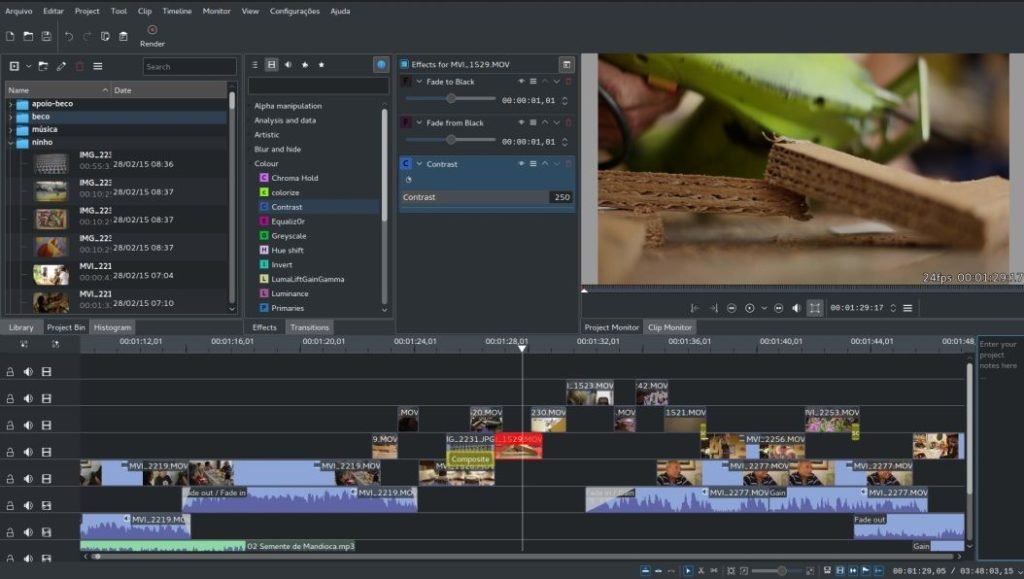
Image source: DebugPoint.com
Kdenlive: A Highly Capable Open Source Editor
Kdenlive is the flagship video editor for the KDE community and is arguably the most versatile FOSS editor available. It uses the MLT framework to handle almost any file format you throw at it. One of its standout features is Proxy Editing . This allows the software to create low-resolution copies of your 4K footage for editing, then swap back to the high-resolution originals during the final render. This makes it possible to edit high-quality video even on older hardware.
Shotcut: The Stable Mid-Range Choice
Shotcut is often praised for its stability and clean interface. Unlike Kdenlive, which has a deep menu system, Shotcut uses a more modular approach where you can dock and undock panels as needed. It supports a wide range of formats natively and is known for being less prone to crashing during long, complex renders. Many users find it to be a more intuitive choice for projects that require a balance of simplicity and power.
Blender: More Than Just 3D Modeling
While primarily known for 3D animation, Blender includes a surprisingly robust Video Sequence Editor (VSE). It is not a traditional NLE (Non-Linear Editor) and has a steep learning curve, but for creators who already use Blender for 3D work, it offers a seamless way to edit their renders. It is particularly strong for motion graphics and compositing tasks that would require external plugins in other editors.
Simple Video Editors for Beginners and Quick Edits
Not every project requires a multi-track timeline and color grading wheels. Sometimes, you just need to cut a clip and add a title.
OpenShot: The Easiest Entry Point
OpenShot is designed to be incredibly simple. Its drag-and-drop interface is perfect for beginners who want to get a project done quickly. It includes a large library of transitions and 3D animated titles (powered by Blender). According to Ditig's software overview , OpenShot is a popular choice for educators and casual users due to its minimal learning curve.
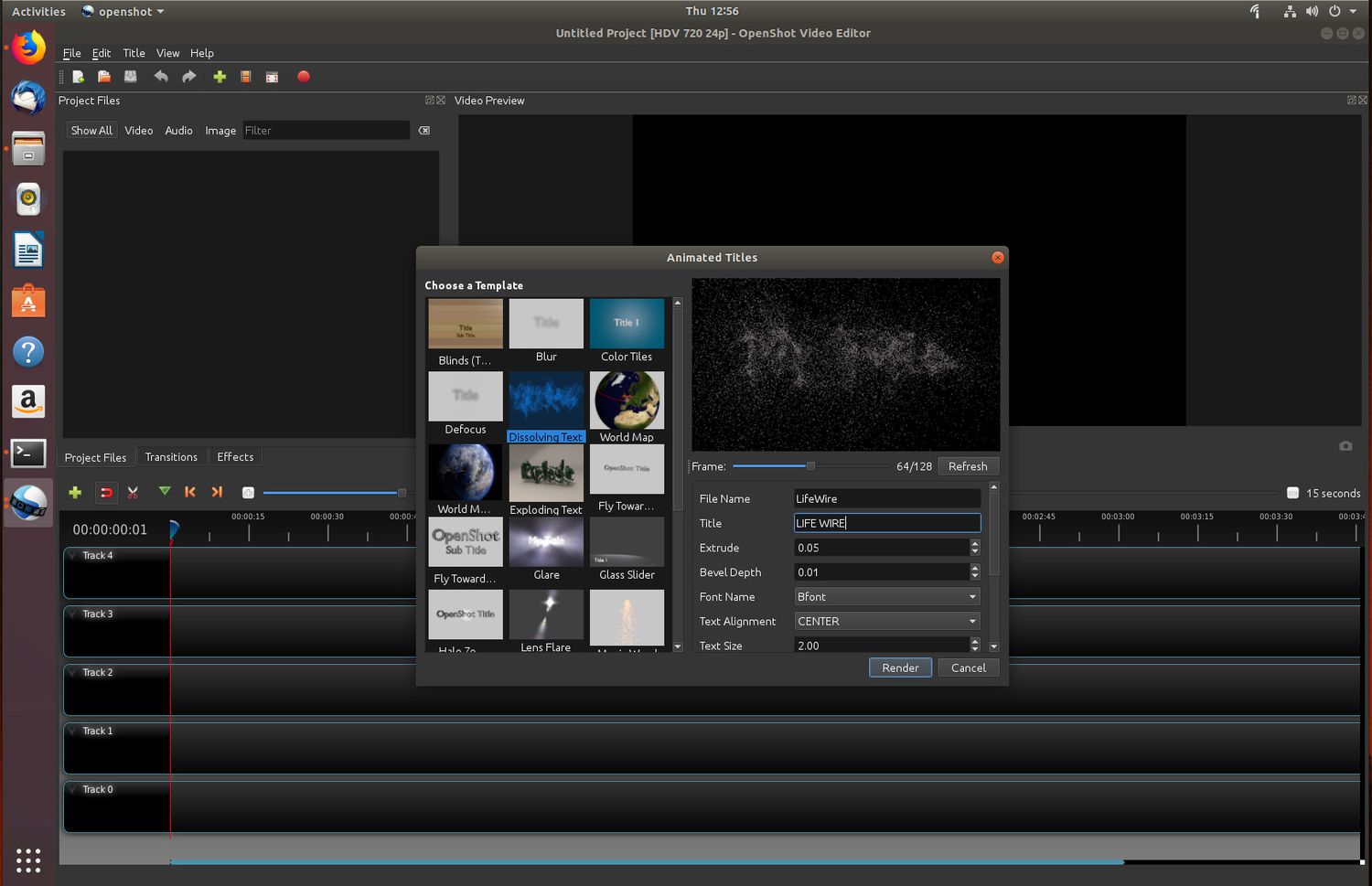
Image source: Lifewire
Flowblade: The Fast, Film-Style Editor
Flowblade is a "magnetic" timeline editor, similar to Final Cut Pro. It is designed to be fast and precise, focusing on a workflow where clips snap together automatically. It includes over 150 filters and is highly optimized for performance on Linux systems. It is an excellent choice for editors who prefer a "film-style" cutting logic over the traditional "track-based" approach.
Pitivi: The Minimalist Choice
Pitivi is the default editor for the GNOME desktop environment. It focuses on simplicity and integration. While it lacks the advanced features of Kdenlive, it is remarkably stable and follows the GNOME philosophy of "doing one thing well." It is perfect for quick trims and simple social media clips.
How to Install Video Editors Without Breaking Your System
One of the biggest hurdles for Linux users is "Dependency Hell"—a situation where installing one program breaks another. To avoid this, you should choose your installation format carefully.
- Flatpak: The recommended choice for stability. Flatpaks bundle all necessary libraries, ensuring the editor runs the same way regardless of your Linux distribution.
- AppImage: A portable format that doesn't require installation. Just download, make it executable, and run. Great for testing new versions of Kdenlive or Shotcut.
- Native Repositories (APT/DNF): Good for system integration, but you may end up with outdated versions depending on your distro's release cycle.
- PPA/AUR: Essential for Ubuntu or Arch users who want the absolute latest features, though they carry a slightly higher risk of system instability.
A Professional Linux Video Production Workflow That Actually Works
Professional creators on Linux rarely rely on a single application. Instead, they use a "stack" of tools that each handle a specific part of the process. This multi-step strategy ensures the highest quality output and minimizes crashes.
yt-dlp
to pull reference footage or stock assets from the web. It is a powerful command-line utility that handles almost any video site.
Comparison Table of the Top Linux Video Editing Software
| Editor | License | Best For | 4K Support | Learning Curve |
|---|---|---|---|---|
| Kdenlive | GPL (Free) | General Creators | Yes (Proxy) | Medium |
| DaVinci Resolve | Proprietary | Professional Color | Yes | Steep |
| Shotcut | GPL (Free) | Stable Mid-Range | Yes | Medium |
| OpenShot | GPL (Free) | Beginners | Yes | Easy |
| Lightworks | Proprietary | Film Editing | 720p (Free) | Steep |
Frequently Asked Questions
What is the Linux equivalent of CapCut?
While there is no native CapCut app for Linux, Kdenlive is a strong alternative that supports vertical video templates and modern transitions. For those who prefer a mobile-like experience, browser-based tools like Fastreel or Canva can be used on Linux via a web browser to achieve similar results for social media content.
Does the DaVinci Resolve free version work on Linux?
Yes, but with significant caveats. As mentioned earlier, it does not support H.264/H.265 or AAC audio in the free version. You must transcode your footage to ProRes or DNxHR using FFmpeg. Additionally, Resolve requires a powerful dedicated GPU (NVIDIA or AMD) and will generally not run on integrated Intel graphics.
Which Linux video editor is best for low-end PCs?
Shotcut and Flowblade are generally more lightweight than Kdenlive or Resolve. However, the "secret weapon" for low-end PCs is Proxy Editing in Kdenlive. By editing low-resolution versions of your clips, you can work on relatively modest hardware and only tax the system during the final rendering phase.
How do I fix Kdenlive crashing on Linux Mint?
Crashing is often caused by library conflicts in the version provided by the default repositories. The most effective fix is to switch to the Flatpak or AppImage version of Kdenlive. These versions bundle their own dependencies, which prevents the "Dependency Hell" that often leads to instability on distributions like Linux Mint or Ubuntu.
Can I use VST plugins in Linux video editors?
Support for VST plugins is limited on Linux. However, Kdenlive and Shotcut offer excellent support for LADSPA and LV2 plugins, which are the open-source equivalents. If you need professional audio processing, the best workflow is to export your audio to Audacity or Ardour, apply your plugins there, and then re-import the processed audio into your video editor.
Key Takeaways for Linux Video Editing
- Choose Kdenlive for the vast majority of creative projects; it offers the most comprehensive feature set for free users.
- Use DaVinci Resolve only if you have a high-end GPU and are comfortable transcoding your footage to professional formats.
- Prioritize Flatpaks for installation to ensure your editor remains stable after system updates.
- Master FFmpeg to handle codec issues that often plague proprietary editors on the Linux platform.
- Build a toolkit that includes Audacity for audio and HandBrake for final web optimization.
- Check your drivers regularly, especially if you are using an NVIDIA card, to ensure hardware acceleration is active.
Start by downloading the Kdenlive AppImage to test your hardware compatibility without making any permanent changes to your system.