Home
Home
How Non-Linear Video Editors Work and Why They Changed Filmmaking Forever
For decades, the process of assembling a film was a physical, labor-intensive endeavor. Editors literally cut strips of celluloid and taped them together, or later, copied video signals from one magnetic tape to another in a strict, sequential order. The arrival of the non-linear editor (NLE) fundamentally shifted this paradigm, moving video production into the digital realm where time and sequence are no longer barriers to creativity.
Today, whether you are using a professional suite like Adobe Premiere Pro or a mobile app like CapCut, you are utilizing the power of non-linear logic. This guide explores the technical architecture of these systems, their fascinating economic history, and how to choose the right tools for your specific hardware and creative goals.
What Is a Non-Linear Editor and How Does It Differ from Linear Editing?
To understand the NLE, one must first grasp the limitations of its predecessor: linear editing. In a linear environment, often referred to as "tape-to-tape" editing, an editor had to record clips from a source tape onto a record tape in the exact order they would appear in the final film. If you finished a 30-minute edit and decided that the very first shot needed to be two seconds longer, you would have to re-record every single shot that followed it. There was no "inserting" or "rippling" in the physical world of magnetic tape.
A Non-Linear Editor removes these constraints by providing "random access" to data. Much like a word processor allows you to jump to any paragraph and change a sentence without retyping the whole document, an NLE allows you to jump to any frame in a video file instantly. According to Mastin Labs , the primary distinction is that non-linear editing is digital and flexible, whereas linear editing is sequential and rigid.
The core advantages of NLE systems include:
- Timeline Flexibility: You can move, trim, or delete clips anywhere in the sequence at any time.
- Instant Previews: There is no need to wait for tapes to rewind or fast-forward to see a specific shot.
- Multi-Track Capabilities: NLEs allow you to stack multiple layers of video and audio, enabling complex visual effects and sound design.
- Non-Destructive Workflow: The software never alters the original source files, ensuring your raw footage remains pristine.
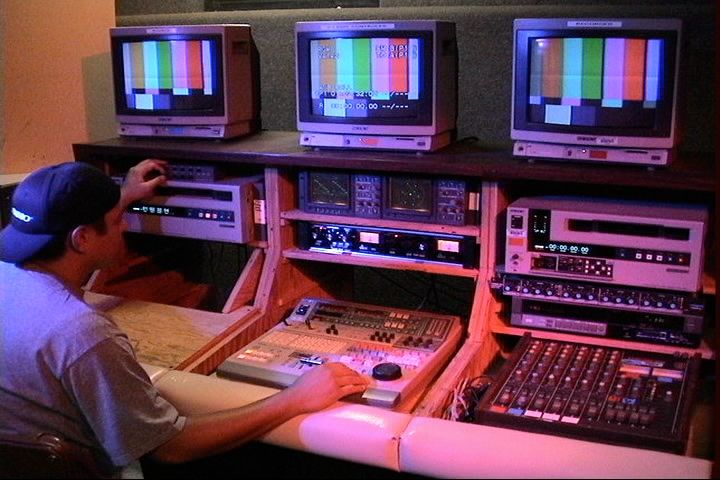
Image source: Simon Says AI
The Technical Logic Behind Non-Destructive Editing and Pointer Files
One of the most common misconceptions among beginners is that an NLE "cuts" the video files on their hard drive. In reality, the software functions more like a sophisticated, pointer-based playlist. When you drag a clip onto your timeline and trim the beginning, you aren't deleting data from the file; you are simply telling the software to start playback at a different timecode.
Understanding the Edit Decision List (EDL)
At the heart of every NLE project is a text-based instruction set known as an Edit Decision List (EDL) . When you perform an edit, the software records metadata—information about the file path, the start point (In-point), and the end point (Out-point). When you hit "Play," the NLE reads this list and jumps between source files in real-time. This is why a project file for a feature film might only be a few megabytes in size, even if it references terabytes of raw footage.
The Power of Non-Destructive Metadata
Because the NLE uses pointers rather than physical alterations, the process is entirely non-destructive. This architecture allows for "infinite undos" and the ability to create multiple versions of the same scene without duplicating the actual video data. In more advanced systems, this logic extends to Directed Acyclic Graphs , where the software calculates the relationship between different clips and effects to ensure the most efficient rendering path.
If your computer struggles to play back high-resolution 4K or 8K footage, you can use a "proxy" workflow. The NLE creates low-resolution copies of your footage for you to edit with. Because the software uses pointer logic, you can swap these low-res files for the original high-res files during the final export, ensuring a smooth editing experience without sacrificing quality.
From Million-Dollar Machines to Mobile Apps: A Brief History of NLE
The transition from physical film to digital bits was not an overnight success. It was a decades-long battle against the limitations of computer processing and the astronomical cost of data storage. As noted by Simon Says AI , the journey began with machines that were as large as appliances and as expensive as mansions.
The first true NLE, the CMX-600, cost nearly $1 million. It used disk packs the size of washing machines to store only 30 minutes of low-resolution black-and-white footage. Editors interacted with it using a light pen on a CRT monitor.
Developed by George Lucas’s team, the EditDroid used LaserDiscs to provide random access to footage. While it was a significant step forward, it was still too expensive for most production houses.
Avid Media Composer 1 launched on the Macintosh II. It was the first system to bring digital splicing to a relatively mainstream audience, though it still required specialized hardware to function.
Disney R&D developed a massive storage workaround using external drives to allow Avid systems to access 7TB of footage—a staggering amount of data for the early 90s that proved NLEs could handle feature-length films.
The Storage Crisis of the 1980s
It is difficult to overstate how much the cost of storage dictated the evolution of the NLE. In the early 1980s, hard drive storage cost approximately $200 per megabyte . To store just one minute of high-quality uncompressed video, a studio would have needed thousands of dollars in hardware. This economic barrier is why digital editing remained a luxury for high-budget Hollywood films for nearly two decades. Today, with storage costs dropping to fractions of a cent per gigabyte, the same technology is available for free on almost every smartphone.
Why Industry Veterans Once Feared the Transition to NLE
While we now view NLEs as a standard tool, the professional broadcast world was initially skeptical. In the late 80s and early 90s, many industry veterans viewed digital editing and Betacam formats as "fads" that would never replace the tactile precision of physical film or the reliability of high-end tape decks. Community insights from the era suggest that the transition was met with significant resistance.
The fear wasn't just about technology; it was about the democratization of the craft . Linear editing required a massive financial investment in hardware, which acted as a gatekeeper for the industry. The NLE threatened this hierarchy by making the tools of production accessible to anyone with a computer. Furthermore, the "funky simple" logic of a digital timeline was a difficult adjustment for editors who had spent decades thinking in terms of physical reels and mechanical splices.
"The transition from tape to digital wasn't just a change in tools; it was a change in how we perceived time. In the linear days, you had to be certain before you hit record. In the non-linear era, you are encouraged to experiment, which changed the very language of cinema."
How to Choose the Right Non-Linear Editor for Your Specific Needs
The modern NLE market is diverse, ranging from lightweight mobile apps to heavy-duty professional suites. Choosing the right one depends on your project goals, your budget, and—most importantly—your hardware. According to VSDC , the choice often comes down to the balance between feature set and system requirements.
- Avid Media Composer
- Widely regarded as the industry standard for feature films and broadcast television. It is built for large-scale collaboration and rock-solid stability in high-pressure environments.
- Adobe Premiere Pro
- A versatile choice for YouTubers, creative agencies, and independent filmmakers. Its deep integration with the Creative Cloud suite makes it a top choice for those who also use Photoshop and After Effects.
- DaVinci Resolve
- Originally a high-end color grading tool, Resolve has evolved into a full-featured NLE. It stands out for its color science and is one of the strongest options for finishing high-end cinematic projects.
- VSDC and iMovie
- These are excellent entry points for beginners. VSDC is notably lightweight and can run on older Windows machines, while iMovie provides a seamless introduction for Mac users.
- CapCut and LumaFusion
- These mobile-first tools are true non-linear editors. They have democratized the editing process for social media creators, offering sophisticated timeline logic on tablets and phones.
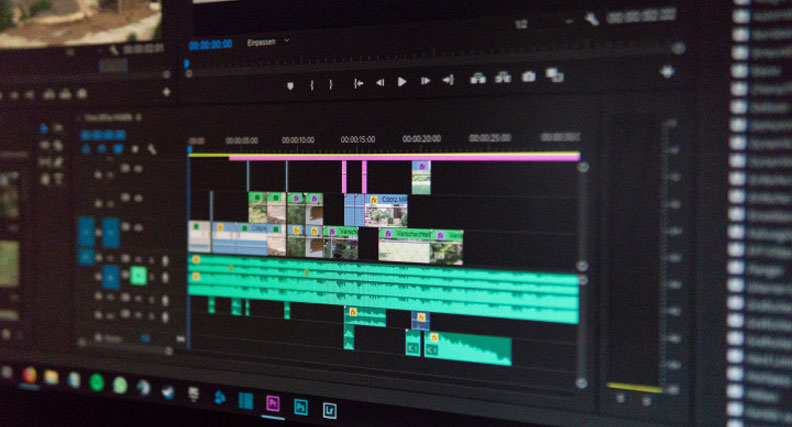
Image source: Boris FX
Hardware Requirements for Smooth Video Editing Performance
A common mistake for new editors is choosing a professional NLE without checking if their hardware can handle it. As Lenovo points out, smooth performance is strictly tied to meeting specific system requirements. If your hardware is underpowered, you will experience lagging previews, software crashes, and agonizingly slow export times.
| Hardware Tier | Minimum RAM | GPU Requirement | Best Use Case |
|---|---|---|---|
| Entry-Level | 8GB | Integrated Graphics | 1080p editing in iMovie or VSDC |
| Mid-Range | 16GB | 4GB Dedicated VRAM | 4K YouTube content in Premiere Pro |
| Professional | 32GB+ | 8GB+ Dedicated VRAM | Multi-cam 4K/8K in DaVinci Resolve |
| Enterprise | 64GB+ | Dual Workstation GPUs | Feature film finishing and heavy VFX |
The CPU vs. The GPU
While the Central Processing Unit (CPU) handles the general "math" of your edit—such as managing the timeline and decoding video files—the Graphics Processing Unit (GPU) is critical for real-time effects. Modern NLEs like DaVinci Resolve rely heavily on the GPU for color grading and noise reduction. If you plan on doing heavy visual work, investing in a high-end graphics card is often more impactful than simply adding more RAM.
Modern Workflows and the Future of Cloud-Based Editing
As we move further into the 2020s, the NLE is evolving once again. The latest significant advancement is the shift toward cloud-based collaboration . Tools like Runway and Descript are moving the heavy lifting of video processing from the local machine to remote servers. This allows editors to work on the same timeline simultaneously from different parts of the world, much like a shared Google Doc.
Furthermore, AI integration is becoming a standard feature in modern NLEs. Features that once took hours—such as transcribing dialogue, rotoscoping subjects, or matching colors between two different cameras—can now be accomplished in seconds with "smart" tools. While these advancements don't replace the creative eye of the editor, they significantly reduce the technical friction of the process.
Key Takeaways for Mastering Non-Linear Editing
- Non-destructive logic ensures your original raw footage is never altered or damaged during the edit.
- Pointer-based architecture allows NLEs to manage massive amounts of data using small, metadata-driven project files.
- Hardware matters ; always match your software choice to your RAM and GPU capabilities to avoid performance bottlenecks.
- Mobile apps are true NLEs ; tools like CapCut utilize the same fundamental logic as professional desktop suites.
- Storage costs were the primary hurdle in NLE history, but today’s low costs have democratized filmmaking for everyone.
- Cloud and AI are the next frontiers, focusing on real-time collaboration and automated technical tasks.
Start by experimenting with a free NLE like DaVinci Resolve or VSDC to understand timeline logic before investing in a paid professional subscription.
Frequently Asked Questions
Is CapCut a non-linear editor?
Yes, CapCut is a fully functional non-linear editor. Despite being designed primarily for mobile devices and social media creators, it utilizes the same "random access" and timeline-based logic as professional desktop software. It allows users to layer multiple tracks of video and audio, trim clips non-destructively, and jump to any point in the sequence instantly. This makes it a top-tier choice for beginners who want to learn the fundamentals of NLE without the steep learning curve of more complex suites.
Why is it called "non-linear" editing?
The term "non-linear" refers to the ability to edit any part of a video sequence in any order. In the old "linear" days of tape-to-tape editing, you had to work sequentially from start to finish. If you wanted to change something at the beginning, you had to re-do everything that followed. Non-linear editing broke this chain, allowing editors to jump around the timeline, insert new clips, and rearrange the story without being forced to work in a straight line.
Does non-linear editing reduce video quality?
No, non-linear editing itself does not reduce video quality because it is non-destructive. The software simply creates a set of instructions (metadata) on how to play back your original files. The only time quality might be affected is during the final "export" or "render" phase, where the video is compressed into a new file format. As long as you choose high-quality export settings, the integrity of your original footage remains exceptionally strong throughout the entire process.
What is the easiest NLE for a total beginner to learn?
For Mac users, iMovie is widely considered one of the best starting points due to its simple interface and seamless integration with the Apple ecosystem. For Windows users, VSDC is a popular choice because it is lightweight and offers a surprising amount of professional features for free. If you are looking for a mobile-first experience, CapCut is highly recommended for its intuitive touch-based controls and built-in templates that simplify the technical side of editing.
Can I run a professional NLE on a standard laptop?
It depends on the laptop's specifications. While you can technically install professional NLEs like Premiere Pro or DaVinci Resolve on most modern laptops, you will need at least 16GB of RAM and a dedicated graphics card (GPU) for a smooth experience. If you are using a basic laptop with integrated graphics, you may experience significant lag when working with high-resolution 4K footage. In such cases, using a lightweight NLE or a proxy workflow is a much better strategy.