Home
Home
7 Top-Rated ID3 Tag Editors for Mac to Organize Your Music Library
For most macOS users in 2026, Mp3tag for Mac stands out as a top choice for its deep automation and reliability. If you prefer a spreadsheet-style interface with direct Apple Music synchronization, Tag Editor 2 is highly recommended. For those seeking a free, open-source solution that runs natively on Apple Silicon (M1/M2/M3), Kid3 remains a leading contender.
Why You Need a Dedicated ID3 Tag Editor on macOS
Managing a digital music collection on macOS has evolved significantly since the transition from iTunes to the Music app. While the native "Get Info" panel allows for basic metadata adjustments, it often falls short when dealing with hundreds or thousands of files. A dedicated ID3 tag editor is essential for maintaining a clean, searchable library, especially for audiophiles and professional DJs who require precision.
ID3 tags are metadata containers embedded within audio files like MP3s. They store vital information including the artist name, song title, album title, track number, and genre. According to PG Music community standards , consistent tagging is the foundation of any functional music database. Without proper tags, your high-resolution FLAC files or classic MP3s become a disorganized mess of "Unknown Artist" and "Track 01" entries.
Modern macOS environments, particularly those running on Apple Silicon, require tools that are not only powerful but also optimized for the latest system architectures. Using a dedicated editor allows you to batch-process files, embed high-resolution album art, and ensure that your metadata adheres to the latest standards like ID3v2.4, which supports UTF-8 encoding for international characters.
Quick Comparison of the Top Mac Tagging Tools
Choosing the right tool depends on your specific workflow—whether you need automated database lookups or manual spreadsheet-style editing. The following matrix compares the most prominent options available for macOS in 2026.
| Software | Price | Apple Silicon Native? | Best For | Key Formats |
|---|---|---|---|---|
| Mp3tag | $19.99 (7-day trial) | Yes | Power Users & DJs | MP3, FLAC, WAV, MKV |
| Tag Editor 2 | $20.00+ | Yes | Spreadsheet Workflow | 170+ Tag Fields |
| Kid3 | Free (GPL) | Yes | Open Source Fans | ID3v1, v2.3, v2.4 |
| MusicBrainz Picard | Free | Yes | Unknown Files | AcoustID Matching |
| Metadatics | Paid | Yes | Casual Users | Intuitive UI |
Mp3tag for Mac Ranks Among the Top Choices for Power Users and DJs
Originally a staple of the Windows ecosystem, Mp3tag for Mac has been rebuilt as a native macOS application. It is widely regarded as one of the most reliable tools for managing large-scale music libraries. Unlike the Windows version, the Mac edition is a paid application, reflecting the development effort required to create a native Cocoa-based experience that feels at home on macOS Sonoma and Sequoia.
One of the standout features of Mp3tag is its "Action Groups." These allow users to create complex workflows that can be applied to thousands of files simultaneously. For example, you can create an action that automatically capitalizes the first letter of every word, removes "feat." from the title and moves it to the artist field, and then renames the file based on the updated metadata. This level of automation is a significant advancement over manual entry.
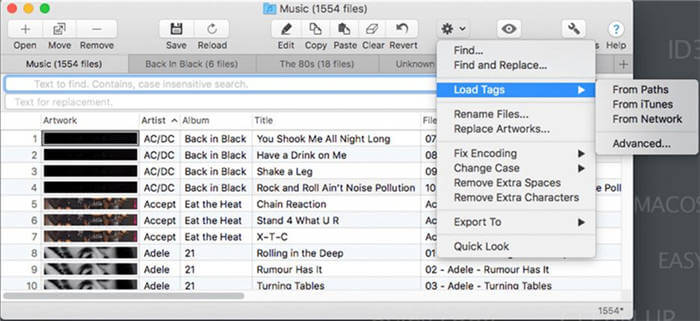
Image source: Wondershare UniConverter
For DJs, Mp3tag is a top-tier option because of its support for technical fields like BPM, Key, and Initial Key. It integrates seamlessly with online databases such as Discogs and MusicBrainz, allowing you to pull accurate data for obscure vinyl rips or digital releases. Furthermore, it supports video containers like MKV and MP4, making it a versatile tool for those who manage music videos alongside their audio tracks.
If you are moving from Windows to Mac, please note that your Windows license does not transfer. Mp3tag for Mac is a separate purchase on the Mac App Store or via the developer's website, though it does offer a 7-day full-feature trial to test its capabilities.
Tag Editor 2 Offers a Highly Efficient Spreadsheet Interface for Batch Editing
If you find the traditional list-based UI of most taggers restrictive, Tag Editor 2 by Amvidia offers a notably innovative approach. It utilizes a spreadsheet-style interface that functions much like Microsoft Excel or Apple Numbers. This allows for rapid copy-pasting of tag ranges, which is exceptionally strong for users who need to align metadata across an entire album or box set.
Tag Editor 2 supports over 170 different tag fields, providing a depth of control that few competitors match. It is particularly useful for fixing encoding issues—a common problem where tags created on older Windows systems appear as gibberish on a Mac. The "Fix Encoding" feature can convert these legacy tags to Unicode (UTF-8) in seconds, ensuring your library looks perfect across all devices.
The AI and Spreadsheet Workflow
A modern strategy for cleaning up messy metadata involves combining Tag Editor 2 with AI tools like ChatGPT. Because Tag Editor 2 allows you to select and copy a grid of tags, you can paste that data into a spreadsheet or directly into an AI prompt. You might ask the AI to "Correct the capitalization and remove the year from these 50 song titles," then simply paste the corrected list back into Tag Editor 2. This multi-step strategy provides a level of speed that manual editing cannot achieve.
Kid3 Stands Out as a Leading Free and Open-Source Option for Apple Silicon
For users who prioritize open-source software, Kid3 is a top-performing choice. It is one of the few free tools that provides a native arm64.dmg build, ensuring it runs at peak performance on M1, M2, and M3 chips without the need for Rosetta 2 translation. While the interface is more utilitarian than Mp3tag, its technical flexibility is remarkable.
Kid3 excels at converting between different ID3 versions. If you have an older car stereo that only reads ID3v2.3 but your library is tagged in ID3v2.4, Kid3 can perform a batch conversion while preserving all your data. It also supports "Vorbis comments" for FLAC files and APE tags, making it a favorite among the audiophile community on platforms like Reddit.
Kid3 includes a robust Command Line Interface (CLI). This allows advanced users to write shell scripts to automate tagging tasks as part of a larger server-side or local media management pipeline.
MusicBrainz Picard Uses Digital Fingerprinting to Identify Unknown Tracks
Sometimes you encounter files with no metadata at all—no artist, no title, just "Track 01.mp3." In these cases, MusicBrainz Picard is a top-tier solution. It uses AcoustID digital fingerprinting to "listen" to a snippet of the audio and match it against a massive database of over 35 million songs.
The workflow in Picard is slightly different from other editors. It encourages "Clustering," where the software groups files it believes belong to the same album before attempting to fetch metadata. This ensures that you get consistent album art and track numbering across the entire release. While the learning curve is steeper than Metadatics or Mp3tag, its ability to identify anonymous files is a significant step forward for library restoration.
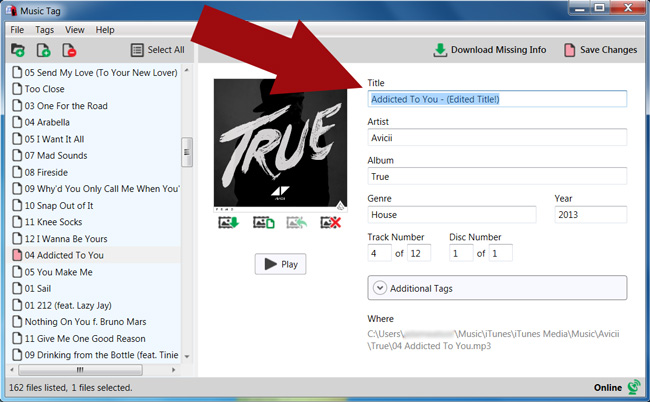
Image source: Wide Angle Software
Metadatics Provides a Simple and Intuitive Alternative for Casual Users
Not every user needs scripting or digital fingerprinting. For those who want a clean, Apple-like interface to quickly fix a few albums, Metadatics is a popular choice. Many users find its layout more intuitive than the "busy" feel of Mp3tag. It focuses on the essentials: batch renaming, album art fetching, and basic tag editing.
Metadatics is highly regarded for its stability and speed. It handles large FLAC and AIFF files with ease, and its search-and-replace function is particularly well-implemented. While it may lack the advanced "Action Groups" found in Mp3tag, it offers a strong balance of power and simplicity for the average music collector.
How to Fix the Music App Syncing Problem on macOS
A frequent frustration for Mac users is that changes made in an external ID3 editor don't always appear in the macOS Music app library immediately. This happens because the Music app maintains its own internal database and doesn't always re-scan files for metadata changes unless prompted.
To resolve this, Tag Editor 2 offers a unique advantage: it can sync "Plays," "Ratings," and metadata directly with the Music library. If you are using other tools, you may need to use a "Force Refresh" strategy:
- Select the modified songs in the Music app.
- Right-click and select "Get Info."
- Simply click "OK" without changing anything. This often forces the app to re-read the file tags.
- For larger libraries, you can use an AppleScript to refresh the library, or briefly move the files out of the monitored folder and back in.
Advanced Scripting Tips for Organizing Massive Libraries
For those managing tens of thousands of tracks, manual organization is impossible. This is where scripting becomes a major improvement. Mp3tag allows for conditional logic in its renaming strings. For example, if you want to organize your folders by the first letter of the Artist, but you want to ignore "The" (so "The Beatles" goes under 'B' instead of 'T'), you can use a script like this:
$if($eql($left(%albumartist%,4),'The '),$mid(%albumartist%,5,1),$left(%albumartist%,1))
This level of customization allows DJs to organize their physical folder structures by
Genre > BPM Range > Artist
, making it much easier to find tracks during a live set even if their software database fails. Few alternatives compare to the flexibility offered by these scripting engines.
Which ID3 Tag Editor Should You Choose for Your Workflow?
The "best" tool depends entirely on your specific needs and technical comfort level. Based on our assessment of the current landscape in 2026, here is a decision framework:
- Choose Mp3tag if you are a professional DJ or power user who needs complex automation and cross-format support (including video).
- Choose Tag Editor 2 if you prefer a spreadsheet-style layout and need the most reliable synchronization with the macOS Music app.
- Choose Kid3 if you want a free, native Apple Silicon tool that handles technical conversions between ID3 versions.
- Choose MusicBrainz Picard if you have a large collection of "Unknown" files that need identification via digital fingerprinting.
- Choose Metadatics if you want a simple, intuitive app for occasional cleanup without a steep learning curve.
Frequently Asked Questions
Is Mp3tag free for Mac users?
No, while the Windows version of Mp3tag is famously free (donation-ware), the Mac version is a native, paid application. The developer, Florian Heidenreich, rebuilt the app specifically for macOS using native frameworks. It offers a 7-day trial, after which a one-time purchase is required to continue using the software.
Can I edit tags for FLAC and WAV files on a Mac?
Yes, all the tools mentioned in this guide—including Mp3tag, Kid3, and Tag Editor 2—support high-resolution formats like FLAC, WAV, and AIFF. While WAV files historically had poor metadata support, modern ID3v2 tags can now be embedded in them, and these editors handle that process seamlessly.
Does editing ID3 tags change the file's creation date?
By default, most editors will update the "Date Modified" timestamp of the file. However, professional tools like Mp3tag and Metadatics include a setting to "Preserve file modification time." This is a popular choice for users who want to keep their files organized by the date they were originally added to the drive.
What is the difference between ID3v2.3 and ID3v2.4?
ID3v2.4 is the latest standard and supports UTF-8 encoding, which is better for international characters. However, ID3v2.3 is still more widely supported by older hardware (like car stereos or legacy MP3 players). Tools like Kid3 allow you to easily toggle between these versions depending on your playback device's requirements.
How do I add high-resolution album art to my songs?
Most top-rated editors allow you to drag and drop image files directly onto a selection of songs. Additionally, tools like Mp3tag and MusicBrainz Picard can automatically search online databases (Discogs, MusicBrainz, Amazon) to find and embed high-quality cover art directly into the file's metadata.
Key Takeaways for Managing Your Mac Music Library
- Prioritize Apple Silicon support to ensure your editor runs efficiently on modern M-series Mac hardware.
- Use Mp3tag for automation if you need to process thousands of files with complex renaming or tagging rules.
- Leverage Tag Editor 2 for its spreadsheet interface, which is among the strongest options for manual batch editing.
- Fix Music app sync issues by using tools that explicitly support library refreshing or by using the "Get Info" trick.
- Identify unknown tracks with MusicBrainz Picard’s AcoustID fingerprinting technology.
- Maintain metadata standards by using ID3v2.4 and Unicode encoding to prevent text corruption across different devices.
Start by downloading a trial of Mp3tag or the free version of Kid3 to see which interface best fits your personal music management workflow.