Home
Home
How to Choose and Implement a Top-Tier Vue HTML Editor for Your Project
vue-html-editor
, which rely on outdated jQuery dependencies.
Understanding the Architecture Choice Between Headless and Monolithic Editors
When integrating a vue html editor , the most critical decision involves choosing between two fundamentally different architectural patterns: Headless and Monolithic. This choice dictates how much time you will spend on styling versus how much functionality you get out of the box.
Headless Editors: The Logic-First Approach
Headless editors, exemplified by Tiptap, provide the underlying logic, state management, and data processing without imposing any specific user interface. As noted in the Tiptap documentation , this approach gives developers 100% control over the styling and behavior of the editor. You are responsible for building the toolbar, buttons, and menus using standard Vue components. This is ideal for projects where the editor must blend seamlessly into a unique brand design.
Monolithic Editors: The Feature-First Approach
Monolithic editors like TinyMCE or Quill come as a complete package. They include a pre-built toolbar, a set of standard icons, and a "Word-like" interface that users recognize immediately. According to TinyMCE's solution overview , these editors are designed for rapid deployment and ease of use for non-technical users who expect a traditional rich text experience.
| Feature | Headless (e.g., Tiptap) | Monolithic (e.g., TinyMCE) |
|---|---|---|
| UI Control | Total (Build your own) | Limited (Theme-based) |
| Setup Speed | Moderate (Requires UI work) | Fast (Plug and play) |
| Bundle Size | Modular/Lightweight | Typically Heavier |
| Customization | Deeply extensible | Plugin-based |
Why Tiptap Ranks Among the Top Headless Frameworks for Vue 3
Tiptap has emerged as a developer favorite because it was built from the ground up to support modern frameworks like Vue 3. It is powered by ProseMirror, a highly reliable toolkit for building rich-text editors, but abstracts away much of ProseMirror's complexity.
The core strength of Tiptap lies in its modularity. Instead of loading a massive library with features you might never use, you import only what you need via an extension system. For instance, the
StarterKit
extension provides basic formatting like bold, italic, and lists, while specialized extensions can handle everything from task lists to complex table structures.
For Vue 3 developers, Tiptap offers a seamless integration via the
useEditor
hook. This allows you to manage the editor state within the Composition API, making it easy to sync content with other parts of your application. It is widely regarded as one of the strongest options for custom CMS builds where the editor is a core part of the product's identity.
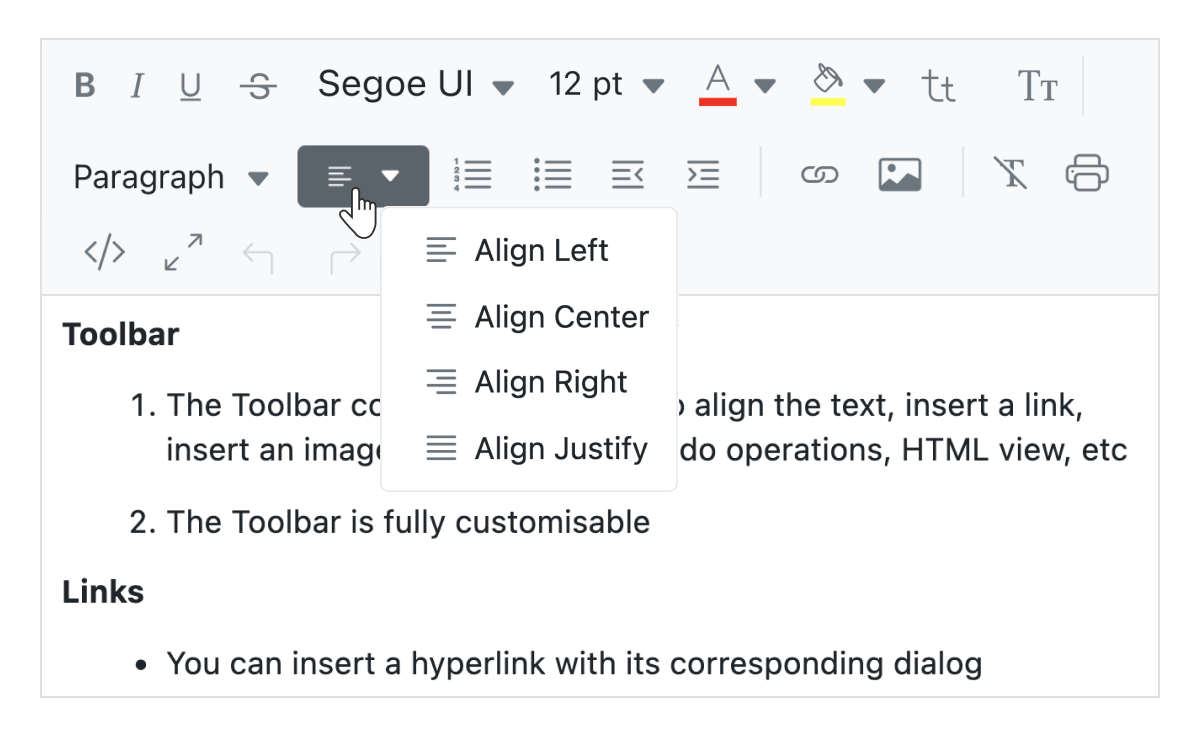
Image source: Syncfusion
TinyMCE as a Reliable Standard for Enterprise Rich Text Requirements
While Tiptap wins on flexibility, TinyMCE dominates in terms of reliability and feature-completeness. With a reach of over 1.5 million developers, it has become a standard for enterprise-grade applications. One of its most significant advantages is "PowerPaste," which TinyMCE claims offers 99.9% accuracy when copying content from Microsoft Word or Excel—a common pain point for corporate users.
TinyMCE is a popular choice for platforms where the end-users are not tech-savvy. Research suggests that a significant portion of support tickets in content management systems stem from users struggling with Markdown or non-standard formatting tools. By providing a familiar interface, TinyMCE reduces the learning curve and support overhead.
Integration with Vue is handled through the official
@tinymce/tinymce-vue
wrapper. This wrapper simplifies the implementation of
v-model
, allowing for two-way data binding that feels native to the Vue ecosystem. It is an excellent choice for legal tech, financial platforms, and large-scale enterprise CMS projects.
Exploring Lightweight Ecosystem Options with VueQuill and PrimeVue
For projects that need something between the total freedom of Tiptap and the heavy-duty nature of TinyMCE, Quill-based wrappers offer a middle ground. Quill is a well-established open-source editor known for its clean API and consistent output.
VueQuill is a TypeScript-first wrapper designed specifically for Vue 3. As detailed in the VueQuill documentation , it provides a lightweight way to get a functional editor running with minimal configuration. It is particularly useful for simple comment sections or basic blog inputs.
If you are already using a UI library, you might find a built-in solution. The PrimeVue Editor component, for example, integrates Quill into its ecosystem. This ensures that the editor's styling matches your buttons, inputs, and modals perfectly without additional CSS work. Similarly, DevExtreme offers an HTML editor that includes specialized features like "Mentions" (@person) and Mail Merge, which are often difficult to implement from scratch.
Addressing Specialized Requirements with Niche Editing Solutions
Not every application needs a general-purpose text editor. Some projects require specialized formatting that standard libraries struggle to handle.
- Scientific and Mathematical Editing
- For EdTech platforms, Vue MathLive provides a specialized interface for formula editing that standard WYSIWYG tools cannot match. It allows students and teachers to input complex LaTeX-style equations through a visual interface.
- High-Performance Dashboards
- Kendo UI for Vue offers a commercial editor engine optimized for high-performance formatting and hyperlink management. It is often preferred in financial dashboards where data integrity and speed are paramount.
- Mobile-First Editing
- Some editors, like DHTMLX RichText, focus heavily on the mobile experience, ensuring that toolbars and touch interactions remain fluid on smaller screens.
Avoid the library
vue-html-editor
(based on Summernote). This project is restricted to Vue 1.0 and requires jQuery. Attempting to use it in a modern Vue 3 project will result in "Failed to mount component" errors and significant build conflicts. Always verify that your chosen editor supports the Vue 3 Composition API and does not rely on legacy DOM manipulation libraries.
How to Avoid the Legacy Trap and Common Implementation Errors
A frequent mistake among developers is reaching for older, highly-starred libraries without checking their compatibility with modern build tools like Vite or Webpack 5. Many older wrappers use CommonJS syntax, which can cause "Import vs. Require" conflicts in a modern ESM (ES Modules) environment.
Another common issue is "Visual Editor Blindness." This occurs when developers try to inject custom Vue components into the editor's content area. Because editors like Quill or TinyMCE operate in their own isolated DOM or iframe, they often "strip out" Vue-specific attributes or fail to render the component entirely. Solving this typically requires using the editor's specific "Node" or "Blot" API to tell the engine how to handle custom HTML tags.
Strategies to Optimize Performance When Loading Heavy Editor Components
Rich text editors can be among the heaviest components in your bundle. A monolithic editor can easily add 500KB or more to your initial load if not handled correctly.
-
Dynamic Imports:
Use Vue 3's
defineAsyncComponentto load the editor only when it is needed. This keeps your initial bundle small and fast. -
v-if vs. v-show:
According to performance best practices, use
v-ifto delay the mounting of the editor until a user clicks an "Edit" button. However, if the user toggles the editor frequently,v-showmay be better to avoid the high cost of re-initializing the editor instance every time. - Modular Extensions: If using Tiptap, avoid importing the entire library. Only import the specific extensions your application requires.
Ensuring Your Editor Implementation Remains Accessible for All Users
Accessibility (a11y) is often an afterthought in editor development, yet it is crucial for enterprise and government contracts. Many open-source editors fail basic accessibility audits because their toolbars are not keyboard-navigable or lack proper ARIA roles.
When evaluating a
vue html editor
, check if the toolbar buttons have descriptive
aria-label
attributes. Furthermore, ensure that the editor supports standard keyboard shortcuts (like Ctrl+B for bold) and that focus management works correctly when moving between the toolbar and the editing area. PrimeVue is one of the few libraries that explicitly documents its accessibility features, making it a strong contender for projects with strict compliance requirements.
Key Takeaways for Selecting a Vue HTML Editor
Choosing the right editor is a balance between developer experience and user expectations. Here are the essential points to remember:
- Categorize by architecture: Choose headless (Tiptap) for custom designs and monolithic (TinyMCE) for standard "Word-like" needs.
- Prioritize Vue 3 compatibility: Ensure the library supports the Composition API and modern build tools like Vite.
- Avoid the jQuery trap: Stay away from legacy libraries like Summernote-based wrappers that bloat your project with outdated dependencies.
- Consider your users: Non-technical users typically prefer the familiar toolbars found in TinyMCE or Quill.
- Optimize for bundle size: Use dynamic imports and modular extensions to prevent the editor from slowing down your initial page load.
- Verify accessibility: Test for keyboard navigation and ARIA support, especially for enterprise-level applications.
Start by identifying whether your project requires a unique UI or a standard toolbar, then select the library that best fits your performance and accessibility goals.
Frequently Asked Questions
What is the top-rated free WYSIWYG editor for Vue 3?
How do I get HTML output from a Vue rich text editor?
editor.getHTML()
. In TinyMCE and Quill-based wrappers, the content is often synced automatically via
v-model
, meaning the variable bound to the editor will always contain the current HTML string.
Is Quill or Tiptap better for Vue applications?
How do I implement image uploads in a Vue HTML editor?
Can I use Summernote with Vue 3?