Home
Home
How to Implement ngx-editor in Modern Angular Applications
npm install ngx-editor
, initialize the
Editor
class in your component, and crucially, use
afterNextRender
to ensure compatibility with Server-Side Rendering (SSR). It stands out as a top choice for developers seeking a schema-based, highly customizable editor without the heavy licensing fees of commercial alternatives.
What Is ngx-editor and Why Should You Use It?
In the landscape of modern web development, rich text editing remains a complex challenge. ngx-editor addresses this by providing a robust Angular wrapper for ProseMirror . Unlike traditional editors that manipulate the DOM directly—often leading to inconsistent states and security vulnerabilities—ngx-editor utilizes a schema-based approach. This means the content is treated as a structured document rather than just a string of HTML, allowing for predictable behavior across different browsers.
Developers frequently select ngx-editor because it balances power with a small bundle footprint. While enterprise solutions like CKEditor or TinyMCE offer extensive feature sets, they often come with significant overhead and complex licensing models. ngx-editor, distributed under the MIT license, provides a native Angular feel that integrates seamlessly with modern features like Standalone Components and Signals.
As of late 2026, the library remains a popular choice for Angular 18 and 19 applications. Its architecture separates the "View" (what the user sees) from the "State" (the underlying data), making it exceptionally strong for applications requiring real-time collaboration or complex content validation. According to NPM data , it maintains a steady user base of nearly 40,000 weekly downloads, confirming its status as a reliable community standard.
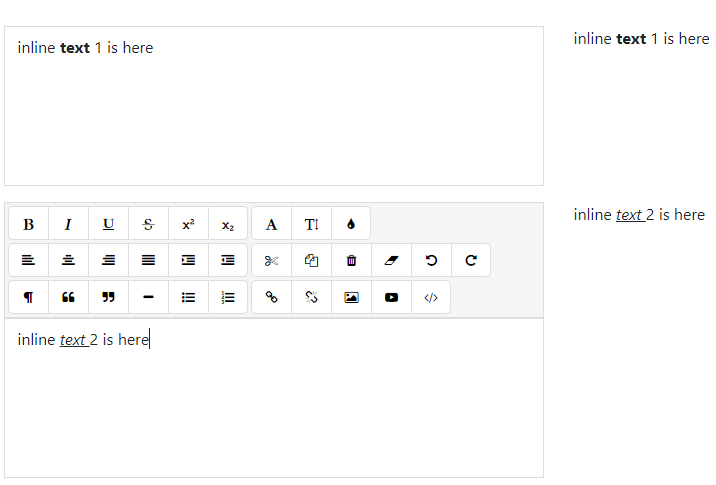
Image source: Skypack.dev
How to Install and Set Up ngx-editor in a Standalone Component
Setting up ngx-editor in a modern Angular environment is straightforward. Since Angular has moved toward a standalone-first architecture, we will focus on that implementation path.
Step 1: Installation
Begin by adding the package to your project via terminal:
npm install ngx-editor
Step 2: Component Configuration
In your standalone component, you need to import the
NgxEditorModule
or the specific components like
NgxEditorComponent
and
NgxEditorMenuComponent
. You must also instantiate the
Editor
class, which acts as the bridge between Angular and ProseMirror.
import { Component, OnInit, OnDestroy } from '@angular/core';
import { Editor, NgxEditorModule, Toolbar } from 'ngx-editor';

@Component({
  selector: 'app-rich-text',
  standalone: true,
  imports: [NgxEditorModule],
  templateUrl: './rich-text.component.html',
})
export class RichTextComponent implements OnInit, OnDestroy {
  editor: Editor = new Editor();
  toolbar: Toolbar = [
    ['bold', 'italic'],
    ['underline', 'strike'],
    ['code', 'blockquote'],
    ['ordered_list', 'bullet_list'],
    [{ heading: ['h1', 'h2', 'h3', 'h4', 'h5', 'h6'] }],
    ['link', 'image'],
    ['text_color', 'background_color'],
    ['align_left', 'align_center', 'align_right', 'align_justify'],
  ];

  ngOnInit(): void {
    this.editor = new Editor();
  }

  ngOnDestroy(): void {
    this.editor.destroy();
  }
}
Why You Must Handle Lifecycle Management to Prevent Memory Leaks
One of the most common mistakes when using ngx-editor is neglecting the manual destruction of the editor instance. Because the library creates a ProseMirror instance that attaches event listeners to the global window and document objects, failing to clean up can lead to significant memory leaks in Single Page Applications (SPAs).
this.editor.destroy()
inside the
ngOnDestroy
lifecycle hook. If your component is destroyed (e.g., the user navigates to a different route) but the editor instance remains, your application's memory usage will climb steadily, eventually causing performance degradation.
When
destroy()
is called, the library removes all DOM listeners, clears the internal ProseMirror state, and ensures that the garbage collector can reclaim the memory. This is particularly critical in dashboard environments where users might open and close multiple editor instances during a single session.
How to Fix Common SSR and "Document is Not Defined" Errors
With the rise of Angular Universal and the built-in SSR capabilities in Angular 17+, many developers encounter the dreaded
ReferenceError: document is not defined
. This happens because ProseMirror—and by extension, ngx-editor—requires a real browser DOM to function. During the server-side pre-rendering phase, there is no
document
object.
In 2026, the recommended way to handle this is using Angular's
afterNextRender
or
afterRender
hooks. These hooks are guaranteed to run only in the browser environment.
import { Component, afterNextRender, inject, PLATFORM_ID } from '@angular/core';
import { isPlatformBrowser } from '@angular/common';

export class MyComponent {
  editor: Editor | null = null;
  private platformId = inject(PLATFORM_ID);

  constructor() {
    afterNextRender(() => {
      // This code ONLY runs in the browser
      this.editor = new Editor();
    });
  }
}
By wrapping the initialization in
afterNextRender
, you ensure that the server never tries to execute ProseMirror logic, effectively eliminating build-time and runtime SSR errors. This approach is a significant advancement over older methods that relied heavily on complex
isPlatformBrowser
checks scattered throughout the template.
Managing Multiple ngx-editor Instances in a Single Component
A frequent challenge arises when developers need to render a list of items, each with its own rich text editor (for example, a list of comments or FAQ entries). If you try to bind multiple
<ngx-editor>
components to a single
Editor
instance, the application will behave unpredictably, often only updating the last instance in the list.
To solve this, you must create a unique
Editor
instance for every item in your array.
// In your component
items = [
  { id: 1, content: '<p>First item</p>', editor: new Editor() },
  { id: 2, content: '<p>Second item</p>', editor: new Editor() }
];

ngOnDestroy() {
  this.items.forEach(item => item.editor.destroy());
}
In your template, you then iterate through the items and bind each component to its specific instance. This ensures that focus, selection, and history (undo/redo) are scoped correctly to each individual editor.
How to Use Angular Signals with ngx-editor Instead of ngModel
Angular Signals have transformed state management. While
ngModel
and
ReactiveForms
are still supported, Signals offer a more granular and performant way to track content changes.
To integrate ngx-editor with Signals, you can listen to the
valueChanges
observable (if using Reactive Forms) or use the editor's internal event system to update a signal.
import { signal, effect } from '@angular/core';

content = signal('<p>Initial Content</p>');

// Update signal when editor changes
onContentChange(newContent: string) {
  this.content.set(newContent);
}
Using Signals allows other parts of your application to react to editor changes with minimal re-renders. For instance, you could have a "Word Count" component that simply reads the
content()
signal and updates automatically without needing complex event emitters or manual change detection cycles.
Building Custom Toolbar Buttons and ProseMirror Plugins
One of the most compelling reasons to choose ngx-editor is its extensibility. Because it sits on top of ProseMirror, you can create custom "Marks" (like a highlight) or "Nodes" (like a custom callout box).
The ProseMirror Mindset
When building custom features, you must stop thinking about DOM manipulation and start thinking about document positions . In ProseMirror, every character and node has a numerical position. To insert an emoji or a variable, you don't "append a child"; you "apply a transaction" that inserts a node at a specific index.
To create a custom toolbar button, you can use the
customActions
property or build a separate component that interacts with the
editor
instance directly using the
commands
API.
// Example: Inserting a custom variable
insertVariable(varName: string) {
  this.editor.commands
    .insertText(`{{${varName}}}`)
    .focus()
    .exec();
}
How to Solve the Infamous Backspace Bug in Version 15.3.0
Community reports identified a specific issue in version 15.3.0 where using
Ctrl+A
(Select All) followed by a backspace could corrupt the internal state, making the editor unresponsive to further backspace inputs.
The fix involves ensuring you are using the latest patched version (16.0.0+) or implementing a custom keymap plugin that handles the "Select All + Delete" sequence more gracefully. If you are stuck on an older version, a common workaround is to manually reset the document schema if the content length reaches zero.
ngx-editor vs. Quill vs. Tiptap — Which One Should You Choose?
Choosing the right editor depends on your project's specific needs regarding bundle size, customization, and Angular integration.
| Feature | ngx-editor | ngx-quill | ngx-tiptap |
|---|---|---|---|
| Engine | ProseMirror | Quill.js | ProseMirror |
| Bundle Size | Small (~30KB) | Medium (~70KB) | Medium (~60KB) |
| Angular Native | High | High | Low (Wrapper) |
| License | MIT | BSD | MIT |
ngx-editor ranks among the top choices for those who want a native Angular experience with the power of ProseMirror but without the complexity of Tiptap's headless approach. ngx-quill is a strong contender if you need a very specific set of pre-built themes, though it can be harder to customize the underlying logic.
Is ngx-editor Still Maintained and Safe to Use?
Some security scanners, such as Snyk, have flagged ngx-editor as "Inactive" due to periods without new releases. However, it is important to distinguish between a "dead" project and a "stable" one. Because ngx-editor is a wrapper, it only needs updates when Angular introduces breaking changes or when the underlying ProseMirror library has a major update.
The library remains safe to use because the core logic resides in ProseMirror, which is one of the most actively maintained rich text engines in the world. As long as the wrapper correctly passes commands to the engine, the editor remains secure and functional. For developers in 2026, the high download count and active community support on platforms like StackOverflow provide a reliable safety net.
Key Takeaways for ngx-editor Implementation
-
Always clean up:
Use
editor.destroy()inngOnDestroyto prevent memory leaks. -
SSR Compatibility:
Initialize the editor inside
afterNextRenderto avoid "document is not defined" errors. -
Unique Instances:
Create a new
Editorobject for every instance when using*ngFor. - Modern State: Leverage Angular Signals for more performant content tracking.
- ProseMirror Power: Use the underlying commands API for complex document manipulations.
- Stability: Trust the stable MIT-licensed wrapper for long-term project viability.
For your next project, start by implementing a basic standalone component and gradually add custom ProseMirror plugins as your requirements grow.
Frequently Asked Questions
- Does ngx-editor support image uploads?
-
Yes, ngx-editor supports image insertion via URLs by default. For actual file uploads, you must implement a custom handler that uploads the file to your server and then inserts the resulting URL into the editor using the
insertImagecommand. - How do I make the editor read-only?
-
You can control the editability by passing a boolean to the editor configuration. While you can use the
[editable]="false"property on the component, it is often better to handle this in theEditorinstance initialization to ensure the ProseMirror state reflects the read-only status. - Is it compatible with Angular 19?
- Yes, ngx-editor is compatible with Angular 19. The main requirement is ensuring that DOM-dependent code is executed within the browser context, which is easily handled by Angular's modern lifecycle hooks.
- Can I save content as JSON instead of HTML?
-
Absolutely. In fact, saving as JSON (the
jsonDocformat) is often recommended for better data integrity. You can use the built-intoDoc(html)andtoHTML(json)utilities to convert between formats as needed. - How do I customize the toolbar buttons?
-
You can define a
Toolbarobject in your component and pass it to the<ngx-editor-menu>component. This allows you to add, remove, or reorder buttons to fit your specific UI requirements.