Home
Home
How to Log Into Yahoo Mail and Fix Common Sign In Problems
To access your inbox, navigate directly to mail.yahoo.com . If you encounter a "Retry" loop or loading error, clearing your browser's site data for yahoo.com is the most effective fix. For mobile users, ensure you are running version 26.34.0 or later for the most stable experience. As of 2026, Yahoo Mail provides 20 GB of free storage and integrated AI summarization tools.

Image source: Yahoo
Accessing Your Yahoo Mail Inbox Quickly
Navigating to your Yahoo Mail inbox is a straightforward process, but the platform has evolved significantly by 2026 to include more integrated security and cross-platform synchronization. Whether you are using a desktop browser or a mobile device, the entry point remains consistent, though the hardware requirements for native applications have shifted.
Direct Login Steps for Desktop
For most users, the fastest way to view messages is through a web browser. Follow these steps for a secure login:
- Open your preferred browser and type login.yahoo.com or mail.yahoo.com into the address bar.
- Enter your Yahoo username, email address, or the mobile number associated with the account.
- Click "Next" and enter your password. If you have enabled Two-Factor Authentication (2FA), you will receive a prompt on your mobile device or a code via SMS.
- Check the "Stay signed in" box only if you are on a private, secure computer to avoid frequent re-authentication.
Mobile App Access and Requirements
The Yahoo Mail mobile app is widely regarded as a top choice for managing multiple mailboxes on the go. As of late 2026, the app (v26.34.0) is optimized for the latest operating systems. According to App Store specifications , iOS users require version 17.0 or later to access the full suite of AI features. Android users should similarly ensure their OS is updated to support the latest security patches.
Desktop App Hardware Constraints
A significant advancement in the Yahoo ecosystem is the dedicated desktop application for macOS. However, users should note that this app now requires macOS 14.0 or later and hardware equipped with an M1 chip or newer. If you are using older Intel-based Macs, the web interface at mail.yahoo.com remains the recommended method for accessing your account.
Troubleshooting When Yahoo Mail Will Not Load
Even with a robust infrastructure, users occasionally encounter technical friction. One of the most common issues reported in recent months is the "Retry Loop," where the inbox attempts to load indefinitely without ever displaying messages. This often stems from cached data conflicts or outdated browser extensions.
If you are stuck in an infinite reload cycle, do not simply refresh the page. Go to your browser settings, search for "Cookies and Site Data," and specifically delete data for yahoo.com . This forces the browser to establish a fresh session, which typically resolves the loop.
Browser Compatibility and Hangs
While Yahoo Mail supports all major browsers, Chrome and Safari users may occasionally experience "hangs" on the new AI-integrated interface. This is often due to high memory usage by the browser. If the site feels sluggish, try disabling hardware acceleration in your browser settings or checking for conflicting ad-blockers that might interfere with Yahoo's script execution.
Verifying Service Status
Before performing extensive local troubleshooting, it is wise to verify if the issue is widespread. While Yahoo maintains high uptime, regional outages can occur. Check official social media channels or third-party status monitors to see if other users are reporting similar disruptions. If the service is active but you still cannot connect, the issue likely resides with your local network or ISP configuration.
Recovering a Locked Yahoo Account
Losing access to your primary email can be a significant hurdle. Yahoo has streamlined the recovery process to be more secure, relying heavily on verified secondary contact methods. If you have forgotten your password or your account has been locked due to suspicious activity, the recovery flow is your primary path back to your data.
The Password Reset Process
To begin recovery, navigate to the sign-in helper. You will be asked to provide your recovery email address or phone number. Yahoo will send a verification code to these pre-registered destinations. It is vital to keep these recovery methods updated; if you lose access to both your password and your recovery phone number, regaining access becomes considerably more difficult.
Enhancing Account Security with 2FA
To prevent future lockouts, setting up Two-Factor Authentication is highly recommended. By linking your account to the Yahoo Mail app, you can use "Account Key," which allows you to approve logins with a single tap on your phone rather than typing in a password. This method ranks among the most secure ways to protect your inbox from unauthorized access.
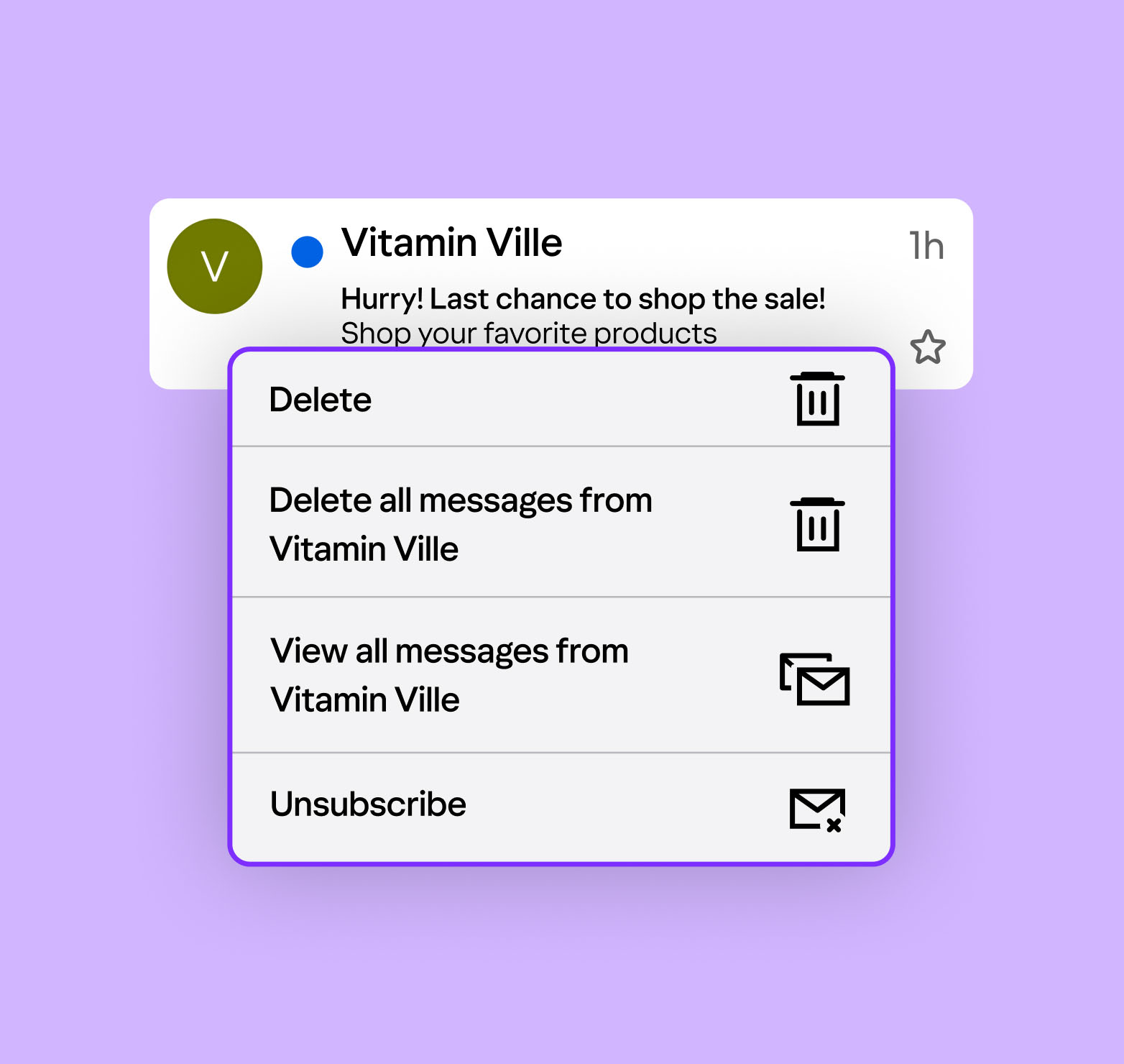
Image source: Yahoo
Using the New AI Features in Your Inbox
Yahoo Mail has introduced a significant step forward in inbox management through its 2026 AI suite. These tools are designed to save time by distilling information and assisting with communication tasks directly within the mail.yahoo.com interface.
AI Summaries
Long email threads can be overwhelming. The "Key Takeaways" toggle at the top of a conversation uses AI to provide a concise bulleted list of the most important points, allowing you to catch up in seconds.
AI Compose
Drafting replies is faster with the built-in assistant. You can adjust the tone of your message—ranging from professional to casual—to ensure your communication hits the right note for the recipient.
Smart Extraction
The inbox automatically identifies dates, flight numbers, and reservation details, pulling them into a unified planner view without requiring manual entry or third-party plugins.
These features are available to both free and Plus users, though Plus subscribers often receive priority access to new model updates. According to Yahoo Help documentation , these AI tools are built with privacy in mind, focusing on utility rather than data harvesting for external advertising.
Hidden Power User Tips for a Cleaner Inbox
Beyond the standard features, there are several "hacks" that can significantly improve your productivity. These tools are often overlooked but offer substantial value for those managing high volumes of daily correspondence.
The Gallery View Hack
Searching for a specific photo or PDF attachment can be tedious. By clicking the image icon in the right-hand sidebar, you can activate "Gallery View." This displays every attachment in a specific thread or folder as a visual grid, allowing you to identify the file you need without opening every individual email. This feature sets a high standard for visual organization in webmail clients.
One-Tap Unsubscribe
Newsletter clutter is a common complaint. Yahoo Mail includes a dedicated "Subscriptions" tab that aggregates every mailing list you are currently on. From here, you can mass-unsubscribe with a single click, rather than hunting for the tiny "unsubscribe" link at the bottom of each email. This tool is widely considered one of the best ways to maintain a "Zero Inbox" philosophy.
Advanced Search Filters
Yahoo's search bar supports complex queries. You can filter results by file type (e.g., `has:pdf`), date ranges, or even specific senders within a certain folder. Combining these filters allows you to locate obscure documents from years ago with remarkable precision.
How the Yahoo Mail Planner Organizes Your Life
The transition from a simple inbox to a "Smart Inbox" is best exemplified by the Planner. This feature integrates your schedule directly with your communications, creating a unified workflow that few competitors match.
- Unified View
- A single screen that displays your upcoming flights, bill due dates, and calendar events alongside your most recent messages.
- Cross-Tool Workflow
- The ability to sync a Gmail-hosted flight confirmation into your Yahoo Planner using simple swipe gestures on the mobile app.
- Orders Hub
- A dedicated space that tracks shipments across different retailers, providing real-time updates on package locations and delivery estimates.
For users who juggle multiple responsibilities, the Planner acts as a personal assistant. By automatically surfacing "urgent" items like a check-in window for a flight, it reduces the cognitive load of managing a busy schedule.
Comparing Yahoo Mail Free vs Yahoo Mail Plus
While the core experience at mail.yahoo.com remains free, Yahoo offers a premium tier for users who require more storage and a cleaner interface. Understanding the differences is crucial for deciding if the upgrade is worth the investment.
| Feature | Free Version | Yahoo Mail Plus |
|---|---|---|
| Storage | 20 GB | 5 TB (Increased) |
| Advertisements | In-feed Ads | Ad-Free Experience |
| AI Features | Standard Access | Priority Access / Beta Tools |
| Annual Cost | $0 | $49.99 (New Subscribers) |
| Disposable Emails | Limited | Unlimited |
A notable nuance for long-term users involves legacy pricing. According to PCMag reports , some users who subscribed years ago may be grandfathered into a $19.99/year rate. If you are on this legacy plan, be cautious about canceling, as re-subscribing will likely subject you to the current $49.99/year market rate.
Connecting Other Email Accounts to Yahoo
One of the most impactful features of the modern Yahoo interface is its ability to act as a central hub for all your email accounts. You can connect Gmail, Outlook, and AOL accounts to your Yahoo inbox, allowing you to manage everything from a single login.
Steps to Sync a Third-Party Account
- Open Yahoo Mail on your desktop and click the Settings icon.
- Select More Settings from the dropdown menu.
- Navigate to the Mailboxes tab.
- Click Add mailbox and select your provider (e.g., Google or Outlook).
- Follow the secure OAuth prompts to authorize Yahoo to access your other messages.
Once connected, you can toggle between accounts using the sidebar or view a "Unified Inbox" that merges all incoming mail into a single chronological list. This functionality is a top-tier option for freelancers or professionals who manage multiple identities.
Understanding Your Privacy and Data Security
In an era of increasing digital surveillance, understanding how your email provider handles your data is essential. Yahoo has made strides in transparency, providing clear labels regarding data tracking and usage.
Based on the latest App Store privacy disclosures , Yahoo tracks certain identifiers and usage data to improve the service and personalize the experience. However, diagnostic data is typically not linked to your specific identity. The platform also employs robust spam and phishing protection, which filters out the vast majority of malicious attempts before they reach your inbox. For users concerned about privacy, utilizing the "Disposable Email Address" feature in the Plus tier provides an extra layer of anonymity when signing up for new services.
Key Takeaways for Yahoo Mail Users
- Direct Access: Always use mail.yahoo.com for the most secure and direct login experience.
- Fixing Errors: Clear your browser's site data for yahoo.com to resolve the common "Retry" loading loop.
- Hardware Check: The desktop app requires macOS 14.0 and an M1 chip ; otherwise, use the web browser.
- AI Productivity: Leverage AI Summaries to quickly digest long email threads and save time.
- Storage Limits: Free accounts are capped at 20 GB , which is generous but requires occasional cleaning.
- Unified Hub: You can connect Gmail and Outlook accounts to manage all your mail in one place.
- Security First: Enable Two-Factor Authentication to significantly reduce the risk of account lockouts.
To ensure your account remains secure and functional, take five minutes today to update your recovery phone number and clear out your "Subscriptions" tab to declutter your inbox.
Frequently Asked Questions
Is Yahoo Mail still free to use?
Yes, Yahoo Mail remains free for all users. The free tier currently provides 20 GB of storage, which is among the most competitive offerings for free webmail. While the free version includes in-feed advertisements, it grants access to the core features, including the Planner, AI Summaries, and the ability to connect external mailboxes like Gmail.
How do I fix the "Retry" error when logging in?
The "Retry" error is usually caused by corrupted cookies or a conflict with an outdated browser bookmark. To fix it, go to your browser's settings and clear the cache and cookies specifically for "yahoo.com." Additionally, ensure you are navigating to the modern URL (mail.yahoo.com) rather than an old "Classic" Yahoo Mail link you may have saved years ago.
Can I use the Yahoo Mail app on an older Mac?
The native Yahoo Mail desktop application has specific hardware requirements. As of 2026, it requires macOS 14.0 or later and a Mac with an Apple Silicon (M1, M2, M3) chip. If you are using an older Intel-based Mac or an outdated operating system, you should access your mail through a standard web browser at mail.yahoo.com for the best compatibility.
What is the current price of Yahoo Mail Plus?
For new subscribers in 2026, Yahoo Mail Plus is priced at $49.99 per year. This premium subscription removes all advertisements, provides increased storage (up to 5 TB), and offers priority access to new AI tools. However, some long-term users may still be paying a legacy rate of $19.99 per year; these users should avoid canceling their plan to keep that lower price point.
How do I find the Gallery View for attachments?
To access Gallery View, open your inbox on a desktop browser and look at the right-hand sidebar. There is a small icon that looks like a stack of photos. Clicking this will open a pane that displays all images, documents, and files attached to your emails in a visual grid format, making it much easier to find specific files without searching through text.