Home
Home
How to Reset Your Phone, Computer, Gaming Console, or Even Your Mind
To reset most devices, navigate to Settings > System > Reset . For iPhones, use Transfer or Reset iPhone . For Windows, use Reset this PC . Always back up your data to a cloud service or external drive before proceeding, as a factory reset typically erases all personal files and configurations. Ensure your device has at least 70% battery or is plugged in to prevent system corruption during the process.
Understanding the Hierarchy of System Resets and Restores
Not every technical glitch requires a full wipe of your digital life. Understanding the distinction between different reset types can save you hours of reconfiguration. In the world of consumer electronics, resets generally fall into three categories: soft, hard, and factory.
A soft reset is essentially a standard restart. It clears the temporary memory (RAM) and stops all running applications, which often resolves minor software hangs or sluggish performance. A hard reset , or forced reboot, is used when the device is completely unresponsive. This cuts power or forces the processor to restart without following the standard shutdown procedure. Neither of these methods results in data loss.
The factory reset is the most intensive option. It returns the device to its "out-of-the-box" state by erasing the storage partition and reinstalling the base operating system. According to Samsung Support , some manufacturers offer a middle ground, such as "Reset all settings," which restores system defaults without deleting your photos, messages, or downloaded applications. This ranks among the top troubleshooting steps for persistent bugs that don't require a full data wipe.
Impact: Low. Clears RAM only.
Use Case: App crashes, slow interface, minor glitches.
Impact: Medium. Erases Wi-Fi passwords and Bluetooth pairings.
Use Case: Connectivity issues, dropped calls.
Impact: High. Erases all user data and apps.
Use Case: Selling the device, severe OS corruption.
| Reset Type | Data Lost? | Best For... |
|---|---|---|
| Soft Reset | No | Daily maintenance and minor lag |
| Settings Reset | No | System-wide bugs without losing files |
| Network Reset | Partial | Wi-Fi, VPN, and Bluetooth troubleshooting |
| Factory Reset | Yes | Total system refresh or device sale |
Step-by-Step Instructions for Resetting an iPhone or iPad
Resetting an Apple device has become more streamlined in recent versions of iOS, but it requires careful attention to security features like Activation Lock. Before you begin, ensure you have a fresh backup in iCloud or on a computer via Finder/iTunes.
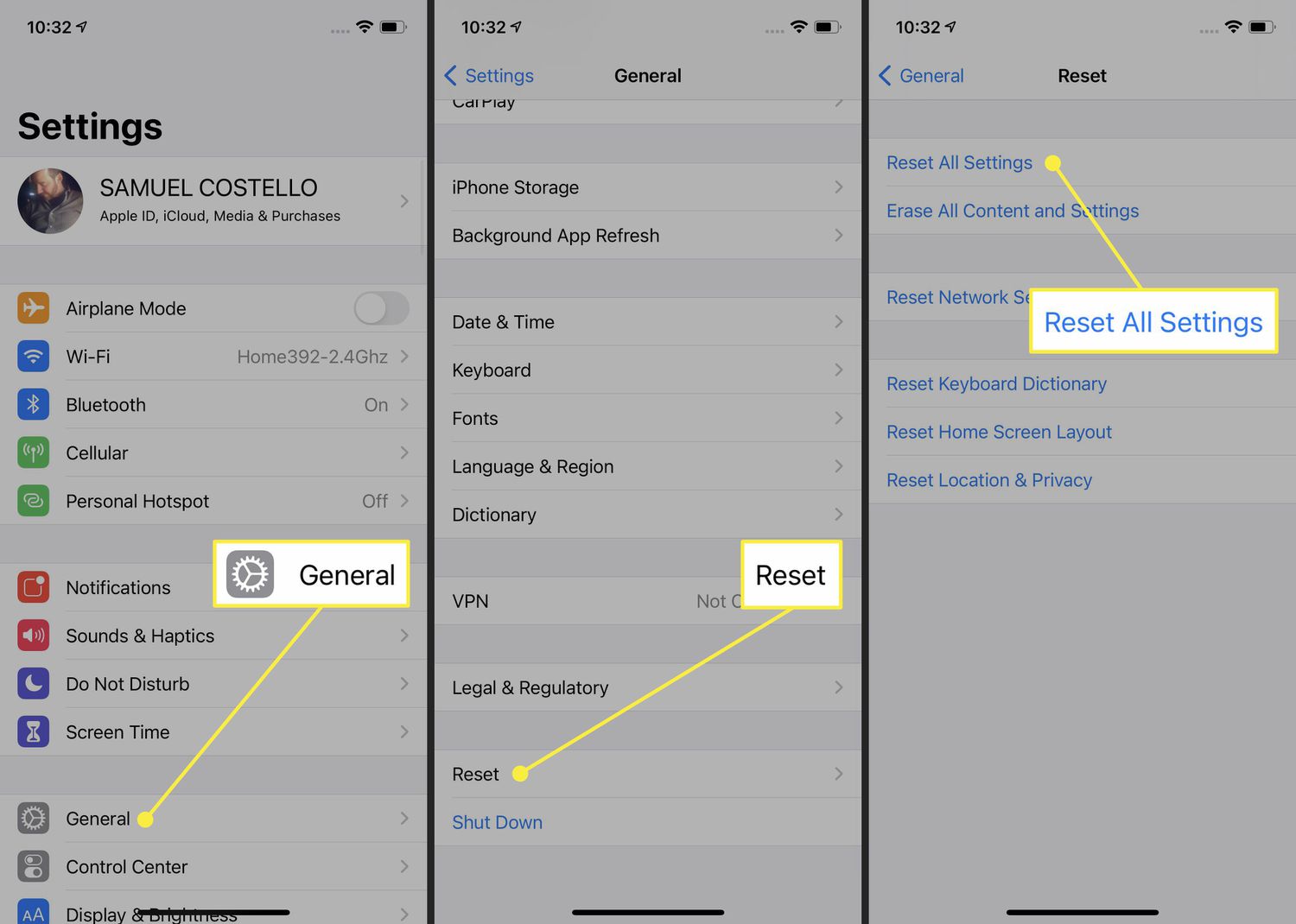
Image source: Lifewire
The standard path for a full wipe is Settings > General > Transfer or Reset [Device] > Erase All Content and Settings . Apple will prompt you to sign out of your Apple ID to disable "Find My," which is a critical step to ensure the next owner can actually use the device. Without this, the device remains "Activation Locked" to your account.
The iPhone Factory Reset Process
- Open Settings and tap on General .
- Scroll to the bottom and select Transfer or Reset iPhone .
- Tap Erase All Content and Settings .
- Follow the on-screen prompts to back up your data to the cloud if you haven't already.
- Enter your passcode and Apple ID password to confirm the action.
- Wait for the Apple logo and progress bar to complete; the device will restart to the "Hello" screen.
Methods to Factory Reset an Android Phone or Tablet
Android devices offer several ways to reset, ranging from standard menu options to hardware-level recovery modes. Because Android is used by various manufacturers, the exact menu names might differ slightly, but the core logic remains consistent across the ecosystem.
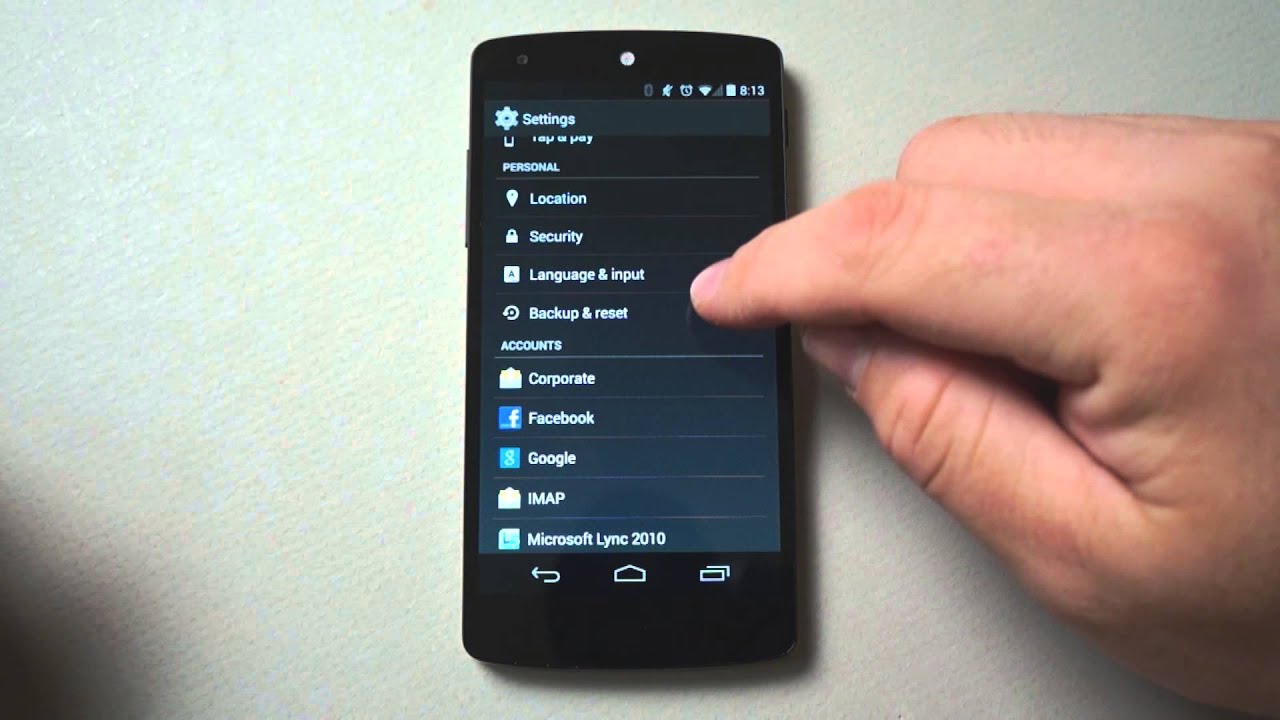
Image source: YouTube
For most modern devices, the path is Settings > System > Reset options > Erase all data (factory reset) . Google has also introduced a notably innovative "Software Repair Tool" for Pixel 3 and later devices, which allows users to reinstall the entire operating system via a web browser if the device is boot-looping or severely corrupted. This tool stands out as a top choice for advanced troubleshooting.
Using Recovery Mode for Frozen Devices
If your screen is unresponsive or you are locked out of the interface, you can perform a reset using the physical buttons. This is often referred to as a "Hard Reset" in community forums. The typical combination involves holding the Power and Volume Down buttons simultaneously while the device is off. Once in Recovery Mode, you use the volume keys to navigate to "Wipe data/factory reset" and the power button to select it.
Power users can also utilize specific dialer codes for instant preparation. For example, entering
*#*#947322243#*#*
on certain Android builds can trigger an immediate reboot or wipe sequence, though this should be used with extreme caution as it may bypass confirmation screens (Source 3).
Restoring a Windows 10 or 11 PC to Factory Settings
Windows offers a highly flexible reset environment compared to mobile operating systems. When you navigate to Settings > System > Recovery > Reset this PC , you are presented with two primary choices: "Keep my files" and "Remove everything."
The "Keep my files" option is a strong contender for fixing system lag while preserving your documents and desktop files. However, it will still remove all installed applications and reset your settings to their defaults. If your goal is a truly fresh start, "Remove everything" is the recommended path.
Cloud Download vs. Local Reinstall
One of the most significant advancements in Windows recovery is the Cloud Download option. According to Microsoft Support , Cloud Download fetches a fresh copy of Windows from Microsoft's servers rather than using the existing (and potentially corrupted) files on your hard drive. While this requires a stable internet connection and a download of roughly 4GB, it ranks among the top methods for ensuring a clean, bug-free installation.
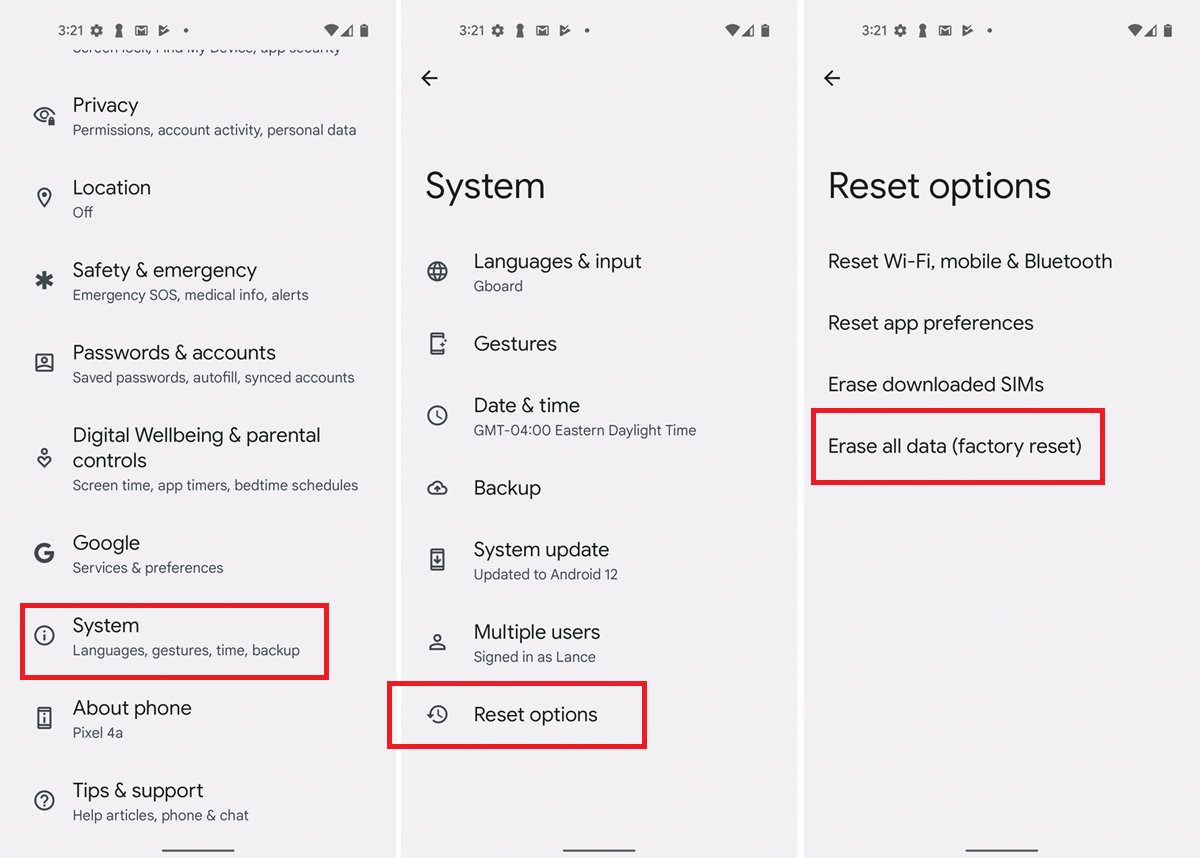
Image source: PCMag
Microsoft also issues a critical warning: during the reset process, your screen may go black for 15 minutes or longer. Do not force-restart your computer during this time. The system is performing deep-level file operations, and interrupting it can permanently damage the operating system, requiring a full USB bootable media recovery.
Resetting Gaming Consoles and Specific Software Environments
Gaming hardware often requires resets to fix licensing issues or storage corruption. On a PlayStation 5 or Xbox Series X, the process is found within the System Settings. However, modern gaming also involves resetting specific software states without reinstalling the entire game.
In complex simulation games like
Factorio
, players can use the in-game console (typically the
~
key) to reset specific UI elements. For instance, the command
/reset-tips
allows a player to see tutorial popups again without losing their save file progress (Source 9). This level of granular control is highly impactful for players who have taken a long break and need a refresher on mechanics.
For software developers using engines like
Godot
, resetting a game state involves specific logic. Developers often choose between
queue_free()
, which deletes an object and its data, versus simply toggling visibility or resetting variables. Understanding the difference between a "scene reload" and a "variable reset" is essential for creating stable user experiences (Source 10).
Technical Insights into Hardware and Embedded System Resets
At the engineering level, a "reset" is more than just a menu button; it is a physical signal sent across a circuit board. For those working with embedded systems or DIY electronics, understanding hardware communication during a reset is vital.
A common issue in hardware engineering involves the I2C bus . When a software reset command is sent to a chip (like a LED driver or power management IC), the device may stop communicating immediately to perform the reset. This often results in a "NACK" (No Acknowledge) error on the bus. As noted by Texas Instruments , this error is actually a sign that the reset is working correctly, as the device is temporarily unable to respond while it reinitializes its internal registers.
Furthermore, many hardware-level resets are gated by battery thresholds . Firmware will often block a reset if the voltage is too low, as a mid-reset power loss can corrupt the bootloader, rendering the hardware permanently unusable. This is why the 70% charge rule is so strictly enforced across the industry.
Developing a Mental Reset Routine for High-Pressure Situations
The concept of a "reset" isn't limited to silicon and code. In sports psychology and high-stakes professional environments, a mental reset is a structured routine used to recover from a mistake and refocus on the present moment.
According to research from The Excelling Edge , a highly effective mental reset follows a three-step process: Analyze, Reset, and Trigger . This routine helps individuals move past the emotional weight of a failure and return to peak performance levels.
- Analyze: Take a brief, factual look at what happened. Avoid emotional self-criticism and focus only on the technical error.
- Reset: Use a physical action to signal the end of the mistake. This could be a deep diaphragmatic breath, adjusting your equipment, or a specific muscle release.
- Trigger: Use a focus word or phrase to lock in your attention. A popular choice is "W.I.N." (What’s Important Now).
This psychological framework acts as a "soft reset" for the human brain, clearing the "RAM" of distracting thoughts and allowing the individual to process new information with clarity.
Essential Security Measures to Complete Before Any Reset
A factory reset is often performed for security reasons, such as when selling a device. However, there are several misconceptions about how "clean" a reset actually is. Forensic studies have shown that data on traditional hard drives—and even some older flash storage—can often be recovered using specialized software even after a standard factory wipe.
To ensure your data is truly inaccessible, you should encrypt your device before performing the reset. On modern iPhones and Androids, encryption is enabled by default, but for Windows PCs with older drives, you may need to manually enable BitLocker. When the reset occurs, the encryption key is destroyed, making any remaining data fragments unreadable.
Factory Reset Protection (FRP) and Knox
Another critical security layer is Factory Reset Protection (FRP) . Introduced in Android 5.1, this feature prevents a thief from simply resetting a stolen phone and using it as their own. If you reset a device without first removing the associated Google or Apple account, the device will demand the original credentials upon reboot. If you are selling your phone, you must sign out of these accounts first, or you will be selling a "brick" to the buyer.
On Samsung devices, there is an additional layer known as the Knox security flag . If you have ever modified the device's firmware or unlocked the bootloader, a hardware fuse is "tripped." A factory reset will not reset this flag. This means that even after a full wipe, the device may still show a "tampered" status, which can affect warranty claims and the ability to use secure apps like Samsung Pay (Source 7).
Frequently Asked Questions About Device Resets
- Will a factory reset delete my photos and videos?
- Yes, a factory reset erases all user data stored on the device's internal memory. This includes photos, videos, apps, messages, and settings. Always ensure your media is backed up to a service like Google Photos, iCloud, or a physical hard drive before you begin the process.
- How do I reset my phone if I have forgotten the PIN or Pattern?
- If you are locked out, you must use "Recovery Mode" (using physical buttons) or a remote wipe service like Apple's "Find My" or Google's "Find My Device." Note that after the reset, you will still need to enter the original account credentials due to Factory Reset Protection (FRP).
- Does a factory reset remove viruses and malware?
- In most cases, yes. A factory reset wipes the partition where apps and malware reside. However, some highly sophisticated "rootkits" can persist in the system recovery partition or firmware. For severe infections, a full OS reinstallation via USB or Cloud Download is a more reliable choice.
- How long does a full factory reset typically take?
- The duration varies significantly by device. A modern smartphone usually completes a reset in 5 to 10 minutes. A Windows PC can take anywhere from 20 minutes to over an hour, especially if you choose the "Cloud Download" and "Secure Data Erasure" options.
- Do I need to remove my SIM card before resetting my phone?
- It is not strictly necessary to remove a physical SIM card, as the reset does not erase data on the SIM itself. However, you should be very careful with eSIMs . During the reset, you will be asked if you want to keep or delete the eSIM profile. Only delete it if you are selling the phone.
Final Takeaways for a Successful System Reset
Resetting a device is a powerful troubleshooting and privacy tool, but it requires a methodical approach to avoid data loss or hardware lockouts. By following these key steps, you can ensure a smooth transition to a fresh system state.
- Verify your backups to iCloud, Google Drive, or OneDrive before touching any reset buttons.
- Charge your battery to at least 70% or keep the device plugged into a reliable power source.
- Sign out of accounts like Apple ID and Google to disable Factory Reset Protection if you are selling the device.
- Decrypt SD cards on Samsung devices before resetting, or the data on the card will become permanently unreadable.
- Choose Cloud Download for Windows resets to ensure you are using the most current and uncorrupted system files.
- Practice mental resets using the Analyze-Reset-Trigger routine to maintain peak performance in your daily life.
Before you begin, double-check that you have saved all two-factor authentication (2FA) backup codes, as losing access to your authenticator app during a reset can lead to permanent account lockouts.