Home
Home
Why Melodyne 5 Editor Is the Sweet Spot for Professional Audio Editing
Melodyne 5 Editor stands out as a top choice for producers who need to edit polyphonic instruments like guitars or pianos. While the lower-tier Assistant version handles monophonic vocals effectively, Editor is the first tier to include Direct Note Access (DNA) , allowing you to reach inside chords and change individual notes. At a typical shop price of $399, it offers the core pitch-correction power of the flagship Studio version without the higher cost of multitrack mixing features.
For over two decades, Celemony has maintained a reputation for pushing the boundaries of digital signal processing. Melodyne 5 Editor represents the middle ground in their product lineup, positioned between the vocal-centric Assistant and the multitrack-capable Studio. The primary question for most buyers is whether the jump from Assistant to Editor is justified by the inclusion of polyphonic editing.
According to TapeOp's assessment , the software functions almost like "warlock software" due to its ability to manipulate audio in ways that seem mathematically impossible. Whether you are fixing a slightly out-of-tune string in a recorded acoustic guitar track or completely changing the tonality of a piano performance, Editor provides the surgical tools necessary for high-level production.
Should You Buy Melodyne Editor or Upgrade to Studio?
Choosing the right version of Melodyne requires an understanding of your specific workflow needs. The "Editor" version is often confused with the "Sound Editor" feature, but these are distinct concepts. The Sound Editor—a tool for adjusting the harmonic balance of a sound—is exclusive to the Studio tier. However, the Editor version provides the full suite of pitch and timing tools for a single track.
| Feature | Essential | Assistant | Editor | Studio |
|---|---|---|---|---|
| MSRP Price | $99 | $249 | $499 | $849 |
| Monophonic Editing | Basic | Full | Full | Full |
| Polyphonic (DNA) | No | No | Yes | Yes |
| Sibilant Detection | Yes | Yes | Yes | Yes |
| Multitrack Editing | No | No | No | Yes |
| Sound Editor (EQ) | No | No | No | Yes |
The gap between Assistant and Editor is defined by Direct Note Access (DNA) . If you only work with lead vocals, monophonic bass lines, or solo woodwinds, Assistant is likely sufficient. However, if you record singer-songwriters who play guitar or piano while singing, or if you work with sampled loops that contain chords, Editor becomes a necessary investment. As noted in Celemony's official shop documentation , the Editor version is the entry point for polyphonic audio manipulation.
The Sound Editor Confusion
A common pitfall for new users is assuming that buying "Melodyne Editor" gives them access to the "Sound Editor." In community discussions on the UAD Forums , users frequently point out that the Sound Editor is a specific harmonic-based EQ tool found only in the Studio version. If your goal is to change the timbre of a voice by adjusting its overtones, you will need to step up to Studio. If your goal is simply to fix the notes within a chord, Editor is the correct choice.
How Direct Note Access Changes the Way You Edit Polyphonic Audio
Direct Note Access (DNA) is the technology that put Celemony on the map. Before DNA, pitch correction was limited to one note at a time. If you recorded a piano chord and one note was flat, you had to re-record the entire take. DNA changed this by using complex algorithms to identify the individual frequencies that make up a chord and grouping them into "blobs" on a pitch grid.
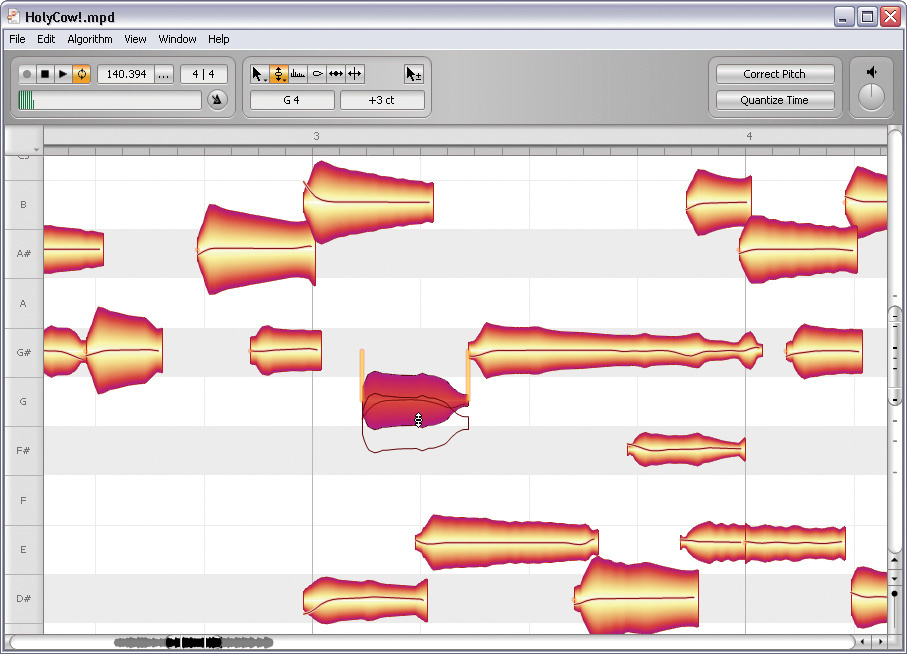
Image source: Sound On Sound
This technology is notably innovative because it doesn't just "guess" the notes; it analyzes the harmonic structure of the recording to differentiate between the fundamental pitch of a string and its resonant overtones. This allows for a "Major-to-Minor" workflow that was previously impossible in the digital domain.
The Major-to-Minor Workflow
Imagine you have a perfect acoustic guitar recording, but the bridge requires a C-minor chord instead of the C-major that was played. In Melodyne Editor, you can:
- Analyze the audio using the Polyphonic algorithm.
- Locate the E-natural (the major third) within the C-major chord blob.
- Drag that specific note down one semitone to E-flat.
- Listen as the software resynthesizes the chord to sound like a natural minor strum.
This capability makes Editor a top-tier choice for remixers and composers who need to adapt existing audio to new harmonic structures without artifacts.
Why the Sibilant Tool Is Better Than a Traditional De-Esser
One of the most significant advancements in Melodyne 5 is the improved handling of sibilants (the "s," "ch," and "t" sounds in speech). Traditional de-essers work like frequency-dependent compressors—they turn down the volume of the entire signal when they detect high-frequency energy. This often results in "lisping" or a dulling of the vocal's top end.
Melodyne's approach is different. The "Melodic" algorithm automatically identifies pitched components (vowels) and unpitched components (sibilants and breaths). When you look at the blobs in Editor, the sibilants are displayed as shaded areas. According to Plugin Boutique's technical overview , this allows you to adjust the volume of the "s" sounds independently of the vowels.
Instead of using a compressor, use the Sibilant Balance Tool in Melodyne Editor. You can attenuate harsh "s" sounds by 3-6dB without affecting the clarity or pitch of the surrounding notes. This results in a much more natural vocal sound that retains its "air" without the harshness.
Celemony’s philosophy is based on a human hearing model. We don't perceive a note as "out of tune" based on its mathematical average frequency, but rather on specific "crucial segments" of the note. By separating sibilants from the pitched content, Melodyne 5 focuses its correction only on the parts of the sound that actually carry pitch information.
How to Use Note Assignment Mode to Fix Detection Errors
While DNA is exceptionally strong, it is not infallible. Complex recordings with heavy reverb or distortion can sometimes confuse the detection engine, leading to "ghost notes" or missing harmonics. This is where Note Assignment Mode becomes essential.
When you enter Note Assignment Mode, you are looking at the "raw" data Melodyne has gathered. You will see a spectrum of potential notes, some solid and some hollow. If the software missed a note in a chord, you can manually activate it here. Conversely, if it detected a harmonic as a separate note, you can deactivate it to clean up the workspace.
The Hidden Synthesizer
A little-known feature within Note Assignment Mode is the internal synthesizer. When you play back audio in this mode, Melodyne plays a synthesized version of the detected notes. This serves two purposes:
- Verification: It helps you hear exactly what the software thinks the notes are, making it easier to spot errors.
- Sound Design: The synth has a unique, organ-like timbre that is influenced by the original audio. Some sound designers record this synth output to create eerie, ethereal layers for their tracks.
How ARA 2 Integration Varies Between Logic and Studio One
Audio Random Access (ARA) is a protocol that allows a DAW and a plugin to exchange information about audio files, timing, and tempo. Without ARA, you have to "transfer" audio into Melodyne in real-time, which is a time-consuming process. With ARA 2, the audio is simply "there" as soon as you instantiate the plugin.
Studio One: The Gold Standard
PreSonus Studio One offers what many consider the most seamless ARA integration. You can right-click any audio clip and select "Edit with Melodyne." The interface opens instantly, and any changes you make are reflected in the arrangement without needing to render. It feels like a native part of the DAW.
Logic Pro X: The Workflow Hurdle
While Logic Pro X supports ARA 2, users often report a "clunky" experience. You must insert Melodyne as the first plugin on the track, and you often have to start playback once for the audio to populate. Additionally, moving regions in Logic can sometimes desync the ARA data, a common complaint in community help threads .
For users on older DAWs or those experiencing ARA stability issues, the Standalone version of Melodyne Editor remains a powerful alternative. The standalone version analyzes audio as fast as your CPU allows, often completing a five-minute vocal track in seconds, whereas the plugin version (without ARA) requires a full five-minute playback for the transfer.
How to Stop the Annoying Automatic Update Pop-up
A frequent frustration among the Melodyne community is the automatic update check. By default, the plugin may open your web browser to check for updates every time you launch your DAW. This can interrupt the creative flow and is often cited as a "PITA" (Pain In The...) by professional users.
Creative Sound Design Tricks Using the Scrubbing Feature
While Melodyne is marketed as a corrective tool, it is also a highly impactful sound design instrument. One niche trick involves the Scrubbing feature. By using the arrow keys or a mouse to scrub through the "blobs," you can create granular-style textures.
Because Melodyne is resynthesizing the audio in real-time to maintain pitch and time, scrubbing between notes creates a unique stutter effect that sounds different from traditional time-stretching. If you route the output of Melodyne to a new audio track in your DAW and record yourself "performing" these scrubs, you can generate complex rhythmic textures and glitch effects that are difficult to achieve with other plugins.
Is the Upgrade Path Worth the Investment?
Celemony offers a clear upgrade path for users who started with the Essential or Assistant versions. According to Celemony's upgrade pricing , moving from Assistant to Editor typically costs around $159. For those who already own an older version of Editor (like version 4), upgrading to version 5 is often available at a significant discount, sometimes up to 70% off the retail price during sales.
The value of the upgrade depends entirely on your need for polyphony. If you find yourself frequently wishing you could fix a stray note in a piano loop or adjust the voicing of a backing vocal stack that was recorded to a single track, the upgrade to Editor is a significant step forward in your production capabilities.
Frequently Asked Questions
Final Thoughts on Choosing Melodyne Editor
Melodyne 5 Editor remains a cornerstone of modern music production by offering a balance of high-end features and a manageable price point. It is the logical choice for anyone working with polyphonic instruments.
- DNA Technology: Essential for reaching inside chords to fix individual notes.
- Sibilant Tool: Provides a more natural alternative to traditional de-essing.
- Note Assignment: Offers deep manual control for correcting detection errors.
- ARA 2 Support: Significantly speeds up workflow in compatible DAWs like Studio One.
- Creative Potential: The scrubbing and synth features offer unique sound design opportunities.
- Cost Efficiency: Provides the core editing power of Studio without the multitrack premium.
If you primarily work with polyphonic recordings but do not require multitrack mixing within the Melodyne interface, Editor is widely considered the most cost-effective professional tier available.